Server Version#: 1.41.8.9834
Player Version#: 7.36.15.10153-6c964b200-Plex (I’m not certain this is the version number but is the only thing I see on the Roku Plex app that looks like a version number).
Operating System: MacOS Sequoia 15.4.1
Hi there, I just bought a brand new Roku Streaming Stick Plus and am having issues connecting it with Plex.
I am attempting to follow the instructions for posting issues from https://forums.plex.tv/t/read-first-posting-media-playback-issues-on-roku/204136 but note that the link to the FAQ - Plex for Roku in the first paragraph 404s.
- I am able to sign into the Plex app on the Roku, and select my profile.
- The Roku Plex app is able to see my media library.
- The machine hosting the media library is on the same wireless network as the Roku.
- The library also permits remote connections.
- There is no VPN enabled on the machine hosting the media library.
- I am able to watch videos just fine via the Plex web app and the Plex app on my iPhone.
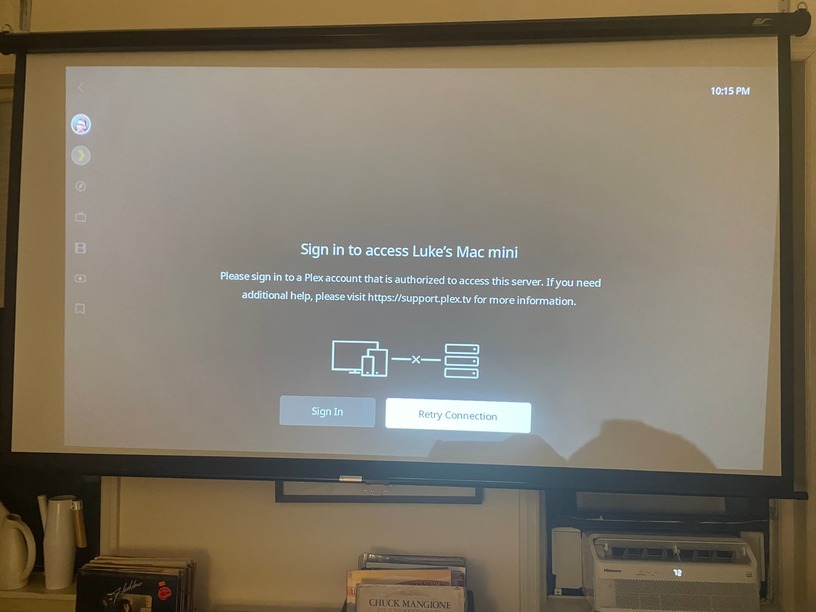
- But when I attempt to select my media library from the Roku Plex app, it shows a warning icon, and suggests I should “sign in to a Plex account that is authorized to access this server.”
- I am already signed into such an account. If I click on “Retry Connection” from this page, it retries for a second or two, and then nothing.
- If I click on “Sign In” from this page, I am given the option to sign in, which is a bit confusing since I’m already signed in. If, nevertheless, I do attempt to sign in, after entering my credentials and clicking “Sign In” I get an “An unknown error has occurred” error message.
Below is an image of the sign in screen that I see, despite already being signed into an account that has access to this library/server.
Thanks in advance.
