Just downloaded current versions of client app and media server onto my Samsung laptop. Went to Live TV and DVR and 87 channels from Hauppauge WinTV-v10 Model 1595 are found and guide rebuilt, but can’t get completed guide for DVR to come up. I only use this Plex configuration to stream OTA content from my antenna when I am out of state and occasionally use the DVR to record local shows at home. This was working properly on my 20 year old Toshiba before it completely crashed. I also allowed access to my son in another state to access OTA TV contents. I am non technical, 79 years old and have read and tried the suggestions but the menus on my laptop don’t come up. I have only been able to reach Plex billing for any support where I suggested closing or deleting my account and starting over, but was told that would not work that the only customer support on Plex is through these on line forums. This is new territory for me. The email from Plex billing said that the Plex community would jump right on this problem and I would be surprised that it works. Past experience has been to talk by phone or email to get customer support or recently AI bots but I have tried the bots with no success. Really great if anyone can help!
What do you see when you go to https://app.plex.tv/desktop/ in your web broswer?

or

On previous Toshiba the Toshiba TV was there to click on but no Samsung TV there now?
Only Plex channels?
It would default to Plex channels and then next to it was the tuner option which brought up the guide with DVR options.
try clicing on the “More”, You should see a link for “Live TV & DVR”

Where it says “LIVE TV - Plex Channels” toward the top, click the sliders and see if you have different source options.
This is what I get when I select that:
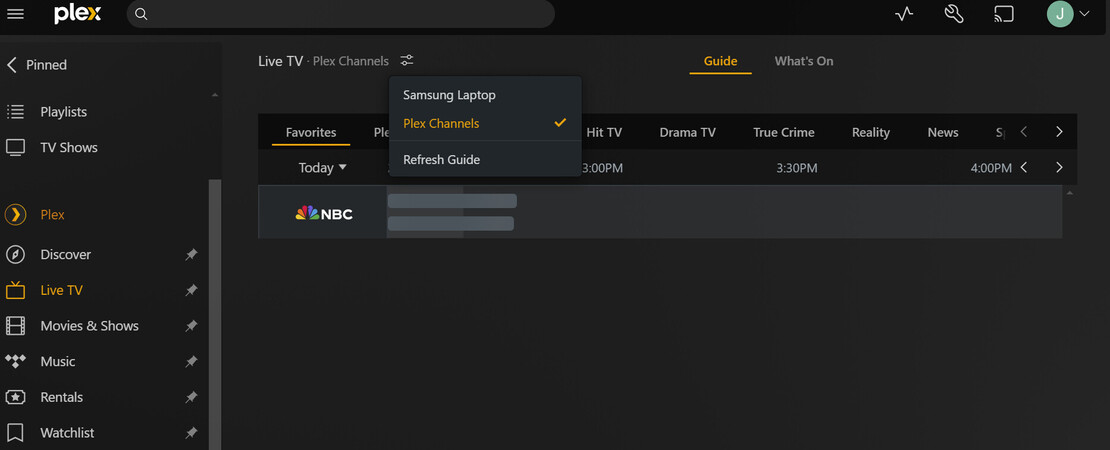
In the past that showed the TV tuner. I tried to refresh there but doesn’t help.
Click the Samsung Laptop, that’s what your server is named. It will say 2 sources, you may have to redo favorites.
This is what I see in Live TV, sure looks like Plex doesn’t think you have a DVR. Have you tried refreshing the guide

That worked!!! Thank you all. I feel so stupid as I checked that menu a dozen times before. One more issue is to be able to allow my son to access the content, he could previously do that. Where do I find that window to invite him access?
In your server settings scroll up to “Manage Library Access,” I believe.
https://support.plex.tv/articles/201105738-creating-and-managing-server-shares/
How do I get to the server window?
I think this should help you out
https://app.plex.tv/desktop/ click the wrench
You have a screenshot of it where it says “Live TV & DVR,” keep scrolling up and it should be toward the top.
Oh, and probably a good idea to schedule a test recording for an OTA show to verify permissions, TV library setup is all good.
I went to library access and typed his email and got this response:

Does this mean he already has access?
I just contacted my son to see if he can view and respond.
So go to Manage Library access and look to see if you see your son listed as a friend.

Then if you click on them, you can edit their access:

https://support.plex.tv/articles/201105738-creating-and-managing-server-shares/#toc-2
They are probably already your friend and just need you to grant them access to the libraries on your new server. Good luck.
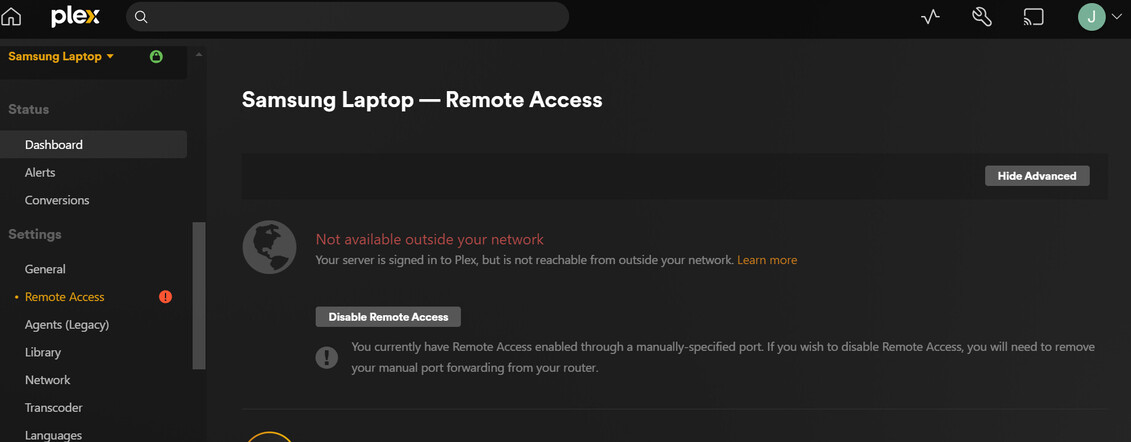
There’s a lot of threads here on “remote access” because there’s a lot of different things that can go wrong. You might want to create a new one since this one is tagged for live tv & dvr and more experienced people can jump in and help.
You can start here before doing a thread though. The Basics of Remote Access Troubleshooting
