I bought a new Fire TV stick and downloaded the Plex app, but it doesn’t even give me the option to log in to my server, it just goes straight to the free content that Plex provides. I go to the settings and the only action I can take is to reset all customizations.
I logged in to Plex on my laptop just fine, and it allows me to log in to my old Roku stick as well. I just don’t understand why the app for Fire TV doesn’t even give me an option to log in to a server at all.
Anyone know what I should do here?
Thanks!
If you go to the Settings what are the two options you have under the Account section?
Edit: I went back inside the house and uninstalled the Plex app from my Fire Stick 4K to reproduce what you see when you first install it.
The sign-in screen comes up briefly and then goes away before you can do anything on it – I remember this from previous reinstall I’ve done.
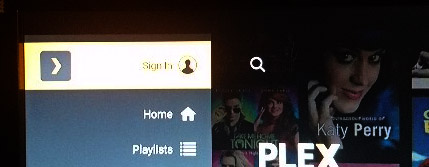
Settings options are all there, except the Account row does not exist at all when you are not signed into an account. I was expecting a Sign In option to be in place of the normal Sign Out one.
But the top option on the sidebar (where the user icon normally is) is replaced with a Sign-in option now.
This topic was automatically closed 90 days after the last reply. New replies are no longer allowed.
