I have tried installing LiveTV & DVR functionality using Synology 918+ and HD Homerun network tuner but dont have the option to enter a postcode nor get past this screen.
I have successfully detected tuner and TV channels, but unless I enter a custom EPG (which I dont have) the continue button is greyed out.
I have the same problem as spatula_city but I live in The Netherlands.
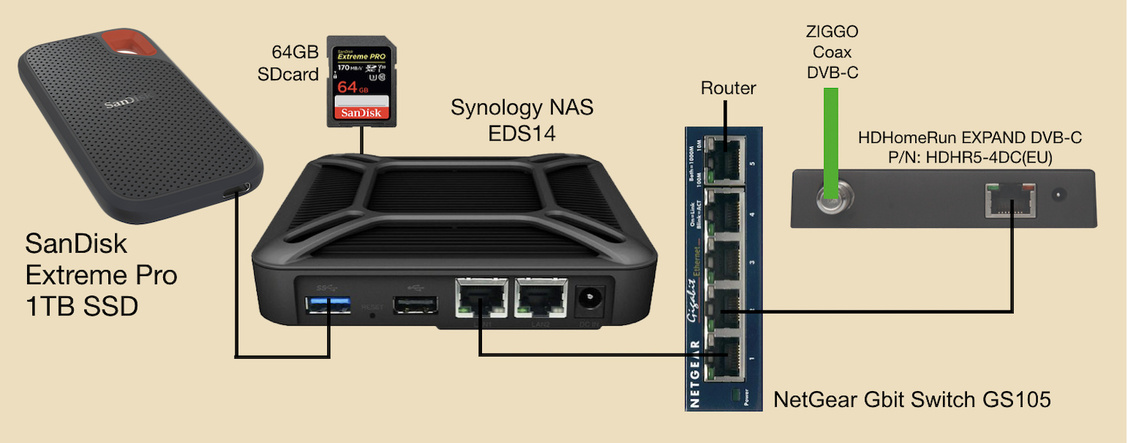
The drawing below shows the setup for:
Live TV & DVR recording with PLEX from the Ziggo-Cable (DVB-C) connected to HDHomeRun EXPAND. A PLEX Media Server is installed on a Synology NAS EDS14.
Locations of Library and Multimedia files:
The internal EDS14 System Partition is only 2.4GB. Therefore I moved the PLEX-Library to the 64GB SDcard. My PLEX-multimedia Library now is 5.6GB. My multimedia collection is located on the 1TB external SanDisk Extreme Pro SSD-disk and is 312GB.
Version and model information:
Synology NAS EDS14, DSM version: 6.0.3-8754 Update 8
Synology NAS EDS14, PlexMS version: 1.18.6.2368-97add474d
HDHomeRun EXPAND model: HDHR5-4DC(EU) with Firmware version: 20190621
My iMac runs: macOS Mojave 10.14.6.
PLEX version on my iMac is 1.6.3.1009-57cf57c8.
The next drawing below shows the screens for the DVR Setup:
I was able to scan 145 channels but the screen on the right cannot ‘CONTINU’ because it is greyed out. Stopping PMS and rebooting EDS14 does not help.
I bought a €4,99 monthly Plex Pass mainly for watching Live TV but it is not working.
Are the HDHomeRun people angry to Plex because they use their hardware for DVR?
What can I do instead of waiting for a Plex update?
I have the exact same problem. Also in the Netherlands… I’ve been having this issue for months now. What kinda works is selecting Belgium and match some of the general Dutch channels as a test. Tried multiple version on multiple platforms. Nothing works. Even forced it by hacking the HTML/CSS forcing it to continue. Also tried finding issues in the logging or with Fiddler.