Any update on a fix for this please @anon18523487
Not yet.
Want to echo that I am having a download problem on my Android as well. Whenever I try to download something to my Android it starts and I see a small amount of progress, but after a minute or so (about 25% of the way per item) I see “There was an error downloading this file” and a notification of “Some files could not be downloaded”
My server uses a P2000 on an UnRAID box and my Android phone is a Pixel4XL running Android 11. The plex server version is 1.25.3.5409 and my Pixel’s Plex version is 8.29.0.30433 (b3774acd)
Plex Media Server Logs_2022-01-27_10-39-18.zip (3.3 MB)
Please provide the Android logs too.
I have the same download error on my S10 and Tab S7+ like the users before me descriped.
Plex Media Server Logs_2022-01-27_22-23-03.zip (2.3 MB)
plex-log-S10.zip (748.1 KB)
plex-log-Tab S7+l.zip (717.8 KB)
Hi @anon18523487 just keen to understand if Picture in Picture support for Downloaded content is actually on the roadmap, this is the one reason I need to continue paying for inFuse so really would love for a fix to this.
Thanks for including the link on how to find it. Here are both sets of logs:
Plex Media Server Logs_2022-01-27_21-14-38.zip (2.9 MB)
plex-log-Pixel4.zip (2.4 MB)
I should have mentioned this in the first post: I can download without problems if I am downloading a file at original quality. But if I adjust the quality then this problem happens.
@anon18523487
Is there any option when you download a file, this file cannot be played outside of plex?
The original file can be obtained by browsing the plex folders, is there a possibility to encrypt this or put some kind of DRM on it?
Your logs show the same error I’ve identified for some other users. Still waiting to hear back from the devs if they know what the error is.
PiP works on Android. For iOS you need to make sure you download files with maximum capability mode and then set to use the old player. There is a bug I’m looking into around that, but in general it should work.
I see you downloading an episode of Grey’s Anatomy and it is being transcoded. It looks fine to me. It hasn’t finished yet, only got to 39% at the end of the log. Did you see an issue downloading this episode.
No. If you save to the internal memory, you would need root to see the files, but if you save it to an sd card, it’s open to anyone.
Thanks for checking into all of these issues -
I’ve reattached my logs. I am trying to download five Private Practice episodes and four Grey’s Anatomy episodes. I didn’t wait long enough before attaching my logs last time but they will (and have, in the most recent set of logs) all inevitably fail.
I see in the dashboard that the episodes are being transcoded and downloaded, but they do not succeed. I have attached the logs after the transcoding and downloading activities seem to have stopped in the dashboard.
If it is relevant, I am downloading using a managed user instead of the admin user. But, like I mentioned in my previous post, I can download episodes at original quality.
Thanks again for all your help, it is seriously awesome to see such fast responses and troubleshooting with this issue!
Plex Media Server Logs_2022-01-28_08-16-43.zip (3.2 MB)
plex-log-Pixel.zip (2.6 MB)
Ok, I found the failure in your app log.
Jan 28, 2022 08:15:29.191 [6278] DEBUG - [Grabber/e6454123c6df5e93b9b2dfe1684e6cce8949daf5] Grabber: Operation for ‘Grey’s Anatomy - E24 - Death and All His Friends’ completed with status error (Download failed as the transcoder did not complete)
Something on your server told it to stop transcoding.
Jan 28, 2022 08:15:29.507 [0x14c2015f2b38] DEBUG - Request: [192.168.86.25:42948 (Allowed Network (Subnet))] GET /video/:/transcode/universal/stop?session=09ac708c24c3234b9733131db8098bf14b85e81c (11 live) TLS GZIP Signed-in Token (Jake)
I see similar stop command for your other files too. That appears to be coming form the app, but the app logs don’t show that it issued that “stop” command. Something very odd going on.


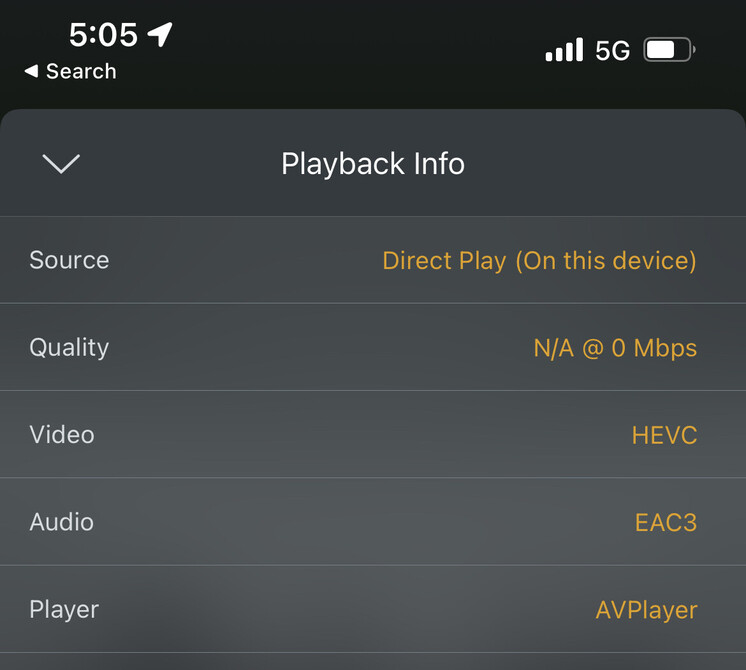
Further testing has confirmed that X265/HEVC content won’t play on my iPad or iPhone iOS 15.2, at all, when old player is enabled. So not sure how this can be a fix for no PIP.
X264 content is fine.
Is this the bug you were mentioning @anon18523487 ? Basically all of my content these days is X265.
I’m sorry, but months and months since this was announced, it’s still far too problematic for prime time. I appreciate the work that @anon18523487 has been doing, but requests for help and feedback have gone unanswered and there don’t appear to be any timeframes for when this will be usable by the vast majority of those who wish to use it.
I’m going to use InFuse for the time being and I may check in again in 12 months.
Hi,
I am a user of a shared server, and yesterday I started the plex pass trial.
I am able to download the episode/movie from the iPhone plex app. However, I am not able to see the download option from the Windows10 Plex app.
Appreciated your support to resolve this weird behavior.
Sharing your article stating that a shared server user should be able to download the media item on my desktop.
I agree I have lifetime plex pass that I got when I was just running on a shield. Sync never worked apparently because of shields internal storage issues so I gave up 3 years ago, plex pass waist of money… now I a have a 720+ synology nas. About to go on a vacation went to use new download feature and download a season… says it is converting 10 episodes and downloading. Phone goes to sleep after 5 min. Open it back up and now says converting 17 episodes?? Of a 10 episode season. Phone goes to sleep again now says 27 episodes. Not a single episode downloads.
Cool downloads works as bad as sync does 3 years ago. So I try and download 2 episodes at a time and have to sit there keeping plex focus and active the whole time for it to work. Sometimes I get stuck in a loop. It will get to 99% on an episode and then fail to complete. If you reopen the app it starts at 0 again and fails at 99.
This is the main feature I paid for plex pass for and then main feature I got the iOS app for. Has never worked for 3 years properly. But they have time to get direct to vhs quality movies I not a single person asked for streaming integrated. Completely disappointing.
All the posts in here as well are like “oh that maybe fixed in this beta” well the beta is full doesn’t help me. I just want a feature that was sold to me to work from 3 years ago.
My thought exactly, this is my core use case and the only reason I went Plex Pass. And now have to pay for an alternative client Infuse, just so I can reliably watch shows that I download to my iPad. I spend quite a bit of time travelling, so this is a really important use case for me.
Hoping we can get reliable download and play (full screen and Picture in Picture) for x264 and HEVC/x265 content sorted quickly.
Hey!
So the new download feature isn’t working on my iPhone 12 either.
Sync does work however (please don’t turn this off just yet)
When I use the new download feature It appears to transcode and download something then get the message “error downloading this item”.
I tried uninstalling the app and clearing out the data and reinstalling it but I still get the above error.
I switched back to the old sync way of getting content onto my phone and that still works no problem.
I’d happily use the new download feature if it worked, but for the time being I’ll have to stick
To sync.
On a side note I’ve been using Plex for many
Many years now and was lucky enough to get a lifetime pass. The app is amazing, what you guys do is amazing. Please don’t let the naysayers get you down!
Ok, sync not working either says “couldn’t retrieve the play queue for this item” 
