That sounds like you’re trying to Download something that isn’t supported. What is it you are trying to download?
Any update for this yet @anon18523487 ? …yea I’m not going away 
Tv episode mkv file hevc encoded 
Anyways I’d assume Plex would transcode it to whatever would work on an iOS device ?
If you were just downloading 1 tv episode, that should work, unless it’s issue 2 or 3 in the first post. If not, then I’ll need logs from the app after you try to download that episode again.
This kind of communication is also desperately needed on the current (horrible) state of Live TV/DVR
I use TV/DVR a bit, and really don’t have any issues to report (Apple TV client, HDHomeRun Network Tuner), what issues are you facing?
Things are really bad for Live TV/DVR if you use Windows and/or AndroidTV/FireTV (issue linked below has been going on for 11 months). This is all I will say here though because this thread is about something else. I was just pointing out that type of communication (rather than ignoring us) about Live TV/DVR is really needed.
Hi @anon18523487,
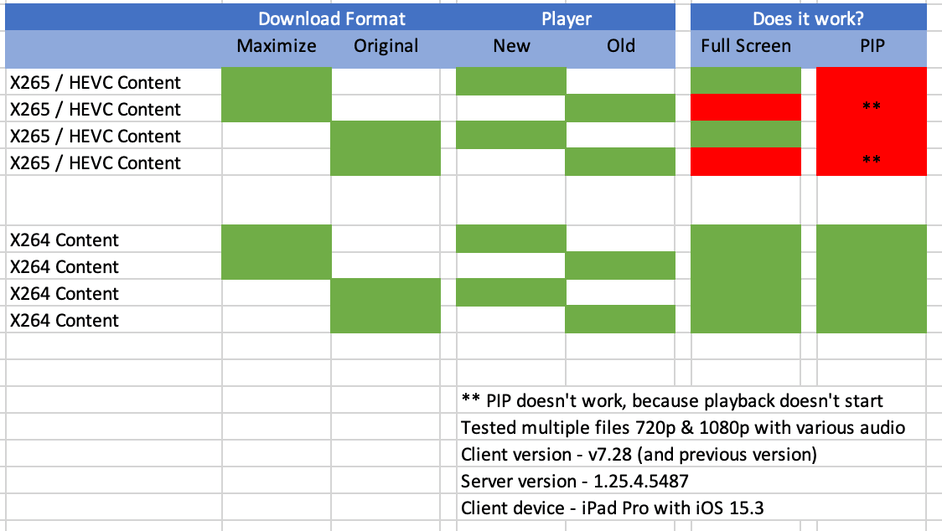
Firstly thanks for the ongoing support, I’ve used every single combination of Download Compatability mode and also old new player, and many different kinds of X265/HEVC files, and I’m afraid that I can’t get PIP working at all, in-fact in some modes I can’t get X265/HEVC files to play back. X264 works fine without issues.
I’ve tried 10 different HEVC files, all had exactly the same issue:
Maximise Compatibility & New Player
Normal playback 
PIP playback 
Maximise Compatibility & Old Player
Normal playback
PIP playback (can’t get normal playback)
Any ideas on what to try, or is this one of the bugs that was alluded to earlier?
So, sync is removed from iOS? Latest update has removed ability to change between sync and downloads…  …
…
Ok, so downloads is still extremely broken for me with music. Downloads are incredibly slow when either transcoding or downloading at “original” quality.
Using plex app 7.28 on iPhone 13 Pro on iOS 15.3, server 1.25.4.5487 on Unraid 6.9.2.
What is interesting to me is the difference between the iOS Plex app and Plexamp.
Plexamp is consistently fast. Downloading 3 albums with 30 tracks stored in Flac takes 30s (original) or 1:10 (transcoded to 192kbps).
Plex app takes orders of magnitude longer. Weirdly, when downloading in “maximum”, plex consumes most of the available bandwidth (about 200Mbps) but each track download seems to restart repeatedly. When transcoding, it’s very spiky with “Error downloading” errors on the app.
In all cases, CPU and RAM ont he server never rise above 20%.
Observation: if you download tracks one-by-one, things seem consistent. If you queue an album or two, things grind to a halt very quickly. Perhaps there is a queue problem?

Finally, it is Not Cool to remove the Sync option when downloads is still broken for so many people. There was an implicit promise that Sync would not be removed until this was sorted.
 . Have since moved to my Android Device that still has sync. Amazingly, iOS system is the one that has the most issues and is the first to migrate… Plex…
PSA - If you are using Sync, don’t allow your iOS device to update to version 7.28 as this one disables the ability to move back to Sync (as noted above).
This is not mentioned in the release notes.
I understand that we need to move forward here and not develop legacy features, so I’m hoping that many issue with downloads are fixed in 7.28.
Hi @anon18523487, as I promised above I wanted to complete some further testing to confirm the behaviour that I’m seeing as constant, I’ve also validated this with another person who uses Plex, using a different Plex server (mind you I believe the issue is nothing to do with server, more the Downloads feature and support issues.
Key point
PIP never works for any X265/HEVC content
If you are downloading music they have some new “Plexamp” app and it downloads all my tracks blazing fast like it should. But main plex IOS app is trash, takes like 40 minutes to download 40 track play list.
New iOS app today (7.28.1). New server version today (1.25.5.5492). Audio downloads still broken.
Personally, I’m switching to a subsonic variant for music, with the play:Sub app. It’s not perfect, but it works, the developer is very responsive, and the UX has made choices that make more sense to me.
Hi. I am having problems with the download feature on my Android S10. It just says ‘There was an error downloading this file. Swipe to remove or tap to retry’. I have made sure that the app has full permissions to the phone. I’ve tried it with original quality and others. It was working maybe about a month ago. I can also still get sync to work as well. I’m not sure what else to try. I haven’t changed any settings for it to stop working so I assume there must have been an update.
plex-log-benedwards91@googlemail.com.zip (1.2 MB)
I’m seeing the same error I’ve seen with others. We’re still looking to see what’s causing it.
So downloads now is broken on both iOS and Android… Sigh
I assumed it would be the same problem. Figured logs from more people might help to find the problem.
For me, the downloads only fail when I’m connected to my home wi-fi. It works when I connect through someone else’s wi-fi!
Has anyone else tried downloading titles over a different wi-fi network?
Hope this helps.
