Server Version#: 1.19.3.2852-219a9974e
Player Version#: 4.30.2
I have been having an issue with my server. When transcoding is turned on, my system is filling up with files in my appdata\local\temp folder where it renders my OS drive useless. The only way I can get this to stop is to turn off transcoding, but then half my videos will not play.
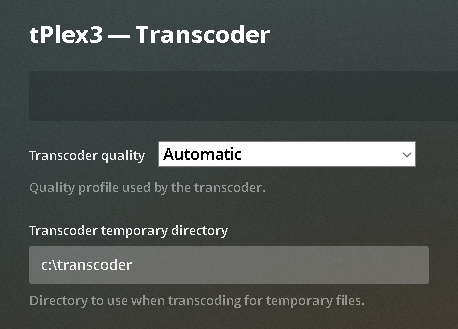
I have searched far and wide for a solution to this, changed directories in the registry, but to no avail. When my server is running and transcoding is turned on, it fills my system in no time at all. Here is a screenshot (https://i.imgur.com/J8WXeoG.png) this is 8 minutes worth of having the transcoder turned on and already equals 3.52gb of space. My OS drive is only 64gb with 6gb of space available. I have tried to switch it to dedicated hard drive just for transcoding, but it does not take and keeps using the temp folder.
I have attempted that. When I wrote this post I turned off Video Transcoding, and that was at 9:50am and I still get a few of the temp files through out the day,
Then when I enable video transcoding, which I did at 12:18 am, I start filling right up with files… In 5 minutes it created over 2gb of temp files. My OS drive does not have much space, I have another drive with enough space to dedicate just to transcoding.
So even with the drive/folder designation, Plex is not using it for transcoding. The designated drive does have a folder and a plex generated structute of Transcode\sessions\plex-transc0de-hexidecimal folder name\Empty Folder.
This seems to be a related issue introduced with the new Skip Intro feature, enabled by default, which analyzes audio files for TV shows. It doesn’t honor the user setting for Transcoder temporary directory and instead uses the OS temporary directory.
This is what you may be seeing. Disable the feature to see if that helps.
I have disabled the Generate intro video markers to Never. And then I turned off the Disable video stream transcoding and instantly start creating temp files again.
They all seem to be right around the 120,000KB sizing.
With Transcoding turned off, half of the library will not play. But with it on, I run out of HDD on my OS drive in a matter of an hour. I am afraid that even if I put a new HDD in place of the OS, it will also fill up, just may take a little bit longer.
Last thing I did last night was to run the Plex server update. Now running 1.19.4.2902-69560ce1e and now I have no access to any of the server settings. All I get are Server Settings are unavailable on any of the menu options I pick. Batting a huge zero with anything I am trying to do to get this up and running smoothly.
I even totally uninstalled and reinstalled the server with same issue.
I cannot enable transcoding and restart server to see if previous suggestion works.