Server Version#: 1.19.2.2737
Player Version#: 8.0.0.17276
Hi all,
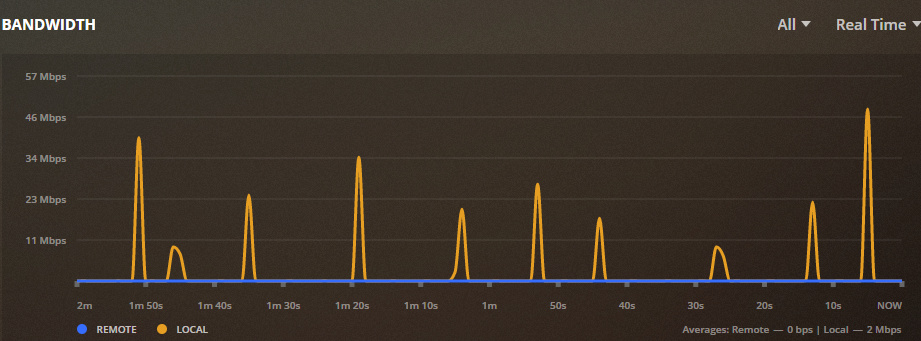
I am using the Plex Server on the Nvidia Shield TV Pro 2019. Whenever I play something using the Plex Client app on the same Shield, it shows local bandwidth consumption:
That leads me to think that when I’m playing something on my Shield, it’s streaming all content to my router and back to the same device. I’ve tried searching through the settings and forums, but most similar issues getting reported seem to revolve around streams on the same device going out to the internet and coming back in, but in my case the stream is at least local rather than remote. I’m not sure if this is a Plex setting, or maybe an inability for Android/Shield to resolve its own IP to localhost?
Has anybody else run into this or have any ideas of what I should look at?
Although that article says otherwise my understanding has always been that all data that Plex plays flows through the router. That is, even if the playback is on the same machine as the server, all data flows from the server to the router to the client.
Plex may want to make it otherwise but for now it is clearly not working that way at all. Heck I see activity on the local network when absolutely nothing is playing. My guess is that the dashboard is not working as intended.
Check your server logs. You can download a zip of them. When the client is accessing the server, the server does log the IP address of where the client is located. This should make it very obvious where the data is going.
Thanks for the replies, I’ll try checking out the server logs. I’m guessing it won’t be the WAN IP since the bandwidth is showing as local and not remote (I disabled the server setting to show WAN IP traffic as Local). So if it’s the LAN IP, I guess that becomes a question of whether the Shield can resolve to itself or if it needs to hit the router.
For the dashboard activity, the spikes from my screenshot above were 30-40Mbps, and that is consistent with what I see if I watch the same content from another device like a Roku. So that’s higher than I would expect to see if I was just viewing the dashboard with no content playing. Usually that just gives spikes of a few Kbps here or there.
I just wanted to circle around with my findings based on the logs for those who may be interested. After enabling verbose and pulling down the logs, all requests are being sent to a host of <private server IP>.<hash>.plex.direct. Fortunately, doing a traceroute on that from either my Shield or PC resolves to the Shield’s private IP and is not going out to the WAN at all. But I believe that would mean the traffic on the Shield is at least routing through the NIC, even though it’s coming back to itself. Hence bandwidth usage would show in the dashboard.
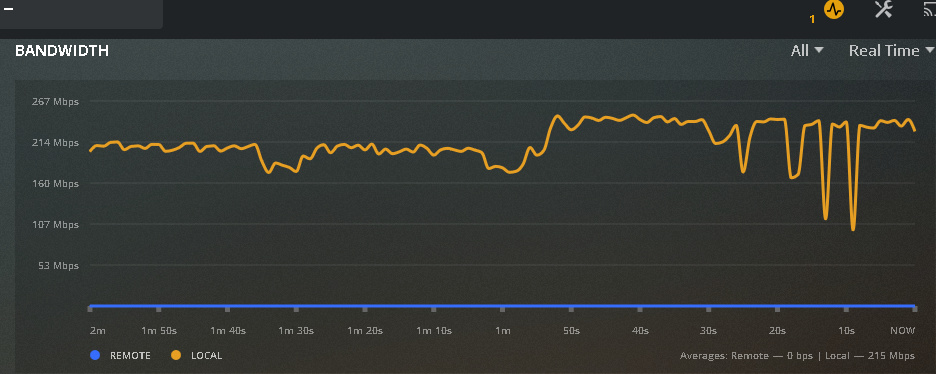
im having same type of issue but it is at much higher bandwidth. mine will get up over 200mbs and will cause buffering and video freeze. server and client both on NVIDIA shield with HDMI running to the TV. only one video playing and its direct play
I have had a Plex server on my shield and using the Plex client on the Shield I had zero problems and my files were on a network share.
The only bandwidth usage I noted was what would be normal for getting a file from a share and, of course, the small overhead that Plex uses to keep metadata up to date and the other things Plex does om the network/internet.
This was about 6 months ago. I have since stopped using my Shield as a Plex server because it just did not work well overall. I now use the Shield as an Emby server and it is MUCH more stable and smoother to use.
Also about that same time I stopped using the Shield as a player. It looks good but it’s interface is not easy for me to use. I use Rokus over 95% of the time and Fire TVs for the other part.
One thing is that to have a reasonably good experience your Shield should be connected wired to your network. I have had all kinds of problems trying to us my Shield wirelessly. Neither my Plex server or my Emby server worked with any reliability when my Shield was wireless.
I do not know how that could make a difference when the server and client are both on the Shield but it does seem to, at least for me.