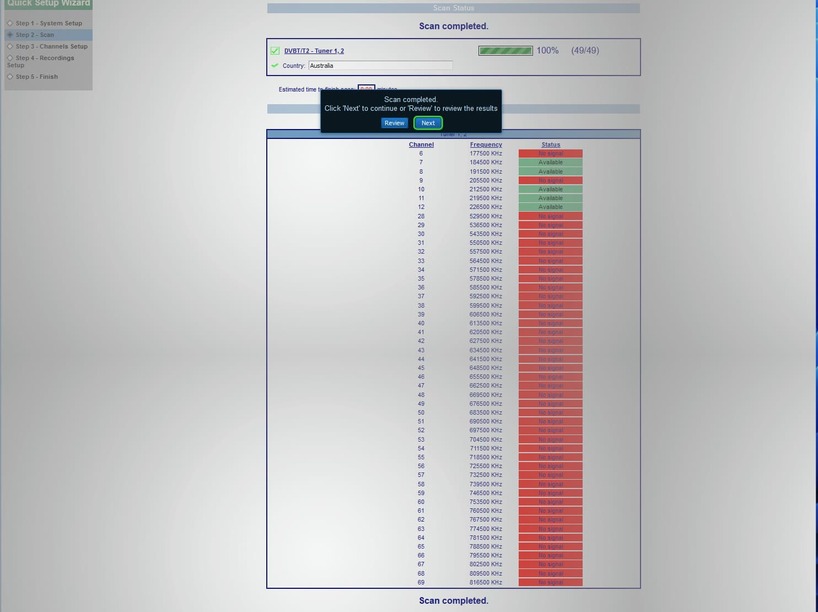
Hi @pl_5309, I have been working with the New Zealand agent (adonistechnology.lgrtech.com) for the Vbox XTi 3442 Dual Tuner (DVB-T/T2) to try and resolve issues with the VBox/Plex connection.
So far I have managed to verify that the Vbox IS connecting reliably with the local Sydney TV channels (all of them). I have verified the VBox channel output via VLC Player in the manner recommended to me by the agent (I checked this by using VLC Player universal plug n play → the VBox device → Live TV → then the channel. I could see every Sydney TV channel output via VLC Player.
Unfortunately, it does seem that there is still a problem getting the Plex DVR software to correctly display all of those channels. No matter how many times I try getting Plex to delete the DVR to clean up the database and re-add, Plex seems to connect to only a couple of channels (10, 2 & SBS) initially. When I try and connect to connect to other channels (7, 71,72,73, 9,91,92, etc) Plex gives the error: “Playback Error Could not tune channel. Please check your tuner or antenna.” I also get the same error when trying to redisplay the other channels that were previously working.
Some details I found on the Net about the Sydney channels listed that seems to accord with my observations, is as follows:
TV channels and frequencies
| TV channel |
Transmitter |
Frequency |
Channel |
| 2 ABC |
|
|
|
| 20 ABC HD |
|
|
|
| 21, 22, 23 |
|
|
|
| 24 News 24 |
Bouddi |
620.5MHz |
41 |
| Manly |
543.625 MHz |
30 |
|
| Sydney |
226.5 MHz |
12 |
|
| 3 SBS |
|
|
|
| 31 SBS Viceland |
|
|
|
| 30 SBS HD |
|
|
|
| 32 SBS Two |
|
|
|
| 34 NITV |
Bouddi |
613.5 Mhz |
40 |
| Manly |
557.5 MHz |
32 |
|
| Sydney |
184.5 MHz |
7 |
|
| 7 Seven |
|
|
|
| 70 Seven HD |
|
|
|
| 72 7 Two |
|
|
|
| 73 7 Mate |
|
|
|
| 74 7 food |
Bouddi |
627.5 MHz |
42 |
| Manly |
529.5 MHz |
28 |
|
| Sydney |
177.5 MHz |
6 |
|
| 9 NINE |
|
|
|
| 90 NINE HD |
|
|
|
| 92 Gem |
|
|
|
| 93,99 Go! |
|
|
|
| 94 Life |
|
|
|
| 95 Gem HD |
Bouddi |
634.5 Mhz |
43 |
| Manly |
564.5 MHz |
33 |
|
| Sydney |
191.625 MHz |
8 |
|
| 10 10 |
|
|
|
| 1,15 10 HD |
|
|
|
| 11 10 Peach |
|
|
|
| 12 10 Bold |
|
|
|
| 13 10 Shake |
Bouddi |
641.5 Mhz |
44 |
| Manly |
550.5 MHz |
31 |
|
| Sydney |
219.5 MHz |
11 |
|
Updated 2 Sep 2021
‘Sydney’ transmitter means one of three close-by transmitters located in the north part of Sydney - Willoughby, Artamon and Gore Hill. The TV usually finds stations automatically, and you do not need to know channel frequency and numbers. But faulty antenna may cause TV auto-tuning to skip some stations. The table above helps with manual tuning and antenna troubleshooting.
Channel numbers and frequencies
As you may see from the table, number on the remote control and TV guides are not the same as channel and frequencies in TV tuning settings. There are many TV channels on one frequency channel of the same broadcaster. Once you tuned on that frequency, you should get all channels of the same station with the same signal quality. For example, if the TV is tuned on one ABC (for Sydney, it is Ch12 226.5 MHz), all ABC channels on numbers 2,20-24, should be found automatically and have the same reception.
TV antenna direction in Northern Beaches
Generally, antennas on hill slopes facing north and north of Bilgola Plateau and Avalon point to Bouddi and are installed vertically. All other TV transmitters at Sydney Northern Beaches are horizontally polarized and facing either Manly or Sydney. Yet some north-facing hill slopes as far as Manly Vale may also require antenna facing north. The best type of antenna, UHF or VHF, type of amplifier, direction, channels etc., is determined experimentally at your specific location with the precision of a meter and few degrees.
Central Coast TV antennas
All TV transmitters on Central Coast work on the same frequencies of channel 40 to 44 range with horizontal polarization. That means the best antennas to use are UHF positioned horizontally. Antenna direction, mast height, and whether you need an antenna amplifier depends on the specific location. Also, the number of outlets and the size of the house may affect installation specifications. Old VHF-UHF antennas or even indoor rabbit ears antennas may still work.
The rule for HD TV channels numbers
High Definition resolution channels numbers end with 0 except 10. HD Ten is on number 1. For example, to view ABC in 1080i high definition, press number 20 on a TV remote control, not 2, 2 is 576i standard-definition. To watch SBS push 30, not 3, and so forth. Old digital TVs, recorders and setup boxes may have HD channels missing or show a blank screen with the sound only.
4K / UHD resolution
Apart from Netflix and Foxtel channel 444, there is no free to air 4K broadcast in Australia yet. 4K TVs artificially upscale fine 4K details from an HD source.