Server Version#: 1.24.0.4930 (FreeBSD - TrueNAS)
Player Version#: 8.22.0.27533
Tuner Make/Model: VBOX xti3442
Guide/Lineup name: My Guide
Using XMLTV?: Yes
Channel number/Name: Plex Media Server Logs_2021-09-02_21-55-14.zip (2.3 MB)
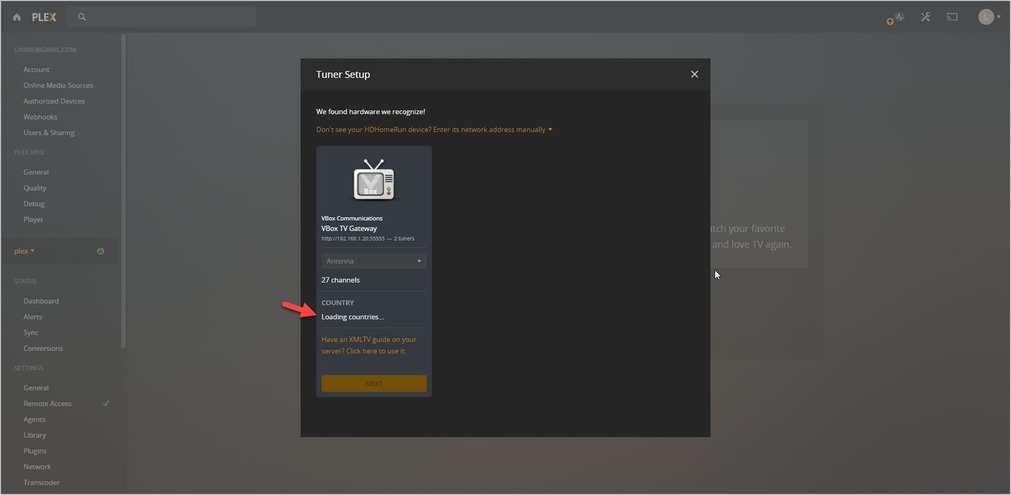
I’m trying to set up VBOX with plex server but I’m getting stuck on the initial step on plex. The country section is stuck on “Loading countries…” (screenshot attached).
Does anyone know how to get by this step? I’ve tried adding VBOX’s valid XMLTV and after fetching the channels, it gives an error when trying to proceed. It seems that it does not load the country and that seems to get it stuck.
I also contacted VBox and they are familiar with this problem and mentioned it started several releases ago when Plex introduced some EPG limitations… It seems that VBox cannot manipulate their firmware to workaround this Plex issue and that a proper solution must come from Plex.
Since my tuner is listed as officially supported for my geographic area and hardware by Plex, and since I’m paying Plex pass mainly for the DVR feature, I think Plex should look into it and offer a solution. How can I properly report this problem to the Plex team?
I see - I am on the same boat as you then. I wonder if there is a known workaround (such as changing the System Locale or something to unblock this panel)…
I’m also still completely stuck with this issue and can’t put the DVR I purchased into use.
Plex team, please refer to this problem with any update or expectations as at the moment we are paying customers that you are leaving in a total uncertainty.
I can confirm that by going to https://app.plex.tv/desktop/ I can now proceed with the VBox DVR setup. But after the setup completes and all relevant channels are added, I get this error when trying to stream a channel:
“Playback Error
Could not tune channel. Please check your tuner or antenna.”
To clarify, the tuner streams all channels perfectly when using its direct client without plex. So it is not an antenna or tuning issue with VBox.
Any suggestions for troubleshooting this? Any specific logs that can help?
@limirs_gmail_com Have you tried uninstalling the VBox software. I don’t know if that might be causing a conflict with Plex. Typically only 1 software can use the tuner at a time. Plex is not able to check if another program has taken control of the tuners.
Other than plex, I’m testing the DVR stream directly through its interface (which works fine), so there is no software for me to uninstall. I closed everything and tried again but the error still shows on plex.
I’d appreciate further guidance since I purchased plex pass and an officially supported DVR especially for this setup of live channels on plex clients, and it is very frustrating that I can’t use it at all.
The channel I’m trying to tune is ‘Ch%2012%20Keshet’.
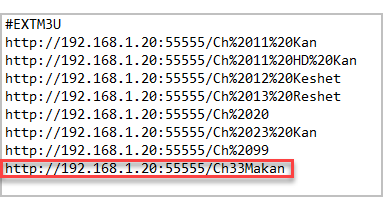
But I have a total of 8 tv channels. I now tried them all and it seems that one of them is working in Plex. By quickly looking at them the working channel is the only one that does not have a space(s) in its name:
When I previously searched the forum, I recall encountering a thread discussing a similar issue but didn’t see a solution. Can you confirm that? Or do you think something else may be going on?
It was just an example of the channel names from the VBox interface. It is not what integrates with plex (over the air). But the channel names are the same.
Can you also refer to the rest of my previous response?