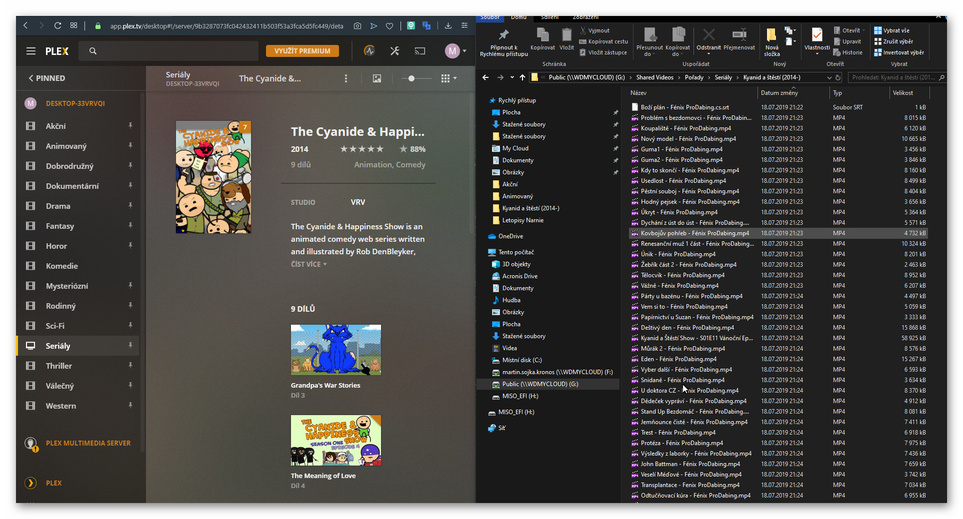
Hi, I would like to ask how to view all videos in a folder, even if they are not in the Plex database.
I stretched youtube cyanide and happiness episode, and Plex only displays some videos that are determined by the database, those videos are around 180 and show only 9 episodes that have been assigned by the database. Can you somehow see the rest that Plex didn’t identify? Thanks.
Plex will only play videos once you added them.
So in order to get them loaded/added… would you mind sharing some details of those files your Plex Server won’t add?
So it is pretty much, I tried to rename some episodes by the names I found on the net and still nothing, probably the best these videos will throw on plex as ‘other videos’ to make all episodes available.
In there, grab the line ‘Local Media Assets’ with your mouse and drag it downwards, so it ends up being at the bottom of the stack of active agents.
Repeat the same under
Settings - Server - Agents - Shows - TheMovieDatabase
Settings - Server - Agents - Movies - Plex Movie
Settings - Server - Agents - Movies - TheMovieDatabase
Take the title as it is used on TheTVDB.
If there is something in parentheses, take that too.
If the title contains invalid characters (depends on your file system), like § : % *, simply leave them out.
Check the naming and the folder structure of your show.
Name the top folder of the show exactly after the title on TheTVDB.
No abbreviations. No additional subfolders. No aliases.
Add the (year) in parentheses of when episode 1 of season 1 of this show was aired.
Name the episode files according to the above linked naming guide.
Use the same title as for the top folder. Show's Title (year) - s01e01 - additional info.ext (’- additional info’ can be left out)
After you corrected the naming and folder structure, perform the Plex Dance with all files for this show.