I was updating some libraries on my server and when I went to change users permissions to allow them to access the new library, I noticed that one has shared back with me… but I cannot for the life of me find out how to add (?) his libraries to my list or even see what’s on them. It just says that they are available and that’s it. I searched the forum and all I got were links to the AWESOME 404 page.
***Just checked and I can access them from my Android but not Windows.
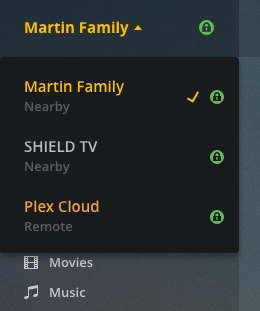
When in Plex Web you’ll need to select the server of the person who’s sharing with you in order to access the shared libraries:
While the mobile clients have received some updates during the last months, that is shifting the focus away from server->library to content-type->library, Plex Web still follows the old paradigm. Hence you’ll need to first select the server. Only then you’ll be able to see/access the libraries of that server.