Server Version#: 1.41.8.9834
Player Version#: 1.109.0.329-ea562b95
My subtitles aren’t auto-syncing. It used to work a long time ago, but now it’s not. Doing “Analyze” on any episode/movie finishes very quickly (under a second) and voice analysis doesn’t seem to work. All players have “Auto Sync Subtitles” checkbox grayed out.
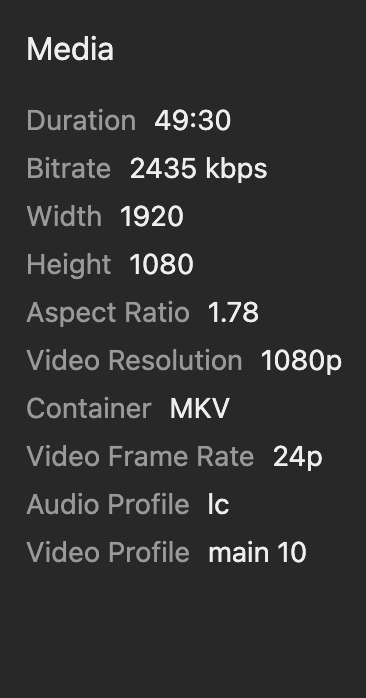
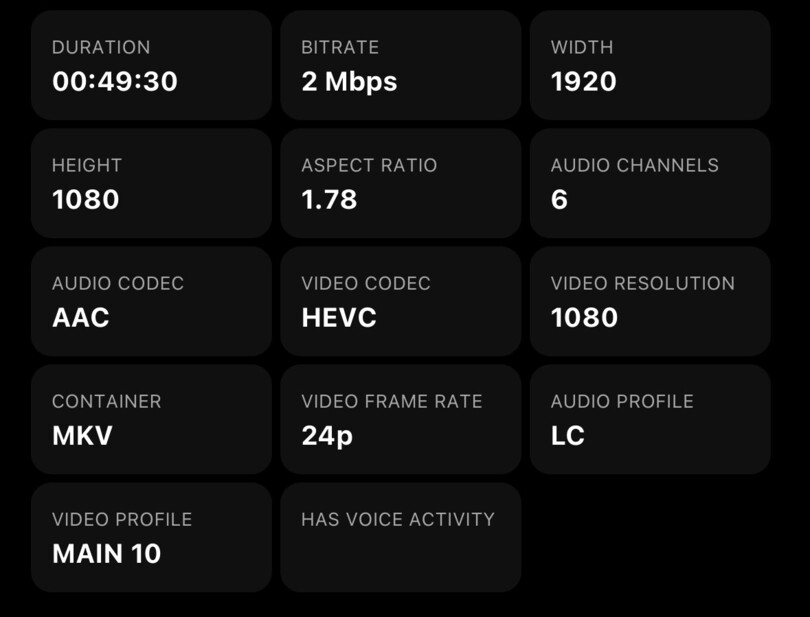
If I go to “More Info” on any item that’ supposed to have it on, the “Has Voice Activity” field that’s supposed to be at the bottom is not there:
I have the “Generate voice activity” setting enabled in the server settings and in the individual library advanced settings:
Manually doing “Analyze” on items does nothing. I am using SRT files, downloaded through Plex from OpenSubtitles. Here are the debug logs when I do “Analyze” on any episode/movie:
Jun 03, 2025 16:13:20.139 [139894986742584] DEBUG - [Req#5d07] LongRunningJobManager [VoiceActivityDetection]: scheduling job for item 22954, 0 pending.
Jun 03, 2025 16:13:20.140 [139895045167928] DEBUG - Completed: [127.0.0.1:41102] 202 PUT /library/metadata/22954/voiceActivity?force=0&manual=1 (5 live) #5d07 GZIP 3ms 377 bytes (pipelined: 11)
Jun 03, 2025 16:13:20.142 [139894888332088] DEBUG - [Req#5d07/VoiceActivityDetectionManager] Running voice activity detection for 'The XXXX S01 E11' (id: 22954)
Jun 03, 2025 16:13:20.143 [139894888332088] DEBUG - [Req#5d07/VoiceActivityDetectionManager] Activity: registered new activity 36694eae-8943-466a-97d8-ab2259f953a5 - "Detecting Voice Activity"
Jun 03, 2025 16:13:20.143 [139894888332088] DEBUG - [Req#5d07/VoiceActivityDetectionManager] Activity: updated activity 36694eae-8943-466a-97d8-ab2259f953a5 - completed 99.0% - Detecting Voice Activity
Jun 03, 2025 16:13:20.143 [139894888332088] DEBUG - [Req#5d07/VoiceActivityDetectionManager] Activity: Ended activity 36694eae-8943-466a-97d8-ab2259f953a5.
I’ve found that only media I’ve added to my server after turning on the option gets analyzed even though I have the setting turned on to “as a scheduled task and when new media is added”. Any media I have from before I turned it on is not analyzed.
Have exactly the same issue. If i manually analyze an item, I can see it complete in the logs, but it never actually does anything. Tried on several different files I have with the same result every time. I do not get any errors, but it just doesn’t work and all the files have hasVoiceActivity=“0” in the xml.
An error related to this was fixed in the server 1.43.x branch.
Though it is not recommended to switch to this just yet, because it also brings a transcoder update which still needs a few wrinkles to be ironed out. Wait until the 1.43.x server is available in the public release channel.
I’ve found that the voice activity detection has problems in general recognizing Japanese in Anime.
Thanks for the info. I gave the beta a quick spin but unfortunately it still doesn’t work even on version 1.43.0.10231. My media has audio tracks in either german, english or both and it doesn’t work on any of them.
Problem still exists on 1.43.0.10467. Neither scheduled nor manual voice activity detection does anything. It seemingly doesn’t work on all of my media. Here is the log entries for a manual detection. It finishes in less than 1s.
Is /tmp supposed to be the transcoding directory? Because I have the default /transcode for that and thats mounted to the host. I also quickly tried mounting /tmp on the host and that also didnt help.
No. But it’s the location where the various analysis features are storing the decoded audio (in WAV format) before it is handed over to the actual analysation code. If it is not defined in the container, /dev/shm is used instead, which is in RAM and is easily filled up with lots/large files.
Another common source of analysis failing is insufficient memory in the OS kernel’s inode tables: Linux Tips - #9 by ChuckPa
(IIRC in the case of Docker, it’s the kernel of the host OS)
Voice activity detection does use the location you have “Transcoder temporary directory” set to as its temporary storage. For my own container, using the official Plex image, I have /trancode set as mine. Here’s a relevant VAD taking place (note the last path in the command, /transcode/Transcode/Detection):
So you do have control over this. Specify a transcoder temp directory. If you followed the directions here (or whomever developed the container for TrueNAS did), you should be good:
Just ensure it points to a location with a good amount of available storage (I’d say at least 64 GB, preferable more).
I am using the official Plex image that you linked and no built in version/app of truenas. Just double checked and transcoding works as intended. I can see the temp files in the mapped folder on the host during the transcoding session. The files don’t ever seem to make it there for VAD though.
I am really out of ideas where the problem could be.
How do you have this setting configured: Settings -> [Select Server] -> Library -> Generate voice activity data
This determines when VAD is triggered. You can’t manually trigger it via the “Analyze” function of a library.
If you want to trigger VAD, then either Plex Dance some media (assuming you have the above set such that new media triggers it) or change your scheduled tasks start/stop times.
OK I just made a random observation. If i rename the file on the filesystem after it has been already added to plex, then VAD immediately and successfully runs.
No idea what to make of this but I don’t feel like renaming all my media….
Not yet but that wouldn’t fix the problem for future additions for my library. It would probably fix all current media though.
Also, wouldn’t the full Plex Dance delete all Metadata? I have manually fixed quite a few matches and Metadata within Plex that would be a pain to do all over again.