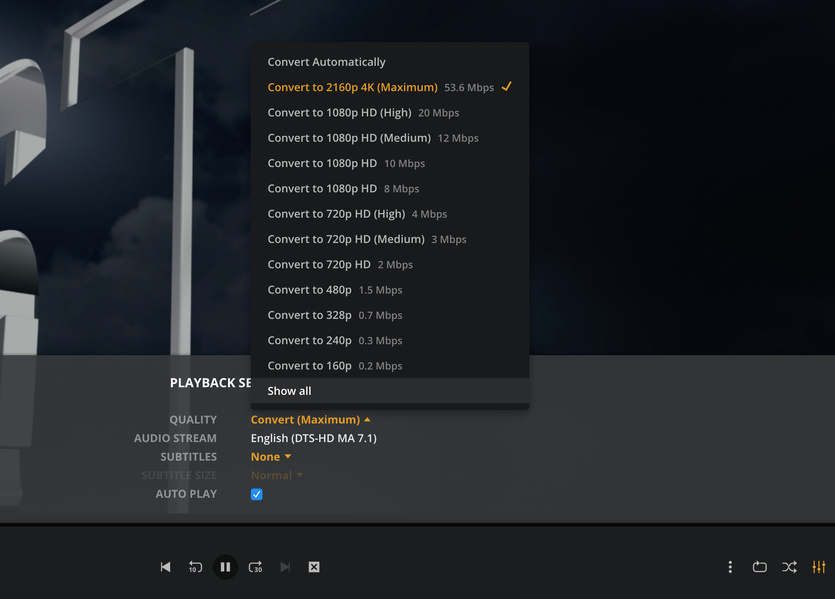
Since the lastest versions I’m hurted with streaming issue in WAN.
In LAN all is ok, max quality and auto-adjust works fine. In WAN mode everyone is blocked between 592kbps and 2mbps. On phones people are limited in 592kbps, on TV 792kbps and web/pc 2mbps.
No double-NAT
I’m in fiber mode 300/300mbps and no problem
I see I’m not alone for this problem. Can you help me ?
For phones, I’ve modified settings but it’s the first time I had to do.
Debian 10, i7 8core, 8Go ram, 750Go HDD + 10To NAS
Thank you
Bonjour,
Depuis les quelques dernières version je suis confronté à un bridage de streaming sur l’extérieur. En LAN tout va bien, l’auto-adjust de qualité est OK, mais en dehors (via WAN) tout le monde est bridé entre 592kbps et 2mbps. Je n’ai fait aucun changement et mon serveur fonctionnait très bien avant.
Il n’y a pas de double-nat
Debian 10, i7 8core, 8Go ram, 750Go HDD + 10To NAS
Je suis en fibre 300/300mbps et aucun soucis.
Côté mobile il a fallut que je change les réglages mais côté TV/web je ne peux rien faire pour le streaming.
Je vois que je ne suis pas le seul concerné en regardant les topics mais aucune solution trouvée.
I had the same, 2mbps per device. What worked for me is that every WAN player has to set the quality individually. It doesn’t matter that you set transcoding to 1080p of anything else in the settings. Every new device needs to set their own quality.
If that doesn’t do the trick you might want to check your “secure connections”
Then it must be something in your settings, because I have the latest build and I can change the quality from WAN on a web browser and the Plex app. It works on a Macbook en Windows PC.
Did you set “Limit remote stream bitrate” to “maximum”
And “Internet Streaming - Video quality” to “maximum”
All is set to maximum yes. I’ve checked and unchecked “adjust quality (beta)” but nothing changed
Some friends are in “automatic quality” but it’s stull at 2MBPS. I think they can changed indeed.
But it’s sad if now everyone have to choose, but in the past all is automatically selected