going crazy here. got the WD Cloud home and installed Plex via the WD Interface. seems to work ok until I try to install the desktop app or iPhone app. (on the desktop it changes my server to my Mac and I can never again connect the cloud drive.) I have to disable and reinstall and set up every time. I want to be able to listen to my music via my iPhone and I’m not sure how you are supposed to do it on the Mac–always via the web page? or can I use the desktop app. also my remote capabilities are giving an error. maybe I have this all confused. I just want to listen to my music at home and away on various devices. Is this possible and if so, what’s the way to go about it. I’ve tried cancelling my account and creating a new one. Ive tried duding the terminal to delete preferences (based on an article I read), I’ve deleted the app on the computer and phone. Nothing seems to work, except when I uninstall and reinstall and don’t activate any other device.
Hello. So this is what I do. I “enable” Plex from the WD Home interface. Then I click “configure.” All goes well and the system is set up. I have some music in my Plex/Shared Music folder and it starts indexing and gathering metadata and album images. I can play the music and all seems well. BUT if I try to log in on a downloaded app to the Mac or iPhone or even if I bookmark that page I originally configured and refresh or re-log in, they all say they are searching for the server–forever! Sometimes it reclassifies my Mac as a server and starts to look for media files there. I tried everything and the only thing that works is to disable the Plex via the WD home app, and then reinstall it–and then it has to index the music all over again. Pulling my hair out after hours of trial and error and now just wanting to return the whole drive. I really hope someone can help. I’ve seen a number of support articles and tried various things but I’m not sure where I’m going wrong. Thanks.
Hi. I’m downloading the Mac desktop player and also the iOS app for my phone… I see my computer and my drive and safari listed in authorized apps, but all I get is “searching for server” and my shared music folders on the drive do not show up.
In one attempt though it was saying my computer was the server which I tried to claim (which didn’t always work) and was looking for media on my computer. I have two computers at home and I just want each to access the shared music, as well as phone, and when I’m away. nothing seems to work.
I tried to go into my router settings and choose a fixed IP address (also tried to figure out the remote access advice you gave me, but was not sure how/where to put in all the info)…
How to I figure out the subnet thing–I couldn’t figure that out. thanks for the help, it’s all a little above my pay grade and don’t understand a lot of this technical advice.
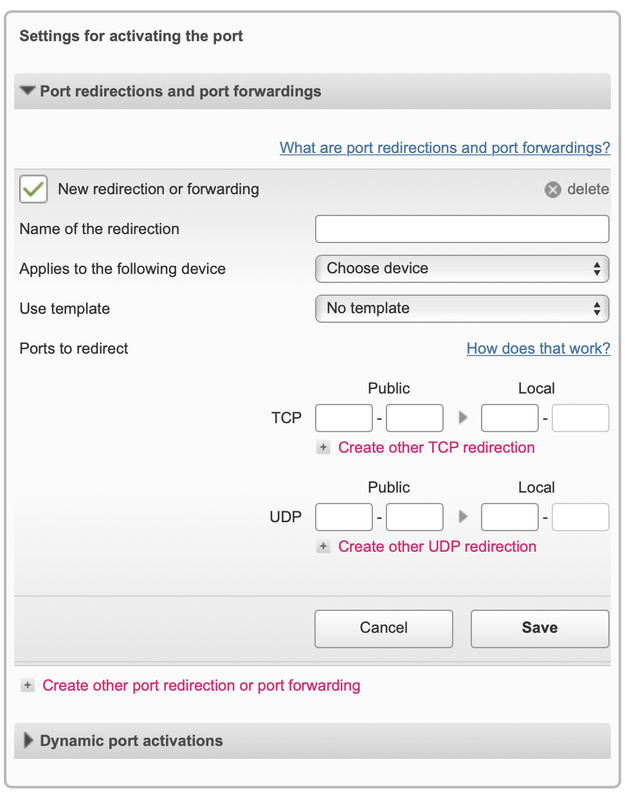
as for the remote settings, this is what I have as inputs, but not clear how to fill them in.
Add images
I’m on a Mac w/ v10.14.5 of Mojave. I have a WD Cloud Home Drive through which I enable and configured the Plex server (via the My Cloud Server web interface). Through that app I updated the firmware of my drive and should be the latest version of Plex (I have no control other than enable and configure–which takes me to Plex where I log in). there there’s a link to download apps, so I download the only Mac desktop app there. when I launch that app, I am asked to log in and where the trouble begins: it says looking for server and never finds it. when I go to authorized devices, both my Mac and my WD network drive are there. The same thing happens when I log in via the iOS mobile app. everything is the latest version. What other info can I give you?

As for the port issue, thanks for that, but I tried to enter the values you provided but get an error msg. in the 2nd field for 50000: “Invalid entry! Please assign a valid port number.”
I really don’t understand what that did technically, but seems to be working now!!! I need to fully test it, will report. thanks!
One more quick question, just so I understand. At one point yesterday I installed an app on my Mac that included a menu bar icon; when I re-downloaded the Mac app during my tinkering, this one doesn’t seem to have a menu bar icon–did I install something different/wrong? what was that?
R
This topic was automatically closed 90 days after the last reply. New replies are no longer allowed.
