Home Cloud Duo server not available of course…! Anyone found a solution ?
Mind sharing some more details (give some meat to the bone…)? 
Let’s start with what version of the Plex Media Server you have installed on your WD Home Cloud Duo. Have you confirmed it’s running (e.g. using the NAS’ package center)?
How are you trying to access it (within your home network or remotely, using the hosted Plex Web or the one installed on your PMS through the WD Home Cloud Duo’s IP address)?
Hi . Version 1.16.3.1402 . I try inside my home network .
Nas Package center ?? what is that ?
1 Like
I was referring to the Services section of the Device Control Panel.
There should be an entry for Plex with a button to either Enable or Configure. If Plex isn’t running at all, the Enable button should be displayed… if it’s running, you should get the Configure button which will allow you to disable the service or start Plex Web from the control panel.
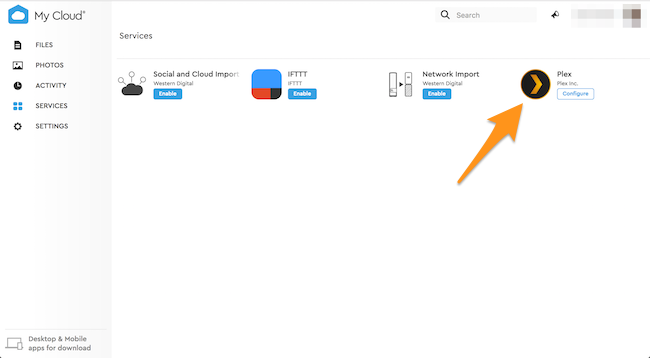
Ahhh yes that is enable !
So where/how do you get the message that your server isn’t available?
E.g. are you trying to connect via https://app.plex.tv/desktop or https://[IP address of the WD Home Cloud]:32400/web ?
From pc! https://app.plex.tv/desktop. But after when i open apple tv plex app works fine! Don’t know what’s going on! 3 of 5 is not available
And what’s the exact symptoms you experienced in Plex Web?
Are the movies not showing or just not playing?
My Cloud Home Duo is currently unavailable
Verify you have a network connection and that the server is online, or see our troubleshooting tips for further assistance.
Thats the message when i try from my Pc through app.plex.tv , but when i go to my apple TV or iPhone works fine !
do you get the same message when you try connecting to Plex Web using the IP address of the WD Home Cloud (https://[WD Home Cloud IP]:32400/web)?
- If direct access works your server might not be available outside your home network (and hence not showing in https://app.plex.tv/desktop) – if you want it to be available outside your home network, we’ll then need to look into your
Remote Accesssetup/settings. - If it doesn’t… well – let’s cross that bridge when we get there
1 Like
Port Forward from my router seems to work now !!!Was Remote Access
This topic was automatically closed 90 days after the last reply. New replies are no longer allowed.
