Server Version#: 1.18.6.2368
Player Version#: 4.20.2
Option not showing in transcoder tab: (show advanced active)
From https://support.plex.tv/articles/115002178853-using-hardware-accelerated-streaming/
Special devices
Some specific devices make use of Hardware-Accelerated Streaming by default. These are special cases, in that an active Plex Pass subscription is not required for the functionality.
- NVIDIA SHIELD
- WD My Cloud Pro PR2100
- WD My Cloud Pro PR4100
Tip! : On these specific devices, a Plex Pass subscription is not required . Hardware-Accelerated Streaming is turned on by default for everyone on these devices.
On top of that… here’s the WD PR4100’s transcoding capabilities from Plex’ NAS compatibility list:
So where is the option to set “Use hardware acceleration when available”
Live TV and DVR via HDHomerun is freezing and buffering when Transcoding is required for remote usage.
As per the linked support article… the PR4100 automatically makes use of the hardware accelerated transcoder… hence no option/flag in the settings.
If your playback is freezing/buffering you might need to share some more details as for what media you’re trying to play (e.g. some characteristics like codecs for video/audio/subtitles, resolution, bitrate…).
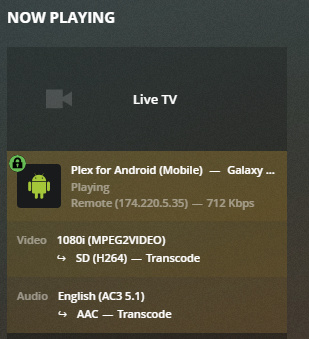
Not sure what else you need.
Well according to that photo.
It is transcoding video from 1080i mpeg2 to SD H264 and the audio from AC3 5.1 to AAC
which looks about right but the remote is only 712 Kbps, surprised it plays at all.

