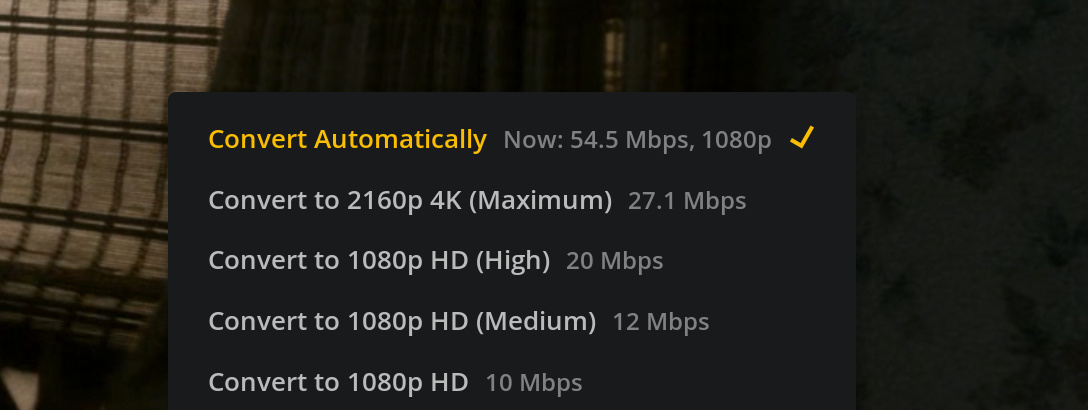
However, as soon as I select “Convert to 2160p 4K (Maximum)” it automatically switches to “Convert Automatically”, which then uses 1080p but with a bitrate that is even higher than the 4k version.
Nope, mine does the same, transcodes to 1080 even if I select the convert to 2160p 4K option.
But why not just install Plex Media Player, as that should be able to direct play your 4K and if you choose the web view, it is just like the webapp, but with better codec support.
I’m aware of the high CPU usage that 4k transcoding causes.
when I try to do the same (4k H265 to 4k H264) on the Samsung TV App it works just fine.
So, I really don’t think that it is a performance issue.
(Even when, plex usual just do it anyway. You just need to accept the buffering every 10 secs.)
So dumber than dirt question are you using a 4k monitor, or a 1080 monitor? I have a1080 monitor, and in the web client settings it only offers me 1080 settings. but when I play a 4k movie in playback settings, if you click on quality settings it will offer me the 4k version, but will not switch to it. I think that is due to me having a 1080 monitor.
Interesting to note YouTube will let me play 4k on my 1080 monitor, and it looks just fine. I think the GPU downgrades it to 1080 automatically.