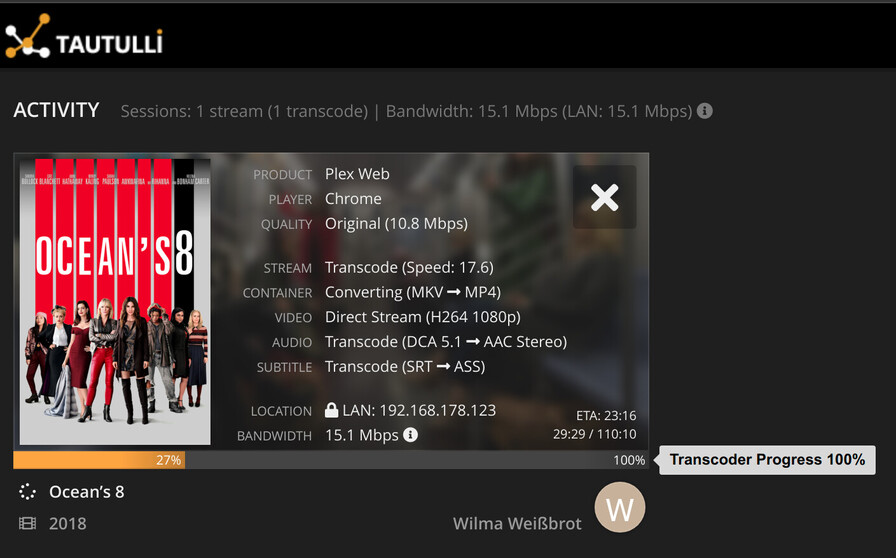
Server 1.25.2.5319 (Running in Docker, host network mode, no reverse proxy or so involved)
Web Player 4.66.1
While streaming a movie in LAN, the buffer of the web player is often suddenly empty. When I restart playback I can watch for another 10…15 mins. Then it is empty again. I see this spinning circle but it never comes back unless I restart playback.
Network load should not be a problem as it is gigabit lan while the movie bandwidth is 15 Mbps only. And currently nothing happens on the LAN besides that stream. Server load should also not be a problem since it used to handle 4 simultaneous 1080p transcoding sessions without problems. Here it is 1 stream only with video direct play. Audio and subs are transcoded. Tautulli shows transcoder progress 100% / transcoding speed 17.
The only noticeable thing I can find in the log is ‘content length = -1’. The playback stopped at 21:35. Plex Media Server.log (280.2 KB)
Any help is appreciated.
Edit:
Contrary to my first statement, the playback did resume after about 45 min (while I was writing this post). According to the log, it was when the job got killed at 22:14. Plex Media Server.log (2.3 MB)
I have a similar issue that cropped up when I moved to the docker container PMS. I just did so recently when I moved from TrueNAS core to TrueNAS scale. Running a current docker image, the WebApp stops playing any video file within 2-4 minutes and will just hang on the buffering circle until the stream is cancelled. Happens on both Edge/Windows and Chrome/Manjaro Linux clients. Video is direcy play, Audio is transcoded.
I have no issues playing content on my Roku TV, Plex Desktop player for Windows, or my Pixel 6 app (Remote and local network), It’s just the web player that refuses to work. I’m not adept at combing through the logs but the PMS log and Transcoder log are attached. Any help would be welcomed. Since Plex abandoned the desktop player for Linux I cannot use my media server on my Linux laptop.
Let me know if I can provide anything else to help troubleshoot.
Going to need to see the Web App logs. The app stopped asking for more data from your server and is telling your serve that playback is in a paused state.
@dmordan I’ll need logs from you too. Your server also shows the player is paused. There might be a bug with the Web app, but I can’t reproduce here. It works fine for me.
I see the buffering in your logs, but no indication of why unfortunately. I notice that it is web version 4.66 which means you are using the local bundles version of the Web client.
While still on 1.24.5, can you try playing a video using the hosted Plex Web from plex.tv. 1.25.0 did bump the version of Plex Web so wondering if it’s a change in Plex Web or actually something in PMS.
Awesome, almost two months after I did the last tests, people in the other thread are asked to do the same tests again. @anon18523487 have you actually talked to anyone about that problem?
Yes I have, but not specifically to Chuck. I read through that other thread at the time and it appeared that it was related to specific files so I didn’t think it was the same issue.
One thing that was mentioned in that thread is this web setting.
For me it was also some files only. Only the 2 I mentioned. Perhaps some more but I am on downgraded server now. I’m not sure what makes them special. The Alternate Streaming Protocol should be disabled they say. I did not mention it because it already is.
Oh, I thought those were just 2 examples you were trying. I didn’t realize it was specific files only. That’s a different story. Do you have any files where this happens in the first minute or 2? If so, are you able to cut the file to include upto that point. Make sure it still fails with this sample file and share that sample file with me.