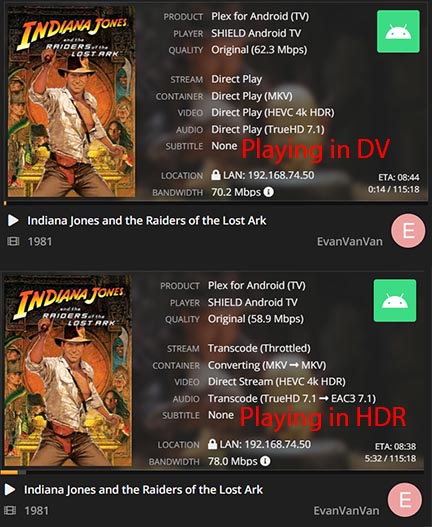
UPDATE: I am now using the 2019 Nvidia Shield again
For Dolby Vision MKV w/ TrueHD (no Atmos), I converted the audio to lossless FLAC. I discovered the audio dropouts were occurring only with the fewer DV MKV w/ TrueHD and no Atmos. For DV MKV w/ TrueHD+Atmos, I still have to start the movie with a standard AC3 track enabled. Once playback starts, I simply switch to the TrueHD+Atmos track and all is well. At this point I can achieve the highest video (HDR/DV) and audio (lossless/Atmos) quality using the 2019 Shield. The support for PGS subtitles is also appreciated.
I have a atmos enabled soundbar coming in, and a 77" LG OLED (CX).
i have the new apple tv, i dont care that much that i loose atmos, as long as the video is direct played and dolby vision is good. Will apple tv work fine+
thought about shield pro also, but it lacks to many other apps that the family uses on the apple tv.
Has anyone been able to get DolbyVision MKVs to playback on the 2019 Shield Pro with the latest Plex server and app versions? It used to work for me and now the feature just seems to be completely broken or was removed from builds. I know there was an issue with the DV engine on the shield crashing, but I have restarted the shield and Plex server and I can’t get any file to play back in Dolby Vision.
Is there any official Plex release notes on Dolby Vision support?
I’m not sure if this is a bug report or what, and it may have all ready been reported…
I have a Nvidia Shield that plays DV files fine when starting from the beginning of the file. But if I stop (and go back to the home sceen/title screen), then try to resume the file, it takes forever to load before falling back to HDR rather than DV. I can fix it by starting the file from the beginning again and fast forwarding back to where I was.
Thank you
Freenas Server; PMS-PP; Version 1.22.3.4392 (I did just update to 1.23.2.4656, but I can’t imagine this fixes it?)
Nvidia Shield (whatever the latest player is)
Thank you for the reply, here are some logs. It looks like it could in fact have something to do with the DV+TrueHD Atmos MKVs this thread is based on? It seems to direct play the file when playing in DV from the beginning, but when resuming, fails to play the TrueHD audio stream and ends up direct streaming the video + transcoding the audio.
Please see the attached files… I didn’t really mean to hijack this thread for a bug report but figured since they are so closely related any thread I started would be merged in here anyway…
Thanks everyone for the feedback. It is good to hear that some have been having success with DV/Atmos. I am pretty sure I am using supported profiles because I had them work previously. I have also noticed the bug when you start a file mid way that Atmos and from the sounds of it DV as well does not get triggered. Hopefully that is something that can be resolved soon as it is a pretty annoying bug. I’ll have to dig more into my logs and see what they say to see if the DOVI decoder is crashing or if it is something else.
I did some more testing and it looks like I am getting similar errors to [EvanVanVan].
I attached my logs. It looks like something is basically crashing and forcing playback to transcode rather than direct play. plex_debug_log.txt (8.3 KB)
I had the same troubles until I started the DV MKV playback with a non-HD audio track. For example, choose AC-3 and after playback starts and DV is enabled, switch to the TrueHD+Atmos track. This also works when starting playback at random timestamps. Just a workaround until Nvidia fixes the DV decoder issues.
I opted in for the WebOS beta Plex app, via the Plex app on the LG, and that’s honestly all I did. It played my Dolby Vision .MKV files without any issues.
Just an update on my issue. It magically started working again, so I dunno. Seems to just be pretty touchy. It is working with 4K DV + Atmos Remuxes now and it is not kicking back into transcoding mode anymore. Knock on wood in hopes that this will stabilize soon with a fix from Nvidia.
I allso had problems with Dolby Vision and Dolby Atmos mkv files. Now with latest updates the problem seems to be gone. Everything is working like charm and even with srt subs. I have LG C9 with LG Soundbar running HDMI v1.4 cables through eARC ports.
LG C9 ver. 05.10.04
NVIDIA Shield PRO ver. 8.2.3 (32.6.518.0)
Shield Plex server v. 1.23.3.4707
Shield Plex app v. 8.19.1.26306 (1a4f048a)
Only adjustments I did was:
in Plex settings disable automatic video quality
in Shield settings 3840x2160 59,940 Hz Dolby Vision and HDR10 Ready display mode (60 Hz didn’t work)
I was able to get everything working with Dolby Vision + Atmos on a Shield, LG C1 and Vizio Elevate with the early access version of Plex on the shield. Plex app version is 8.21.0.26725
I’ve remuxed a few movies from BluRay disc to MKV using makemkv and I can confirm that it merges both layers into a single video track.
But when trying to play them om my LG C8, they only playback HDR.
TV firmware: 05.30.20
Plex Client version: 5.22.1
Plex Platform version: 4.3.0
Plex Server version: 1.24.2.4973-2b1b51db9.x86_64
Media info:
General
Unique ID                                : 48891037336523445475102508759256293863 (0x24C8123F871A690828234A89A38261E7)
Complete name                            : John Wick Chapter 3 Parabellum.mkv
Format                                   : Matroska
Format version                           : Version 2
File size                                : 68.9 GiB
Duration                                 : 2 h 10 min
Overall bit rate mode                    : Variable
Overall bit rate                         : 75.4 Mb/s
Movie name                               : John Wick 3: Parabellum
Encoded date                             : UTC 2021-08-31 07:20:31
Writing application                      : MakeMKV v1.16.4 linux(x64-release)
Writing library                          : libmakemkv v1.16.4 (1.3.10/1.5.2) x86_64-unknown-linux-gnu

Video
ID                                       : 1
ID in the original source medium         : 4113 (0x1011)
Format                                   : HEVC
Format/Info                              : High Efficiency Video Coding
Format profile                           : Main 10@L5.1@High
HDR format                               : Dolby Vision, Version 1.0, dvhe.07.06, BL+EL+RPU, Blu-ray compatible / SMPTE ST 2086, HDR10 compatible
Codec ID                                 : V_MPEGH/ISO/HEVC
Duration                                 : 2 h 10 min
Bit rate                                 : 70.8 Mb/s
Width                                    : 3 840 pixels
Height                                   : 2 160 pixels
Display aspect ratio                     : 16:9
Frame rate mode                          : Constant
Frame rate                               : 23.976 (24000/1001) FPS
Color space                              : YUV
Chroma subsampling                       : 4:2:0 (Type 2)
Bit depth                                : 10 bits
Bits/(Pixel*Frame)                       : 0.356
Stream size                              : 64.7 GiB (94%)
Language                                 : English
Default                                  : No
Forced                                   : No
Color range                              : Limited
Color primaries                          : BT.2020
Transfer characteristics                 : PQ
Matrix coefficients                      : BT.2020 non-constant
Mastering display color primaries        : Display P3
Mastering display luminance              : min: 0.0010 cd/m2, max: 1000 cd/m2
Maximum Content Light Level              : 1000 cd/m2
Maximum Frame-Average Light Level        : 358 cd/m2
Original source medium                   : Blu-ray

Audio #1
ID                                       : 2
ID in the original source medium         : 4352 (0x1100)
Format                                   : AC-3
Format/Info                              : Audio Coding 3
Commercial name                          : Dolby Digital
Format settings                          : Dolby Surround EX
Codec ID                                 : A_AC3
Duration                                 : 2 h 10 min
Bit rate mode                            : Constant
Bit rate                                 : 640 kb/s
Channel(s)                               : 6 channels
Channel layout                           : L R C LFE Ls Rs
Sampling rate                            : 48.0 kHz
Frame rate                               : 31.250 FPS (1536 SPF)
Compression mode                         : Lossy
Stream size                              : 599 MiB (1%)
Title                                    : Surround 5.1
Language                                 : English
Service kind                             : Complete Main
Default                                  : Yes
Forced                                   : No
Original source medium                   : Blu-ray

Audio #2
ID                                       : 3
ID in the original source medium         : 4352 (0x1100)
Format                                   : MLP FBA 16-ch
Format/Info                              : Meridian Lossless Packing FBA with 16-channel presentation
Commercial name                          : Dolby TrueHD with Dolby Atmos
Codec ID                                 : A_TRUEHD
Duration                                 : 2 h 10 min
Bit rate mode                            : Variable
Bit rate                                 : 4 012 kb/s
Maximum bit rate                         : 6 327 kb/s
Channel(s)                               : 8 channels
Channel layout                           : L R C LFE Ls Rs Lb Rb
Sampling rate                            : 48.0 kHz
Frame rate                               : 1 200.000 FPS (40 SPF)
Bit depth                                : 24 bits
Compression mode                         : Lossless
Stream size                              : 3.66 GiB (5%)
Title                                    : Surround 7.1
Language                                 : English
Default                                  : No
Forced                                   : No
Original source medium                   : Blu-ray
Number of dynamic objects                : 15
Bed channel count                        : 1 channel
Bed channel configuration                : LFE

Menu
00:00:00.000                             : en:Chapter 01
00:08:46.776                             : en:Chapter 02
00:14:06.637                             : en:Chapter 03
00:22:40.067                             : en:Chapter 04
00:31:26.301                             : en:Chapter 05
00:37:51.310                             : en:Chapter 06
00:47:43.318                             : en:Chapter 07
00:57:08.842                             : en:Chapter 08
01:02:56.439                             : en:Chapter 09
01:14:27.588                             : en:Chapter 10
01:20:36.623                             : en:Chapter 11
01:28:48.323                             : en:Chapter 12
01:33:51.792                             : en:Chapter 13
01:41:31.794                             : en:Chapter 14
01:53:44.651                             : en:Chapter 15
01:59:51.434                             : en:Chapter 16
I can confirm no transcoding is happening.
Any ideas why DV doesn’t kick in?
I read a few posts back that I must use some beta version of the app?
I can’t really find it.
The format for storing the extra DV data in the video track in an MKV file was added to the spec about a year ago (https://github.com/ietf-wg-cellar/matroska-specification/pull/390). I expect that what’s missing is for LG to update their media stack to read and process this data.
AFAIK, The 2019 Shield is still the only Plex client that handles DV.
When playing DV profile 7 with FEL MKVs on the ShieldTV 2019 with PLEX the FEL is downgraded to MEL (LG CX TV displays the DV logo on top right corner).
When playing DV profile 7 with FEL MKVs on the ShieldTV 2019 with PLEX the FEL is ignored and only the BL+RPU are decoded (LG CX TV displays the DV logo on top right corner).
When playing DV profile 7 with MEL MKVs on the ShieldTV 2019 with PLEX the MEL is decoded correctly (LG CX TV displays the DV logo on top right corner).
Any input on the above would be greatly appreciated.