Server Version#: 1.41.8.9834
Player Version#: 2025.17.0 (1082)
<If providing server logs please do NOT turn on verbose logging, only debug logging should be enabled>
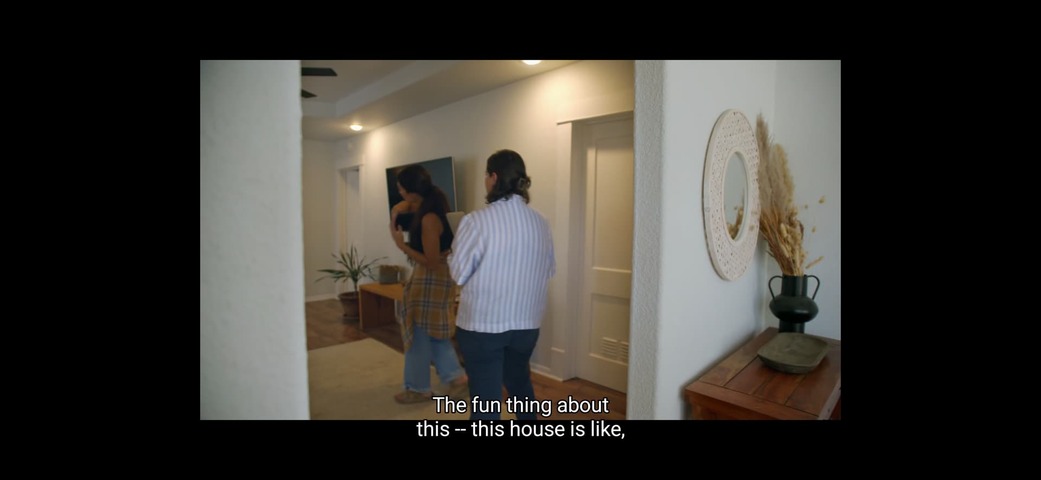
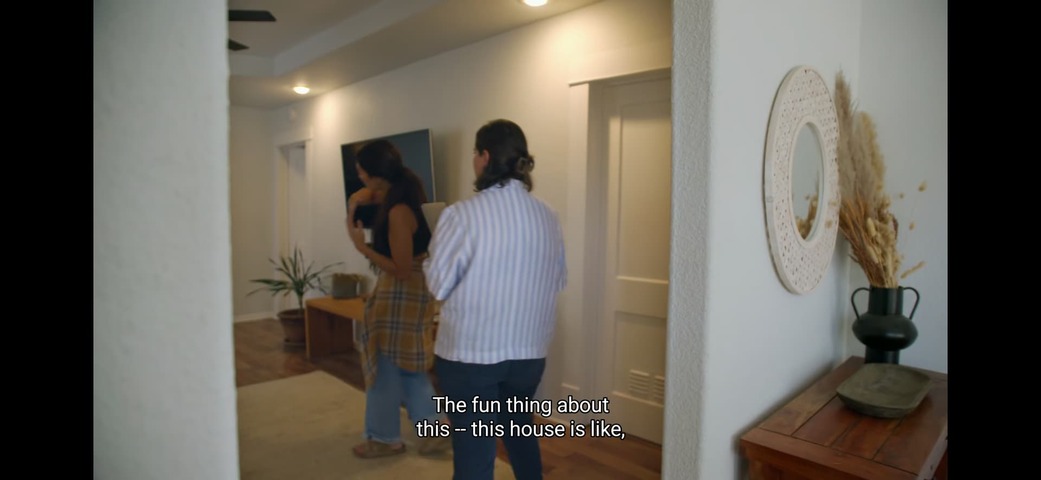
When using the previous version, there was no symptom of the subtitle being cut off even when stretched in stretch mode. ( with Video file with separate video and subtitle files)
After this iOS UI change version update, when setting the stretch mode, the subtitle is cut off as shown in the picture.
There is no such symptom in letterbox mode, but only in stretch mode.
I like the full-fill mode, so I want to use stretch mode, but I can’t because the subtitle is problematic.
I hope it is fixed.
The video is a separate video file called 1.mp4 and a subtitle file called 1.srt.
If just ask you to confirm that the subtitle not only has an .srt extension, but that it also is coded as srt and not ass which could be coded with the location of the subtitles based on what it thinks is the screen area (also devices in ass subtitles).
Not that I believe this is the issue, but it’s easy to do and would help others with trouble shooting.
Thank you for your answer. I tested the same with srt subtitles and ass(ssa) subtitles, and the result was the same as the picture I uploaded. I guess the previous UI app dragged the default video browser of iOS to play. The reason is that it works in the same way as switching scratch mode or letterbox in iOS Safari in the Plex app. I hope Plex will test and fix it.
I wish more people using the new Experience took the time to thoughtfully report on issues instead of bitching and complaining - why be the problem, when you can be part of the solution?