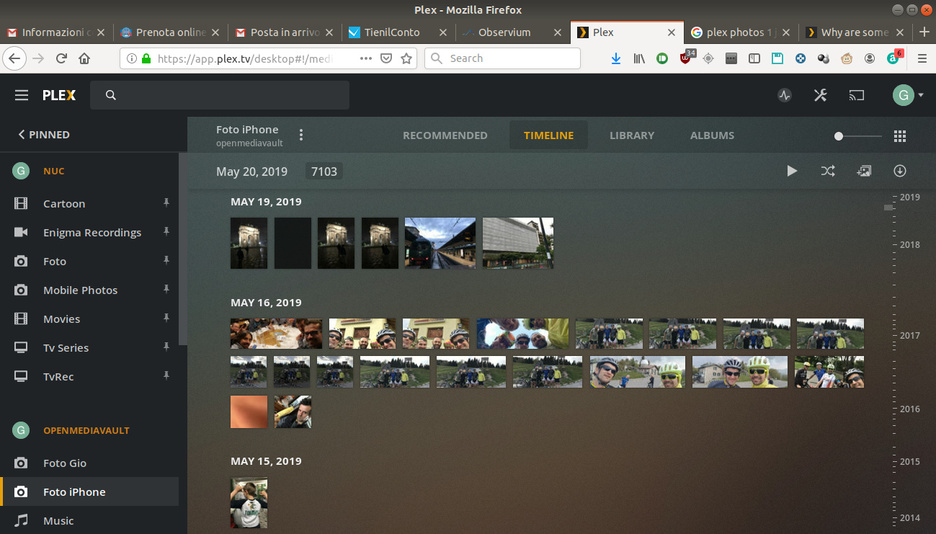
I’m in the same situation.
Oddly enough I have two plex servers that have to the same photos in their library.
The linux one doesn’t have any photo listed as 1 Jan 1900, while the server running on windows has some photos listed in the timeline as 1 Jan 1900.
The other strange thing is that the photos with the wrong date are listed in the right position in the timeline, only with the wrong date above them (see picture).
This started happening to me around the same time as OP. I’ve been removing and re-adding photos over and over to get it to pick up the correct date. Currently still happening on version 1.18.1.1973 .
I just decided to start organizing my photos this morning and encountered the same issue! All my new photos are being dumped into Jan 1 1900 on the Timeline view. If I go to the Library/Photo view and scroll through them manually I can clearly see the correct date tags. I’m on Plex server version 1.18.0.1944
I’m also experiencing this issue. It’s only for a small set of photos which I imported today. It seems like they are being sorted in the correct place in the timeline though, just displaying as Jan 1, 1900.
I had all my photo’s on my Windows based Plex Server but this was limited in Windows where only just over 2000 photos were being seen in a particular folder. It was also very slow to load.
I set up a new Linux based Plex server JUST for my photo’s and now I have a whole whack load of pictures showing up as Jan 1 1900. At least I don’t have any file system limits anymore…
Similar experience here, running Plex on a Mac Mini, except that I have Jan 1, 1900 listed for multiple days. In the timeline the pictures give me the impression they are in order according to EXIF data, however the date displayed on top of the group of pictures is Jan 1, 1900. This looks like a bug, because the files are all fine.
So, plex! what us goin on with this issue? are you working on it? it is very annoying not see correct dates in timeline view…
how come we dont get any answer from staff? that is weird acually… someone could atleast say “yes, we know about it. wait for two weeks, we are workin on this issue, dont be such a pain the ass!” or something…
Experiencing the same “1 Jan 1900” issue for some time, like others I hoped Plex would get this figured out and one of the updates would eventually solve it.
My short-term solution was to never select Timeline.
However, after adding my last two sets of photos, one listed a 1 Jan 1900 and the other as the correct date, I looked back at other sets and realized photos taken with my Panasonic Lumix camera as well as my Olympus TG-2 have the correct dates, but the photos from my Canon SX-260 all show 1 Jan 1900.
So it appears to me Plex has an issue reading the ‘taken date’ of the Canon (and very likely other cameras as well) and defaults to 1 Jan 1900.
When posting photos on a website which geotagged photos, I had an issue with the same Canon camera and was told the camera’s EXIF information was ‘non-standard’ and the webmaster changed his code specifically to address the Canon issue. I wasn’t given specifics and I didn’t care, as long as his change worked.
So… now seeing the 1 Jan 1900 issue ONLY with one of my three cameras, the evidence and my personal experience leads me to believe it is an ‘EXIF/camera’ issue.
And as a former software test engineer, it still astounds me this issue has not been resolved yet.
To be fair, I spent the time between posts digging back through and taking a closer look and here’s what I found:
For me, the 1 Jan 1900 issue first showed up in early October, all the EARLIER sets have the correct date in the Timeline. (Could it have something to do with going to Catalina 10.15?)
Since the Timeline feature appeared I have loaded sets of photos with anywhere from a single photo to dozens and can find NO correlation between number of photos and whether 1 Jan 1900 is listed or the correct date.
SOMETIMES photos taken by my Panasonic DMC-FZ300 show 1 Jan 1900, but not every time.
EVERY time, ALL the photos taken with my Canon SX-260 show 1 Jan 1900. Which is why originally I thought a non-standard EXIF was the problem, but I must admit that does not ‘appear’ to be the case.
(My gut tells me there are a number of factors creating the issue, which is why for some people it appears they’ve had this issue for much longer that myself.)
I’d love to be wrong and a solution is found, but as I mentioned in my first post, for now, I simply never select Timeline, I just use the Library.
That said, I have a photo that shows a capture date of 2012/01/28, and it shows in Plex as 2012/02/02. I can’t see anything in Exif or in file properties that has the February date.
So, Plex Tech unable to fix own bugs? I monitoring every updates. Server get updates often. But developers can not fix a serious error last two month.
The above bug appears without problems, especially with a large number of photos. Also, an error appears when deleting photos. So correct photos after delete some other photos become Jan 1, 1900
I made a distinction of experiments with files. Used the torch and exiftool to correct the date. Without changes
if I open “file info → show XML” information about dates are correct
I’m having the same problem. This seems to have been ongoing for a while but doesn’t look like there has been a response from Plex.
First time on the forum; is it pretty usual not to get a response on these kind of bugs? As a Plex Pass subscriber that would be very disappointing. Even just an acknowledgement that somebody is going to look into it would be nice.