yeah, everything is weird… other issuses are responsed asap usually… but this issue stayes unresponded for few weeks now…
The same problem on windows… I hope it will be repaired soon…
Update, the problem is still not resolved
up!!!
I don’t know if it’s just me, but this issue seems to be fixed for December 2019 photos. Can anyone confirm that?
But I still have November and October 2019 photos as 1 Jan 1900.
Edit: ignore it, it’s the same even for December 2019 photos.
Plex, please at least acknowledge this issue.
New photos added are still having this issue as of Dec. 11 2019 on 1.18.3.2129. Doing Analyze on each photo seems to sometimes fix this for me now, but only sometimes on some photos. Sill have groups I need to try to remove and re-add, but previously this had no effect.
This issue came back to me as well, this time no stopped library scan as far as I can tell. I have to try if the “delete trick” I used before still works… Analyse doesn’t do jack ■■■■ for me.
Just realised that a lot of my pictures are now JAN 1, 1900. What kind of crap is this?
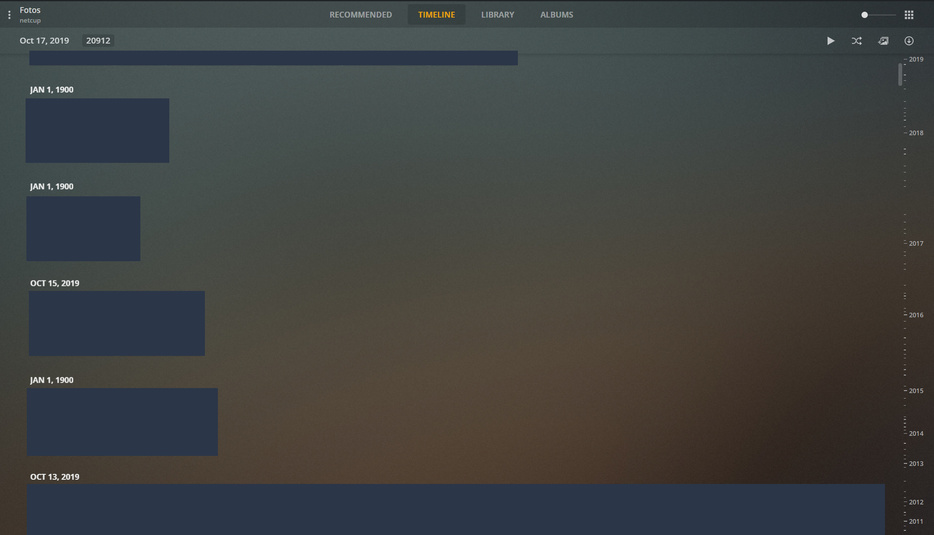
I’ve previously had a look at this and couldn’t reproduce the issue on my end.
A database dump would be really helpful to debug these issues, if somebody experiencing this issue is willing to share that with me via DM it would be appreciated. To grab the database just head over to Settings -> Troubleshooting -> Download database.
Done.
1 Like

Thanks for the reports, with the help of @Coxeroni’s database I was able to track down a recent regression that was causing this. I’ve submitted a fix but not sure exactly which PMS release that will be but will let you know when that’s confirmed.
3 Likes
Thanks for the quick help, looking forward to the solution.
Hi drzoidberg33!
Here the same issue: a lot of photos marked as 1 jan 1900. Those photos have no “camera shot data”. But I have EXIFed using xnview application inserting data.
Creation data, Modification data, EXIF data are correct. But there is no “camera shot data”. Could it be the reason?
How could I send you my database?
Many thanks in advance
Versión 1.18.2.2058
yeah, we already know that this is a plex issue, not our databases, exifs and other dates.
Have plex lates update - 1.18.3.2156. Unfortunately does not contain a timeline fix
Having the same issue with the bulk of my photos. When viewing the meta info in Windows or Plex the date appears correct but the timeline organizes them under Jan 1, 1900.
I notice if I manually change the photo Capture time and set the hour value (hh:mm:ss) >= 5 it appears under the correct day/year.
For example, this date incorrectly organizes the photo as Jan 1, 1900:
2016-10-30 01:13:43
This date results in the photo being correctly organized under October 30, 2016:
2016-10-30 05:13:43
There seems to be a second issue observable in my uploaded which shows the same day separated into two sections when I set the time to 04 before 05.

2 Likes
Great to know that this problem has been addressed, it’s been bugging me for a while now. Waiting for the fix to be released ! Keep us posted.
Just adding to the list of users experiencing the same issue. Unfortunately I don’t have much time to experiment, the only thing I did is re-creating the photo library from scratch, but didn’t help.
Seems support found out what’s wrong, hope they can fix this soon.
Exact same problem here. Mac mini is my server and tons of photos listed as Jan 1 1900. It seemed to just be a visual thing at first, but now media files are incorrectly sorted as Jan 1 1900 as well  Please fix Plex!
+1. Same problem.
