Server Version#: 1.20.4.3517
Player Version#: Both in Web-player and / Windows (1.22.0)
I’m not really sure if I should post this here or in the ‘player’ app. I’m having some weird things in my player and perhaps server. Maybe it isn’t powerful enough for transcoding what I want to have transcoded by my Synology DS918+ Plex server, or maybe I did some misconfiguration.
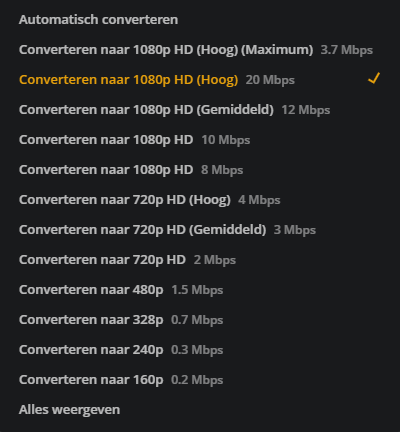
My Windows Plex player keeps crashing when starting to play a video that I set to transcode. But in a way that makes sense, because the maximum streaming quality is @ 3.7mbps.
When I select a transcoding to like, 12mbps (which for this video shouldn’t be possible I guess?), Plex crashes.
The video I want to play is a video of 1080p x 265 HEVC.
So I guess my first question now is: “Why can I still select ‘convert to 1080p HD High @ 20mbps’, when the maximum would be 3.7 mbps according to Plex?”
can you show me the XML of the file with the problem?
The Plex/Web guys do not see this.
also, I need:
PMS version
Are you using the hosted app at “app.plex.tv” or the bundled (from within the server itself) or the PMP / Plex Windows app ? – I’m not a Windows user (linux only)
I might also need the Plex/web logs.
(Having dialog with the engineers as I write this)
The Plex Media Server version is ‘1.20.4.3517’ on a Synology NAS ds918+.
I may not have been very clear about this, but my actual issue is that my Windows application, Plex 1.22.0 is crashing/hanging all the time. Now my Windows Plex app will even crash immediately after logging in to the (managed) user. I would have to reïnstall Plex in order to fix that for a while. When play some files in particular, the application crashes.
So I was trying to eliminate things, and found out that the application also crashes when I select a ‘higher’ transcoding rate than Plex detected itself.
When I’m using the web-player, it works just fine I used the internal web player by the way when testing with that. So I do have a work-around, but it’s still strange.
 I used the internal web player by the way when testing with that. So I do have a work-around, but it’s still strange.