A couple of days ago I was finally able to catch up on a show I’m recording after about 6 weeks. When I tried to play the oldest recording, it stuck at 33% for a few minutes until It stopped with “an error. Check your connection. [Retry][Next ][Stop]” The server just said it was ‘buffering’ the whole time.
The video files play on the Windows app and on Android, but not in a web browser either. Then I checked 2 Roku’s … a new one from last year played at least one of the recordings, while the 1st (much older) one still didn’t.
I searched around and figured out the recordings are .TS files at 720p. I finally checked the Playback Options and thought I’d try the Allow MPEG2 option and … voila!
I’ve been recording for years, what’s happened to require this change?
Server Version#: 1.41.6.9685
Player Version#: ?
Sounds like your server is having issues converting mpeg2 or maybe has video transcoding disabled.
mpeg2 is not officially supported on Roku, and while it can play with that setting checked, other issues may occur like issues with seeking. We have two settings that are off by default.
Allow MPEG2 Enabling this may cause playback issues. Allows direct streaming of MPEG2 for live TV & DVR when ‘Original’ video quality is set and the source is 720p or lower. Higher resolution is excluded due to memory limitations.Experimental 1080p MPEG This is an experimental option to fix memory related issues during MPEG2 playback, and allows direct streaming resolutions up to 1080p.
Thanks for a speedy response. Your explanation sounds pretty cut and dry, except it makes me wonder, “What changed?”
I’ve been using this same setup for years without this issue. The server computer is 3 years old. The only setting I have changed was the commercial detection setting. A release in the last few months seemed to indicate an improvement in that feature, so I turned it on.
Also, it seems that not all recordings are affected. I played recordings from 5+ years ago successfully (as I had years ago). I have some recordings (again, not all) that hang and do not start on the Web App on the server itself as well. Including the episodes that now play on Roku correctly with Allow MPEG2 enabled. (They also play correctly on a Windows laptop with the MS Store app)
It sounds like “Allow MPEG2” is a/the solution, but … quizzical.  Is there going to be an option to change the DVR file type/format/codec in Plex anytime? Would that be a “solution” that doesn’t make Roku “angry?”
Thanks again for the response…
are you just detecting and marking? or detecting and deleting commercials which alters the file?
if you have other mpeg2 videos that work with the setting for Allow mpeg2 off off then I would see if your server is transcoding those to make them work.
I have since turned off the commercial setting. (To see if it might affect playback. It did not.)
I had it turned on to mark and skip, but not delete. To me, that was a “new” feature that I was trying. I had used the feature previously with deleting commercials, and it was … not good.
When turning this on, I chose the setting to go through all of them, not just new recordings.
When this 33% issue arose, I went to old recordings to check and had these mixed results I’ve already mentioned. That’s when I turned off the setting and reanalyzed the library. Still the same (mixed) results.
For those that work with the option off, how can I see and/or prove they’re transcoding? Isn’t the fact that they “work” sufficient?
The shows I’ve started having this issue with are all recorded from OTA channels, and so are all .ts files with the MPEG2VIDEO codec. Other shows I’ve converted by other means - MP4 & MKV - haven’t shown the problem.
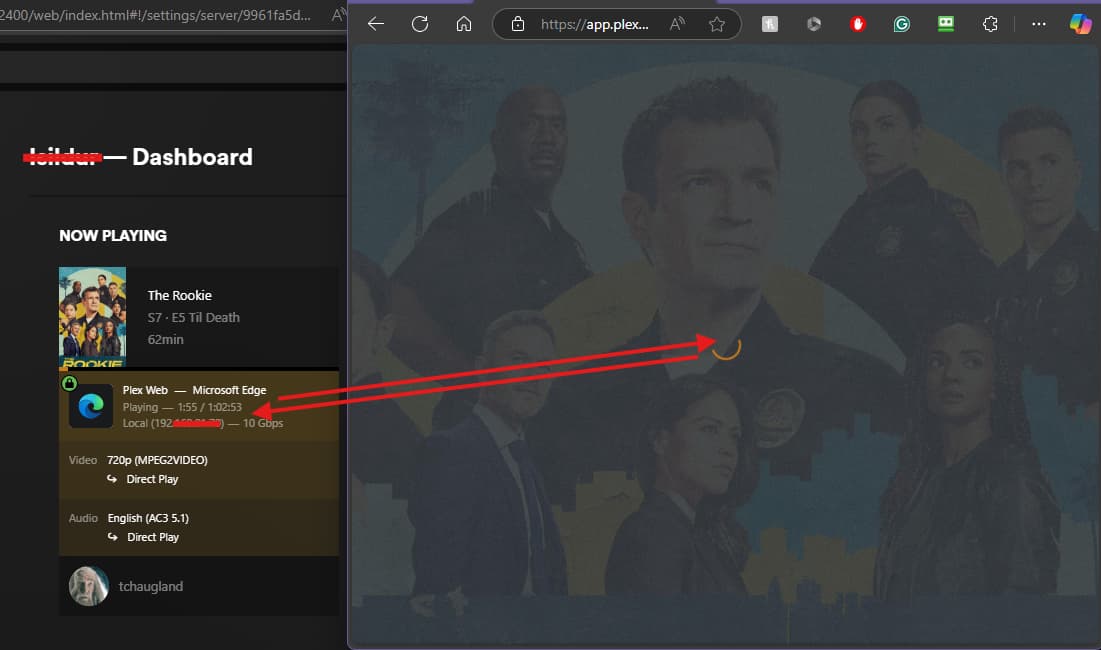
View the dashboard (via the web app) while it’s playing and grab a screenshot:
https://support.plex.tv/articles/200871837-status-and-dashboard/#toc-1
Make sure to toggle the detail icon at the top-right so that it shows the complete playback details:

… as you wish. 
I can do that in the Web App … I’ll be able to get to Roku later today or this weekend.
Never starts (these recordings are where I started):
Plays (shows ‘Buffering’ while I used Snipping Tool):
Started, but then stopped:
Terrible how “life gets in the way.”
Finally got to Roku to do this. And with the ‘new’ server ( Version 1.41.7.9823). It did stop at 33% on the TV, gave me enough time to capture this screenshot on the server, but while I’ve been typing playback started…
Does this mean it is solved? Does it mean I’m impatient? (I am) Does it mean … anything?