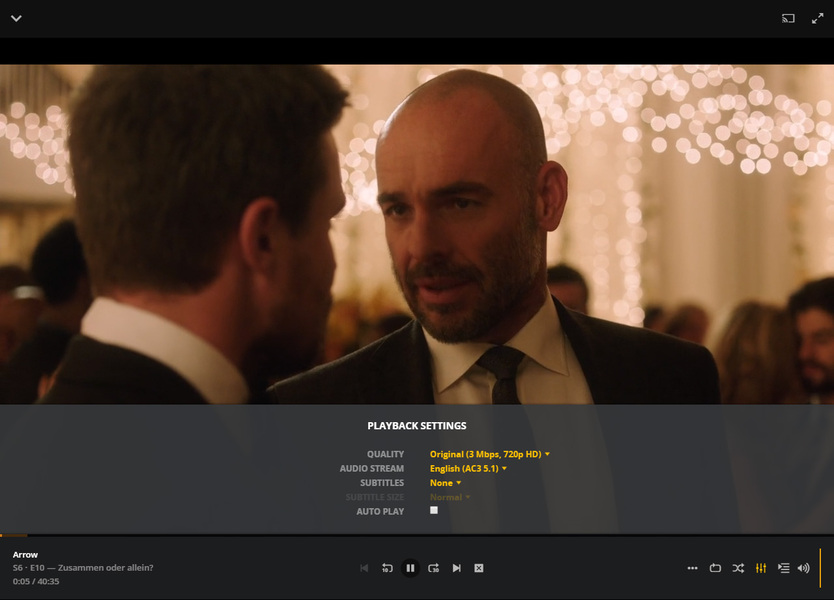
Why does autoplay get turned back on when Plex updates? Is there a way to permanently turn it off?
If I wanted autoplay on, I would turn it on. Please tell who ever it is in the Plex hierarchy who loves autoplay and is is forcing us to use it that he is wrong and that, unless he changes his position, he can go -BLEEP- himself.
Why do you hide the setting in the Post Play screen? Why don’t you put it in with the rest of the settings, like a normal programmer would do?
I have set the autoplay to off many moons ago and it is staying off.
This is a client setting. It is stored in the preferences of the client.
If your client is a web browser, you must make sure that the web browser cannot “forget” any of them.
You do that by telling the web browser to not delete cookies and other data of the web sites plex.tv and plex.direct
If you have other software on your computer (e.g. CCleaner etc.) which deletes usage traces and maintains your privacy by doing so, tell it to exempt browser data from the two above web addresses.
You can also disable autoplay already during playback, by calling up the playback modifier settings