Try deleting the app off your phone and re-installing it. I’ve had this same problem all week. I have a second phone here that’s hooked up to it too, so I checked if it had the same problem but it was working. So I’ve just deleted the app and re-installed it and it’s back to normal
been there, done that. happens on all my devices. Even on latest IOS beta.
I’m also having this issue on my daughter’s iPhone 6S running iOS 11.4. I’ve uninstalled the app, removed devices from her managed account on my plex server, reinstalled the app and still get no connection to the server.
However, if I go into my plex server user it appears to work fine. Maybe this is something specific to managed accounts?
1 Like
This issue just popped up for me recently and I fixed it by changing the Server settings to “Prefer” Secure Connections. I’d turned it off to troubleshoot buffering on the roku app (didn’t fix it)
For me it was clearly related to that setting. Hope this helps someone!
3 Likes
Latest IOS beta Build #14611, still not fixed
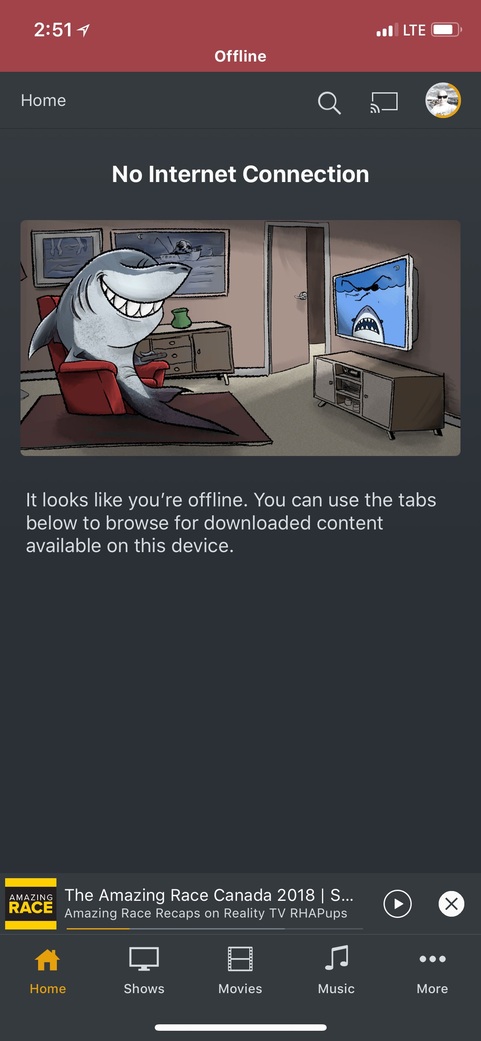
Same issues…what’s going on with this? Showing offline. Ended up uninstalling/reinstalling and won’t even see server.
1 Like
I also continue to have this problem. Only on my managed users (2 or them) and only the Music library. I think it has something to do with using the “sharing tags”. I wish Plex would at least give a simple workaround.


Same issue here. Tried restarting, deleting, and logging in and out but just says everything is offline. I can access Plex via web browser on my phone but not the app.
I too am having this issue. Plex Home page on iOS shows OFFLINE. However, I can go to Shows or Movies and access the content just fine.
1 Like

Also having this issue.
Latest PMS
iPhone X - iOS12 Dev Beta 6
Although mine seems completely related to OpenVPN. If I disable my VPN the Plex app works fine. On the VPN it works maybe 2/10 times I restart it and even then will randomly state I’m offline. The web browser works. This VPN is ONLY routing DNS for pi.hole adblocking.
My other iPhone 7 running iOS 11.4.2 works fine with and without OpenVPN (same profile/config I might add) and the Plex app does not produce this behaviour.
Please let me know if you wish to see logs to help get this resolved.
I’m seeing the same issue, only in the ‘home’ section. When navigating to shows or movies, it’s fine.
After uninstalling my VPN app (vyprvpn) then force closing the Android app, it does seem to fix it when reopening the app. However when navigating to the shows or movies section and back again, the problem returns. Slightly frustrating really.
Is there any more updates wit regards to this?
Is there somewhere those of us experiencing the issues can give logs to help the issue get resolved faster?
Right here.
Thanks. Logs here. PlexDebugInfo-PixelBurst-5.2-14670 (2018-08-08 19.56.44 0100).zip (234.5 KB)
There should be enough logging there to show me using Plex fine on Wifi - with or without VPN, Fine on 4G without VPN but having the ‘offline’ when on 4G with VPN. If I’m quick enough to click anything in the time it’s up I can continue to skip through episodes/songs with no issue all while I’m ‘offline’.
I could also help provide the logs of my iOS 11 iPhone 7 that has no issues over 4G on the VPN if that helps?
Same issue… Home screen says stuff is offline, cant browse… I am not offline browsing or anything… I can go to the movies tab and see movies… Somehow the home screen is messed up.
Ok… fixed it myself… I went to the app cache and totally deleted everything including my account data…from the Android app… Then force quit the app…logged back in, then everything showed up as it should, videos had thumbnails and no longer said offline.
Dev team, have the app clear the cache sometimes, possibly after app update. Totally resolved my issue. In android 8
Same issue as reported by everyone else above. iOS app on iPad shows offline while the server is online.
1 Like
Not that anyone from Plex is watching this, but here are my server logs as well. After a few PMS updates and iOS Plex app updates, this issue is still occurring with managed Plex users and sharing tags for access to specific items in the Music library.
Plex Media Server Logs_2018-08-13_09-36-26.zip (3.7 MB)
And my deivce logs…the sharing tag i’m using for my managed users to access music is “kids” - if that helps.
PlexDebugInfo–5.2-14670 (2018-08-13 11.42.03 -0500).zip (516.4 KB)
