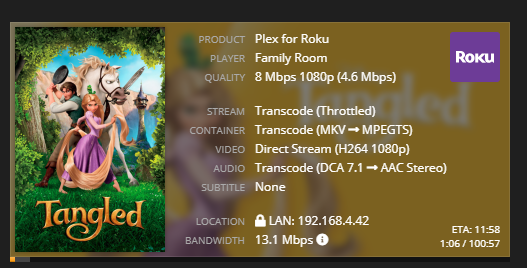
Server Version#: Version 1.18.9.2578
Player Version#:Plex Media Server Logs_2020-04-15_10-26-09.zip (9.4 MB)
Can’t figure out why this transcoding is throttled.
My own bluray, ripped and compressed at RF20 in handbrake for my home network. Player is Roku 3, with all quality options set to “original”, running wired ethernet on a gigabit connection.
I know the audio should be transcoding because the roku is only attached to a soundbar, but I don’t understand why this title is being throttled when others don’t seem to be.
General
Complete name : N:\KIDS MOVIES\Tangled (2010)\Tangled (2010) - [RF20dtsma].mkv
Format : Matroska
Format version : Version 4
File size : 6.61 GiB
Duration : 1 h 40 min
Overall bit rate mode : Variable
Overall bit rate : 9 440 kb/s
Movie name : Tangled
Encoded date : UTC 2020-02-28 03:45:34
Writing application : HandBrake 1.2.2 2019022300
Writing library : Lavf58.20.100
ErrorDetectionType : Per level 1
Video
ID : 1
Format : AVC
Format/Info : Advanced Video Codec
Format profile : Main@L4
Format settings : CABAC / 4 Ref Frames
Format settings, CABAC : Yes
Format settings, Reference frames : 4 frames
Codec ID : V_MPEG4/ISO/AVC
Duration : 1 h 40 min
Width : 1 920 pixels
Height : 1 080 pixels
Display aspect ratio : 16:9
Frame rate mode : Constant
Frame rate : 23.976 (24000/1001) FPS
Color space : YUV
Chroma subsampling : 4:2:0
Bit depth : 8 bits
Scan type : Progressive
Writing library : x264 core 157 r2935 545de2f
Encoding settings : cabac=1 / ref=4 / deblock=1:0:0 / analyse=0x1:0x111 / me=hex / subme=8 / psy=1 / psy_rd=1.00:0.00 / mixed_ref=1 / me_range=16 / chroma_me=1 / trellis=2 / 8x8dct=0 / cqm=0 / deadzone=21,11 / fast_pskip=1 / chroma_qp_offset=-2 / threads=6 / lookahead_threads=1 / sliced_threads=0 / nr=0 / decimate=1 / interlaced=0 / bluray_compat=0 / constrained_intra=0 / bframes=5 / b_pyramid=2 / b_adapt=1 / b_bias=0 / direct=3 / weightb=1 / open_gop=0 / weightp=2 / keyint=240 / keyint_min=24 / scenecut=40 / intra_refresh=0 / rc_lookahead=50 / rc=crf / mbtree=1 / crf=20.0 / qcomp=0.60 / qpmin=0 / qpmax=69 / qpstep=4 / vbv_maxrate=20000 / vbv_bufsize=25000 / crf_max=0.0 / nal_hrd=none / filler=0 / ip_ratio=1.40 / aq=1:1.00
Default : Yes
Forced : No
Color range : Limited
Color primaries : BT.709
Transfer characteristics : BT.709
Matrix coefficients : BT.709
Audio #1
ID : 2
Format : DTS XLL
Format/Info : Digital Theater Systems
Commercial name : DTS-HD Master Audio
Codec ID : A_DTS
Duration : 1 h 40 min
Bit rate mode : Variable
Channel(s) : 8 channels
Channel layout : C L R LFE Lb Rb Lss Rss
Sampling rate : 48.0 kHz
Frame rate : 93.750 FPS (512 SPF)
Bit depth : 24 bits
Compression mode : Lossless
Title : Surround
Language : English
Default : Yes
Forced : No
Audio #2
ID : 3
Format : AAC LC
Format/Info : Advanced Audio Codec Low Complexity
Codec ID : A_AAC-2
Duration : 1 h 40 min
Channel(s) : 2 channels
Channel layout : L R
Sampling rate : 48.0 kHz
Frame rate : 46.875 FPS (1024 SPF)
Compression mode : Lossy
Delay relative to video : -21 ms
Title : Stereo
Language : English
Default : No
Forced : No