Server Version#:1.19.1.2645
Player Version#:2.52.1.70
I installed a new plug and play FIOS router (model G3100) and ever since then I cannot get the PLEX app to work on my Xbox One? Both the server and the XBox One are on the same network. I’m ready to pull my hair out as I have tried EVERYTHING to get the app working to no avail. I have “Allow fallback to insecure connections” set to “Always” on both my server and XBox One. I have uninstalled and reinstalled the APP 3 times. I have the latest build of both the PLEX server and Xbox One App. I’ve port forwarded TCP:32400 on my router. I’ve manually added the server IP address in the Xbox app. I’ve even tried enabeling remote access in the server and still no luck!!!
The app was working fine before. Now nothing? WTF PLEX? Why for the love of Christ can my Xbox One not see the server on the same GD network?!!!
What more do I have to do to get this working?!!!
Thank God the PLEX Player on my PC works or I would have no way to watch my content…AND I’D BE CANCELLING MY PLEX PASS I’VE HAD FOR YEARS!
FIX THIS!!! DO Something! Chime in to the forum sometime and help people out. I no im not the only one with this issue and I’ve seen no solution as of yet!
I went into my router settings and did a port forward of TCP:32400. I didn’t see any other settings in the router that would cause any issue. I’ve even rebooted the router 3 times as well as signing out of the server and Xbox app and signing back in and rebooting PC and Xbox one. I had to send the old router back to Verizon so I cant reinstall it. I’m not 100% sure if changing the router is what caused this or if there was some kind of update in PLEX around the same time. I wasn’t using PLEX for about a week when I changed routers. I’m just assuming because of the timing it was installing a new router that started this. What network details do you need? I have Verizon FIOS 100mb fiber optic internet using a Verizon G3100 router. My PC is Windows 10, I have 2 pc’s, an Xbox One and a PS4 wired to the router. I don’t know how to obtain logs, I know that when I go into PLEX settings all my deices are listed in authorized devices. Recently I tried checking the setting “DLNA” to “Enable the DLNA server” and that didn’t work and under “Network” I added my Xbox One IP address in the “LAN Networks” box and that didn’t work either. I’ve basically given up at this point. I’ve literally spent hours on this. I’ve looked at many threads with the same issue and tried those suggestions and no luck. Maybe I’m crazy but it seems to me this shouldn’t be that hard. I have a “normal” internet setup and “normal” device setup and I shouldn’t have to be a rocket scientist to make this work and since there are MANY similiar threads I know I’m not alone here.I’ll just have to use the PLEX player on my PC (Thank GOD that still works) to watch my content and lose the convenience of the Xbox App.
please try to put paragraphs in, its very difficult to read a huge block of text and separate out the sentences.
details on your network, like;
what internal ip scheme are you using 192.168.x.x, 10.x.x.x or something else?
is your server lan/wired or wifi?
is your xbox on lan/wired or wifi?
if you open Edge on xbox and go to app.plex.tv can you login and access your server and play anything ?
if so, while something is playing via xbox edge, check your pc plex server dashboard and see if it shows what the xbox is playing, and whether it says ‘local’ or not ?
Internal IP is 192.168.x.xxx
server is wired
Xbox One is wired
I can login to my PLEX account on Xbox Edge but it cannot see the server.
I have remote access enabled but it says “your server is signed into PLEX but is not reachable from outside your network”
I clicked the “learn more” link and followed the tips and its still not “reachable”
UPnP is enabled on my router.
Microsoft Edge shows up in “authorized devices”
Not a problem for me as I do not want to reach the server from OUTSIDE my network.
I want to reach it INSIDE my wired network…on the Xbox One app.
it sounds like your new router has some kind security function(s) enabled on it that are blocking your xbox and server from seeing each other.
You might want to see if there is anything called ‘dns rebinding protection’ and disable that.
You might also want to see if there is something called ‘client isolation’ which blocks devices from seeing each other (to help prevent malware/etc spreading).
You may also want to start googling/researching everything you can find on that specific router.
In summary, it appears that both the xbox and server can connect out, but they are unable to connect back in internally.
This definitely points to router/firewall/security blocking the required protocols/ports/etc.
I couldn’t find any DNS rebinding protection or client isolation.
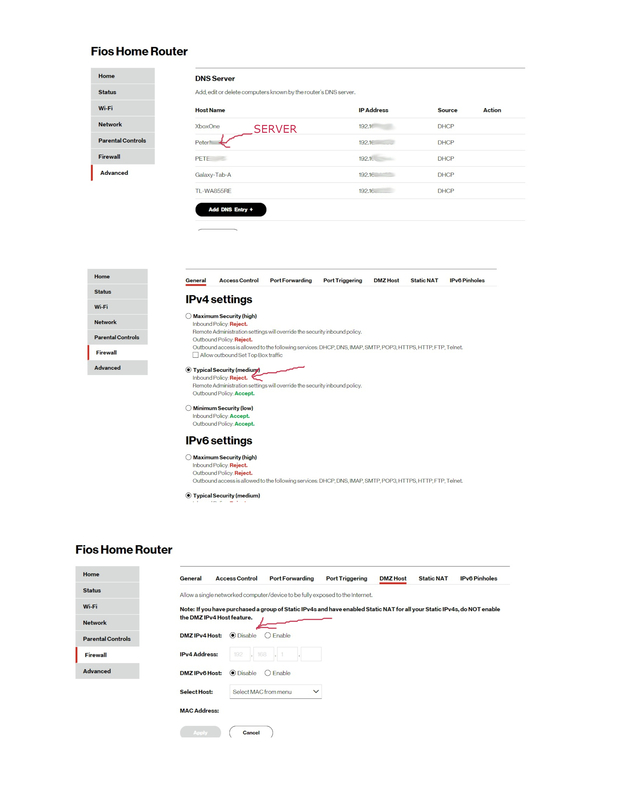
I took some screenshots of a few things you can look at.
The IPv4 settings? Maybe change it to minimium security?
The DMZ host tab? Maybe change it to "enable?
I don’t want to change these setting as I don’t really know what they are, (I googled and its all greek to me) and do not want to compromise my security by changing them if they are not the issue.
Thanks for your help but if theres no solution with these settings then I am done…spent too much time trying to figure this out. Done with it.
But Thanks!
OK. I changed the IPv4 setting to minimium, Rebooted all devices and still no luck.
I saw nothing in access control or advanced that would block anything.
I thank you once again for your help.
I am done with this.
Thread closed.