Hi all,
I’m a lamba user, who likes to read 4k movies stored on my Synology DS918+ NAS.
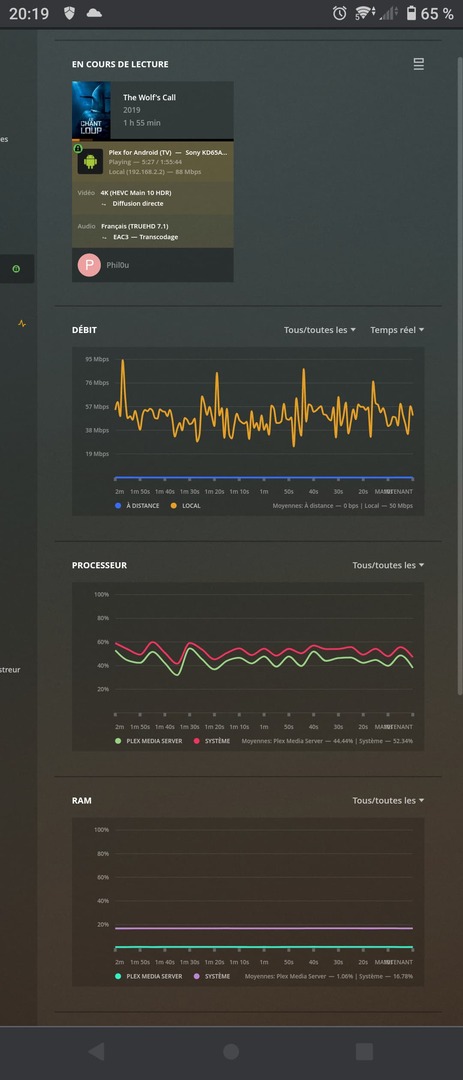
I’m a bit frustrated when the audio is TrueHD, because the Plex player (on my Android TV) is not able to read it, and the Plex server is not able to transcode it fast enough.
I’ve read some topics related to this issue, I understand that it’s either a hardware limitation or that certain codecs requires a license to decode locally (which has a cost !) but my question is :
Is PLEX able to taking care of this issue and if so, will it been done at some point in time ?
I’m not sure… I have a Smart TV Sony KD-65AG8.
Is the TV the problem ?
I have tested with ethernet 100Mbps and with Wi-Fi 6. Still the same error. It seems like the server wants to transcode the audio only, the player displays a message saying the bandwith is not enough (or something like this)
Just because you don’t have the equipment for it now doesn’t mean you can’t future proof your collection Multiple versions would rack up space a lot faster.
Your TV cannot decode/direct play TrueHD audio using the Plex app (no TVs support this due to manufacturer limitations).
As you discovered, if you play a video with TrueHD audio, it will be transcoded by your Plex Media Server to a compatible format.
As @premikkoci mentions, the DS918+ should be able to transcode TrueHD audio.
Some questions / things to try:
Plex Media Server version?
Synology DSM version?
If available, choose the Dolby Digital (AC3) audio track. Movies & TV Shows released on Blu-ray disc with TrueHD audio must include an AC3 version of the audio. If you’ve access to the disc, you can re-rip it and include the AC3 audio track.
Is the video also transcoding?
Monitor playback via Plex Dashboard → Now Playing (expand to show details).
You are running into the limitation of Smart TVs and TV apps.
A soundbar by itself will not help, as no TV supports TrueHD passthrough from TV apps. TrueHD will still transcode.
A different TV would not help, as no known TV supports TrueHD audio.
If you want to direct play TrueHD audio, you need a soundbar or receiver that supports TrueHD audio and either a Nvidia Shield Pro or Xbox attached to the soundbar, not to your TV.
Shield/Xbox ← HDMI → Soundbar ← HDMI-ARC → TV
The Shield and Xbox are the only Plex clients that passthrough TrueHD audio and support 4K HDR video. Plex’s PC/Mac applications, Plex for Windows/Mac and Plex HTPC, will passthrough TrueHD audio. However, they do not (yet) support 4K HDR video.
You cannot attach the Shield/Xbox to the TV, because the KD-65AG8 does not support HDMI-eARC. It supports HDMI-ARC which cannot pass TrueHD audio. So no Sonos soundbars, as they do not have HDMI inputs.
Ok, got it, thank you !
So every PLEX user, without a Shield or Xbox, is facing the same issue…
Do you have any idea why the transcoding is not smooth ? The image breaks and loads every 5 seconds, as if the bandwith was not enough. But the graph shows that it never goes over 95Mbps.
Is there a way to debug the transcoding / networking ?
 Multiple versions would rack up space a lot faster.