Hi, Chuck. I’m having a near identical issue to what others have described here.
Can you please reset my certificate as well?
I’ve tried connecting on multiple browsers with no success. I get the messages “ERR_BAD_SSL_CLIENT_AUTH_CERT” on Chrome and Edge browsers, and “SEC_ERROR_UNKNOWN_ISSUER” on Firefox with an accompanying message that reads “The issue is most likely with the website, and there is nothing you can do to resolve it.”
Multiple entries in the logs I’ve downloaded read:
“(60, SSL peer certificate or SSH remote key was not OK) (SSL certificate problem: unable to get local issuer certificate)”
I’ve trouble shot everything I’ve read about from changing the DNS server, verifying there is nothing in the hosts file that would be causing a problem, no script blockers are running, I’ve cleared the cache and cookies from all browsers, tried incognito mode.
As it stands, plex.tv is the only website with this issue. Any other website that requires a secure login can be accessed without issue.
I’m currently prevented from doing anything that requires connecting to plex.tv securely, which means I can no longer download updates, any meta data for media, or even login to the website from my PC and had to login to use the forums on my phone.
I’m at a total loss here and really hoping that resetting the certificate will be the solution.
Thanks for the reset, Chuck. Unfortunately the problem persists.
I can access the Plex.tv website and can browse the forums, however I can not login to reply. If I click the login button I get directed a page that reads “This site can’t provide a secure connection”, “The connection for this site is not secure”, “Did Not Connect: Potential Security Issue” - different message depending on which browser I use either Chrome, Edge or Firefox.
I also get directed to the same page if I click on the link to install an update manually.
The DNS was set to “Obtain DNS server address automatically”, however, I had gone into my Ethernet connection properties under the Change adapter options and changed it to use 1.1.1.1 for the DNS server address under Internet Protocol Version 4 (TCP/IPv4). I had also tried using 8.8.8.8
I have attached the logs. I’m completely stumped as to what the issue could be. I should note I’m attempting to attach them from my phone for the first time, so if there is any issue, please let me know.
I’ve installed no new software or changed any settings. The only change made around the same time the issue cropped up was updating iTunes in order to backup my phone. I’ve done that a number of times in the past without issue, but it’s literally the only thing on my PC that has experienced any change recently. Plex Media Server Logs_2022-02-14_13-00-25.zip (5.0 MB)
Which login button? ( I can’t see what you’re looking at )
Linux updates are ALL manual. Please provide more detail.
– Oh, you have Windows
– Don’t know how that works but if you can’t exit the GUI and install by clicking on the downloaded installer file, I think that qualifies as a Windows/Antivirus problem??
Set your DNS to 8.8.8.8 with alternate 8.8.4.4 and retest.
What are you doing with your own certificate on the box? Something is misconfigured.
Feb 14, 2022 10:25:13.102 [8616] WARN - [HttpClient] HTTP error requesting GET https://plex.tv/api/resources.xml?includeHttps=1&includeRelay=1&auth_token=xxxxxxxxxxxxxxxxxxxx (60, SSL peer certificate or SSH remote key was not OK) (SSL certificate problem: unable to get local issuer certificate)
CURL error 60 will show up when there is a MITM (Man In The Middle) cert which Plex isn’t aware of. Plex is safeguarding against an possible malicious unknown redirection without your knowledge.
Just the login button at the top of the forum page.
And
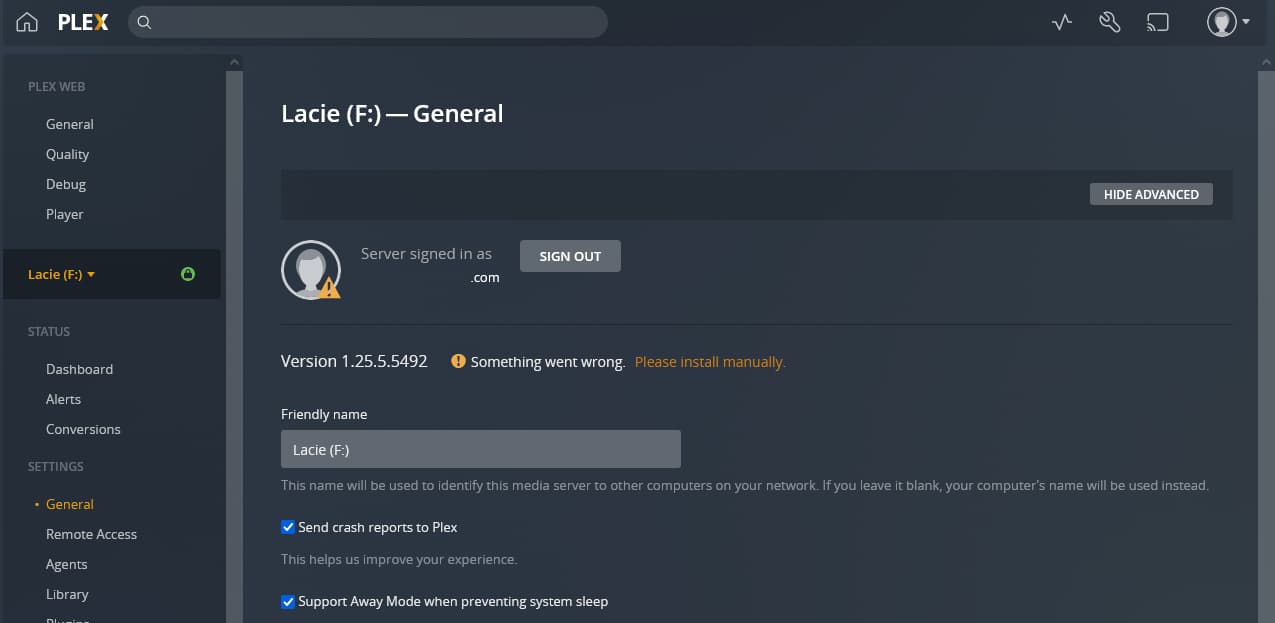
I do have Windows, and am sensing shame. I will attach a screen shot so you can see what I am seeing on the General and Remote Access pages. The remote access page used to display my IP address, which it does not any longer. There is also now a yellow warning triangle next to my email address showing that my server is signed in which was not there previously.
I do not know where/how to help you with your browser / Windows problem but if you cannot get a secure connection to the forum,
I think your priority is to get that working first. Browsers are really basic.
You might need to have it clear all its cookies / browser local data and then force restart it (clear its caches)
Your machine itself has a good cert.
Feb 14, 2022 10:24:58.742 [9640] INFO - SQLITE3:0x883ac26d, 283, recovered 26 frames from WAL file C:\Users\Windows\AppData\Local\Plex Media Server\Plug-in Support\Databases\com.plexapp.plugins.library.blobs.db-wal
Feb 14, 2022 10:24:58.749 [9640] DEBUG - Running migrations. (EPG 0)
Feb 14, 2022 10:24:58.833 [9640] DEBUG - [CERT] Subject name is /CN=*.ea50fcf1cf034f69a6fb86476cd2be06.plex.direct
Feb 14, 2022 10:24:58.833 [9640] DEBUG - [CERT] Installed certificate with fingerprint 68:49:b2:c6:b4:4d:f9:72:54:ab:0a:5e:44:61:22:1c:2f:55:c2:f4.
Feb 14, 2022 10:24:58.833 [9640] DEBUG - [CERT/OCSP] Stapling requests will be made to 'http://r3.o.lencr.org/'.
Feb 14, 2022 10:24:58.834 [9640] INFO - [CERT/OCSP] Successfully retrieved response from cache.
Feb 14, 2022 10:24:58.834 [9640] DEBUG - HttpServer: Listening on IPv6 as well as IPv4.
Ok, I’ve cleared everything from all browsers, and now what I was really worried about happening has just happened, and now I can no longer log into the web app to access the logs - or anything for that matter.
This is what I see now, however, when I click on the lock icon in the address bar, it does show that a secure connection is established but when attempting to login to use the forums (or use anything at the plex.tv address) I get a secure connection failed message.
But why this is only happening to plex.tv and no other website is what I can’t understand. My banking page, and any other page that uses a secure connection have no issues at all.
I also no longer have remote access to it.
And if it’s something that is occurring across 3 different browsers, I’m guessing that it might not be browser-related but instead something else which I can’t begin to guess at this point.
[chuck@lizum user.2025]$ unzip ../Logs\ 2\ \(2\).zip
Archive:  ../Logs 2 (2).zip
  End-of-central-directory signature not found.  Either this file is not
  a zipfile, or it constitutes one disk of a multi-part archive.  In the
  latter case the central directory and zipfile comment will be found on
  the last disk(s) of this archive.
unzip:  cannot find zipfile directory in one of ../Logs 2 (2).zip or
        ../Logs 2 (2).zip.zip, and cannot find ../Logs 2 (2).zip.ZIP, period.
[chuck@lizum user.2026]$