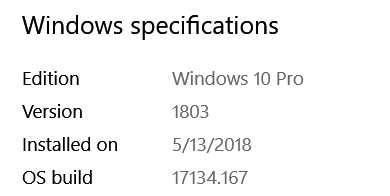
I’m getting the same error as others have indicated here. However, I cannot install the Windows 10 update you suggest because I am using an Evaluation Copy of Windows 10, specifically:
Version 10.0.17713 Build 17713
I did attempt to install KB4345421 but I got a message saying it was not applicable.
That’s why you can’t apply the update. Eval copies are restricted to encourage you to license it. Eventually Windows will nag you more aggressively to update until the point it turns your wallpaper black. When it does expire, Windows will reboot every 3 hours. Two weeks after expiration Windows will refuse to boot and your install will be corrupted by Windows built in anti-piracy protection. You need to activate it or all your data will be lost. Source: https://www.thewindowsclub.com/what-happens-when-windows-10-expires
Hi rg9400:
Thanks for the information. I tried your suggestion but my system wouldn’t let me restore back to July 10th for some reason.
I tried this instead: I went into Control Panel, Programs & Features, View installed updates (left side menu), and just deleted the one update you mentioned (KB4338819).
I then restarted my PC and viola! It worked in resolving the issue for me as well. Thanks for the information!
@clepardsden It’s interesting you were able to uninstall it that way. From my understanding MS removed the ability for security updates to removed via the UI. You have to use cmd. When I look over my installed updates on both a laptop and desktop, 4338819 is listed in Settings UWP, but not under CPL. When I query for installed hotfixes with cmd, it shows as installed.
Either way, you should reinstall security update 4338819 and then 4345421, which fixed what the first broke. The removal of that update was only temporary for the few days it was broken.
Sorry I didn’t explain fully. I have a fully licenced copy of Windows 10 Pro but I am a programmer and part of their Developer program where I get new versions ahead of the mainstream, not unlike we get with Plex Pass. Thanks, though
Thank you cbabb! My PC automatically reinstalled 4338819 yesterday because i didn’t shut the updates off. When I checked for new updates it installed 4345421 so all is good in my world. Thank you for sharing your knowledge!
I too have had this error for the past week or so. I have both of the above mentioned windows updates installed as well as the latest Plex server and the problem is NOT fixed. I still get “there was a transcoder error”.
Have also been experiencing this error, for at least 1.5 months now. Tried everything suggested in this topic but am still the error.
Current setup;
Plex client: Plex App 3.3.4 on Samsung UE55KS7000 TV(2016 Tizen Model)
Tizen version: 2.4.0
PMS version: 1.13.4.5251
Direct play with external subs(image format).
Tried the following:
Installed the KB4345421 update
Removed & Reinstalled Plex App on Tizen TV
Attempted Repair installation for PMS
Unfortunately it’s still happening. I can send @sa2000 my debug logs if he requests them.
I just made a thread on this. In my case, it seems like some sort of memory leak. The transcoder seems to increase its usage to around 3.7gb before completely crashing. The strange part is that every time it crashes when the transcoder gets to around 3.7gb, and that I can resume playback immediately after it crashes.
For the record, Windows is UP TO DATE, with Plex Media Server on the latest release.
The Conversion failed. The transcoder exited due to an error is a generic general issue and may arise due to many reasons. The specific errors that seem to come on when the windows bad update was applied were these logged errors
There is already a topic on memory issue. I am waiting for logs and a file that actually brings the problem on so it can be reproduced and investigated.
I will have a look at your thread and link to the existing one
My issue started with the latest update. There was an update about a week ago, and then another very soon after - so mine is up to date. Should I revert to the previous version (which worked perfectly)? If so, how do I do that? Please note that I see no paperclip or any obvious way to attach my logs, but I do have them.