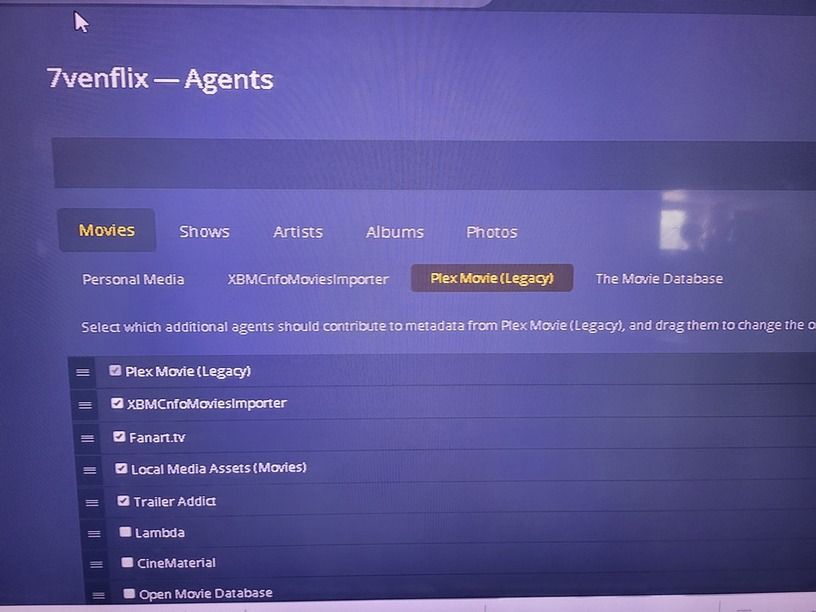
Been running Plex for many years but just got bitten by a very strange bug when trying to add some movies.
My standard workflow is to use MediaCompanion to scrape the metadata into a .nfo file, along with poster and fanart images, then move all the files to the Plex server, set the movie listing order to Date Added and run Scan Library Files using XBMCnfoMoviesImporter.
New movies appear at the top of the page and I clean up the info - except this time the usual “placeholders” appeared as expected, but briefly showed a red trash can icon before disappearing. None of the new movies showed up at all.
When I dug into the movie folder, I found that Plex had deleted the .nfo files associated with the new movies!
I thought that Plex knew nothing about .nfo files, but mine got nuked somehow - I just have no idea how. I assume that it has to be XBMCnfoMoviesImporter?
Any advice gladly received - in the meantime I’m madly backing up everything before daring to poke it again. Will put the new movies in a separate folder and try scanning again with fingers crossed.
Server Version#: 1.26.0.5715 on Manjaro linux
Player Version#:
Plex doesn’t know anything about NFO files except for the tt info line.
XBMCnfoMoviesImported can parse them with the old agents.
The new agents can’t do anything with that Plug-in.
Plex will not delete arbitrary files within the media itself.
The most it will do is delete the media and associated items
— IF—
You have file file system mounted READ/WRITE
—AND—
You have media deletion enabled (Settings - Server - Library)
—AND—
You click Delete from one of the player apps
—AND—
Confirm the deletion.
I have never had PMS delete any media I didn’t expressly delete myself.
I’ve been using Plex for close to a decade for my media collection (> 4,500 movies in 18Tb of USB3 NTFS drives) and nothing like this has happened before. Hence the panicked post in the forum.
You mention “old agents” and “new agents” - can you clarify? How do I go back to the old agent? Do I need to go back to an older version of plexmediaserver? I’m new to Manjaro linux so there will be quite a learning curve, but I’m up for it if neccessary. Or throw together a new server running on something like Mint if it comes to it.
Does this mean that XBMCnfoMoviesImporter is completely broken in recent releases of plexmediaserver? If so, how do people who use things like TinyMediaManager now work with Plex? What have Plex got against .nfo files anyway?
Sorry for so many questions, but you say that “I have never had PMS delete any media I didn’t expressly delete myself.” - that was me until two days ago!
The scanners (and agents) changed about a year ago now. Development started earlier than that.
If you remember, it was announced some 2-3 years ago that Python and the then-current scanner, agents, and plug-in support would be deprecated and ultimately removed.
The new scanner and agents are now written in C++. Python isn’t used anymore.
Somewhere, I’ve seen where the new scanners have limited knowledge of NFO files too but don’t know anything about that. If you want , I can go talk to one of the devs about how that all works.
I do not know the specific status of your XBMCnfoMoviesImporter plug-in but would not be surprised to find it about to die / already dead because of these changes.
Again, I can ask about that.
Regarding not deleting media - There are two ways to prevent deletion:
Method 1
I bought a NAS
Moved all the media to that NAS
Mount the media (read only) for PMS use
Mount that same media again (read/write) for my use.
NFS mount options guarantee PMS cannot modify the files
Method 2 —
Something you can do in your configuration:
Plex runs as user plex:plex on Linux
Set all your media to be owned by your username and your group
Asssign read-only permissions for ‘others’
Example:
movies/
   Movie 1/
      Movie 1.mkv
In the above,
movies - owned by chuck:chuck, permissions 755
Movie 1 - owned by chuck:chuck, permission 755
Movie 1.mkv - owned by chuck:chuck, permission 644
This guarantees Linux will enforce permissions and non-privleged user plex cannot modify anything.
In order to do this, you’ll need to convert these NTFS drives to ext4 formatting.
NTFS does not enforce permission protection the way Linux does.
If you have a spare drive / can shuffle things around, it can be done – just tedious.
If anyone can tell me the most recent plexmediaserver version that is compatible with XBMCnfoMoviesImporter I would be really grateful. I don’t need any of the shiny new widgets in later releases, I just need a stable platorm that continues to work without stuff breaking.
So regarding scanners and agents, am I right that Plex insists on scraping all of its metadata from sites like IMDB - there is no option at all to use local data (-poster.jpg, -fanart.jpg and .nfo) generated by tools like MediaCompanion? And then Plex trucks off to the internet and tries to update things whenever it feels like it as well, no matter what you told it the data was in the first place.
There must be so many people like me who like to work that way (OK, so I’m OCD but Plex seem to want to make it all but impossible. As a coder I frankly don’t understand it - it must be a lot harder to write a scraper than to write an import script for .nfo files. I don’t want Plex to use .nfo files itself, just be able to import from them.
Rant over, but I really would like to know why Plex doesn’t want to work with .nfo files.
It is. In the agents settings, you will need to make sure it is at the topmost place and 2nd underneath all other agents. I just used it. Works better than Plex agents.
That’s the setup I’ve been using for many years and which had always worked (and better than Plex as you say) - until the crash.
Weird that the “placeholders” appeared for the new movies when scanning, might even have been a brief glimpse of the “I’m working on it” icons - but then the red trash can icons appeared instead of the movie poster and less than a second later the movies disappeared from Plex completely. Jpg and .ts files were fine, but the .nfo files had been deleted.
7venflix - can I ask what version of plexmediaserver you are running? I’m on 1.26
Sounds like I need to move on from XBMCnfoMoviesImporter - will set up a new movie folder and try out the new movie agent.
Agreed - the problem is that the files concerned were moved into an existing folder already containing hundreds of other movies which had been imported without any problem using the same workflow.
I can only conclude that v1.26 of Plex has finally broken XBMCnfoMoviesImporter completely and I need to move on with an alternative solution. Maybe Jellyfin?
I am on 1.26. I am still using NFOimporter. I had to make sure the agents in the Library settings are set to use TMDB. The new plex agent interferes with the NFO data.
When I use the new Plex agent with my NFO files, the agent rearranges my metadata (genres, timestamps, images). I don’t think the developer has updated the plugin for the new beta agent. When I renamed the plex fingerprint executable and made NFOIMPORTER and Lambda my secondary and tertiary agents, it worked. All my metadata repopulated pretty nicely. I with this 1.26 beta didn’t cause so many database issues.