When i reinstall v 2.713.102 from the app store i have a throughtput of 130+mbps when playing large 4k content. When the tv restarts the update v2.715.131 is forced and the max throughtput is ± 70 mbps. Why is there a difference? I have a fast stable network.
I have 2.713.103 installed (no update available on the LG EF950V) and since today (might be yesterday or even the day before) it can no longer connect to my Plex server. I cannot even get a timeout to reset the connection. It just tries to connect forever.
Could use some help with this.
2.715.131 version on LG 55EG960V stops working too. Home screen is visible but I can’t navigate to any other section in the app. After reinstall the application, the version 2.713.102 were installed. Navigation possibility comes back but when I am navigating into some season of TV show, I can’t see any episode on a screen but only “–>” symbols in the left upper corner.
Did someone found a way how to deal with these issues?
Save here. Navigate via TV “Mouse” isnt possible. After reinstall it works, but if I restart my TV it dont work anymore. LG 65UF Webos 2. 
PS: The old Design of xplay had more ux than the new one.
Hey
can you tell me how you measure the speed on your network?
I experience the same issue.
I have downloaded a TV series with 2 seasons. Season 1 does not work ("->" symbol), season 2 works fine.
Hello,
There is also a problem with Home Users:
If I connect with the local account A, I get a good dashboard.
But if after I connect with my main account Plex, I get the dashboard of local account A.
I’m experiencing this problem with all local accounts
Can you fix that too?
Thank you.
Anyone else has issues entering the main XPlay screen. I haven’t changed anything but it now will not work.
Uninstalled and reinstalled v2.713.103 - connected to dashboard but this is what I see when I want to watch a video.

Issue 2.
I noticed this a while back. I have x265 4k media at super high bit rates and file sizes. Used to play no problem using direct play on the TV but I went to try and play one (before the above issue occurred) and it now stutters and will not play. I thought it may be my network but everything else is fine and unchanged.
What is going on with this app?
From the server with task manager. And on the tv with speedtest.
v2.713.103 on a 65SJ8500 not working… stuck on xplay loading…
Whats happening?
Is it time to just swallow pride and roll back to the old Xplay that actually worked well? 
5 Likes
I’ve reset the TV to Factory Defaults and reinsstalled XPlay… That fixed the issue… also the latest version wanted to install now…
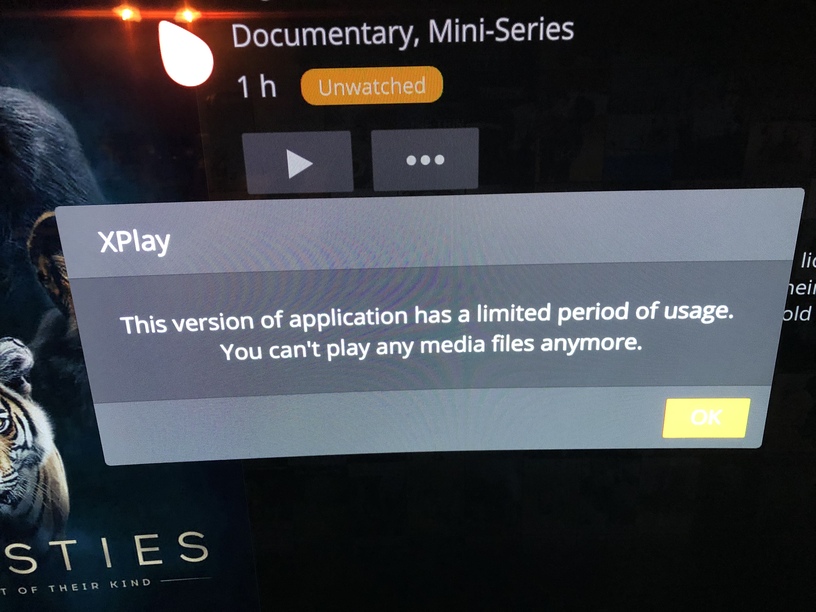
Had to uninstall and reinstall for xplay to work
When it did version 103 I get this message this version has limited … you can no longer play media files !!!
Roll back to xplay previous version before all this mistakes and bugs
The developer has stopped working on this app good bye for the money we payed wish he had left the old working version before disappearing
He has not. See https://twitter.com/lgxplay
1 Like
This application has gone from good to unusable for me in the last 6 months and I don’t have the patience to wait for a single semi-active developer to fix my issues. So I have now given up and moved to an Nvidia Shield TV with Plex which works flawlessly for my needs.
I hope everything works out better for you guys that still stick around.
He used to have GitHub for the new version, but closed it for some reason.
Yesterday my LG B8 installed the latest update. I put some Dolby trailers to play before the movie. They didn’t work on XPLAY, but now after the update they’re working… but sometimes the pre-roll video plays on repeat. Also how to make the cinema trailers function working? It’s enabled on the server and on every client but only plays the pre-roll videos.
how do you install an app from Gihubb on LG ?
What the hell is going on here ? Yesterday after weeks of not using the app it was upgraded to v2.715.171
Today it rolled back to v2.713.102 even if LG store propose the v2.713.103 which i tried to reinstall but it stays on .102
How is that even possible ?
