I have the same problem the resume it’s not working anymore. The XPlay client is starting the movie ALWAYS from the begging. I have the latest version 2.714.091. WEbOS 4.0 LG OLED 2018. It’s definetly related to this last version update. It seems it messed up really a basic function. The plex server it’s the version from December 2018 (1.14.1.5488). Everything worked ok till this Xplay update. Dear developers please solve this issue from the latest version for WebOS we can’t revert to previous version on LG Smart TVs!
Why can’t he just bloody re submit the old xplay version that worked and everybody liked, I don’t understand?
Then keep working on this for a few months and submit it again when it works
2 Likes
This new version the screen saver starts playing every 5 mins while watching the movie.
Just disable the screensaver from XPlay settings and restart the app… You already have the screensaver from the tv so it’s not needed.
1 Like
Lately i have had this issue with HEVC main 10 4k movies. They direct play on my LG TV but they buffer every ~5seconds. When played on official plex app they direct play just fine. Earlier they have been working fine.
I also have buffering issues at certain 4K movies, it stops buffering in every 15-20 seconds. Not sure if it’s the bandwidth (the TV is connected to an AC wifi so i don’t think so), it buffers also on movies which i was able to watch without any issues earlier. It’s quite random because it happens on both lower and higher bitrate videos as well, some higher bitrate ones just plays perfectly…so it’s weird.
Any suggestions how to sort this out?
1 Like
Try to disable secure connection in the network section of the Plex server configuration of your NAS.
This solved for me.
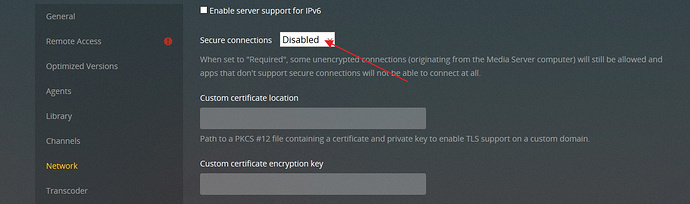
Will try it thanks!
Disabling the secure connection worked for my buffering issue. Now waiting for the resume to work again. It just starts to play from beginning like said earlier.
For me it did not solve the buffering issue, after turned off secure connection videos does not play at all. I disconnected the TV from the wifi and plugged an ethernet cable in…voila…it worked fine.
It is very strange since the wifi had 800Mbs and the TV’s ethernet port is only 100Mbs, and the router is right behind the TV.
Same for me, resume option does not work anymore 
I’ve got the same 2 issues. Resume isn’t working I get constant buffer issues even on lower bitrate files. Working fine in the official Plex app, so not a speed issue. Tried disabling secure connections, but doesn’t seem to help…
Very funny 714.091
1- I have 8 managed users with pins - only 6 are shown even after uninstall and re install
2-the 7 users worked without a pin for the 1st time then it showed that they need pin after 1 use without pin !!
Resume is not working
Really read the posts man he is not replying here or on twitter
Im enjoying The OLD xplay on one of my TV’s C8 Oled never upgraded working fine
the other TV with the new version 2.714.091 C8 as well is a disaster !!!
why dont the devolper push the old xplay untill he solves all his problems !!!

Because he’s too busy posting tweets about issues with LG support. You know, basically saying it’s not his fault he launched a beta product with issues because LG are the reason for all his current issues.
I have to say, I do like the new UI and features that were added, but his inability to fix these issues quickly or rollback to the previous version until they are fixed is a clear sign of unprofessionalism.
If I wasn’t so busy myself, I’d spend the time and build an alternative for everyone to use.
1 Like
To add to that. Why haven’t simple “low hanging fruit” issues like the sort order persistence been fixed? We’re constantly told it takes days for LG to get back to him on issues so why isn’t he pushing out fixes for these other issues that are regressions from the previous product?
Besides fixing the reported issues first, here are some other items that I’d love to see added:
- Smart remote wheel navigation needs to be added to other areas of the UI (eg Left side pop out window)
- I’d like to see a return navigation option added so we can get back to the previous screen regardless of where we are in the UI
- I’d like the Delete selection under MORE ACTIONS removed, or to be made optional, as I don’t want my kids etc accidentally deleting files
- Automatic login option should be added to Settings area. Pretty much every other Plex client has this so I was surprised this feature wasn’t added in this new version.
- This might just be me, but I’m not a fan of the yellow progress indicator at the bottom of the posters. I think it ruins the look of the them and I will never need a visual indicator of how far along I am.
- Other features I’d like added are a time estimate added to the video UI that will show what time the current program ends. Also, the native version of Plex on the LG’s has a nice Info option which overlays a lot of info over top of the current program being played. I’d love to see something like this added to Xplay as it’s quite informative and can be used for troubleshooting various issues (eg Transcoding).
I forgot to add, I haven’t been able to login to Xplay for the past two days. Every time I click on one of the icons for my users the wheel spins for a couple of seconds and then displays the same icons again.
How many users you have ?
Me personally I have eight
Sometimes xplay shows only 3
Other times it shows 6 out of the 8
I twitted him about that and still no reply
Your right this is unprofessional roll back till u solve ur problems !!!
