Server Version#: 1.20.2.3402
Player Version#: 8.7.2.20952 (5f6d7f6b)
Phone: Samsung Galaxy S10e
Android Version#: 10 (Android security patch level: September 1, 2020)
Long time Plex user. Running Plex Media Server on Windows Server 2012 R2. Media is stored on a local drive on the same server. Primary use of Plex is for streaming music. My entire collection is in FLAC format. I’ve been using Plex in tandem with a Chromecast Audio to stream music to speakers in the house. I recently started adding my video collection to Plex to stream video to TVs and consoles, but that accounts for maybe 1% of my Plex usage. For Music playback I have Remote Streaming set to “Original” so that it plays it back in native FLAC format, but I do have “Use low quality on cellular” enabled for when I’m outside the house. This is all verified working correctly.
Overall it has bugs, and aside from some frustrating behavior it has generally served my purpose well. Because of the various bugs that have never been fixed I never subscribed. However, I’ve wanted to workaround one issue that is playback while I’m out of the house such as riding my bike, which is more of a phone/cellular issue. I recently got a larger memory card for my phone so I could test out the sync functionality, and just the other day signed up for a monthly Plex Pass. And so begins my fun…
I chose an album to sync and pressed the Download/Sync button. Initially I configure it for “Original” Audio Quality. Everything appears good. Status shows the sync process. Using a file explore on my phone I check and my memory card shows data under \SD card\Android\data\com.plexapp.android\files\media_parts, and more specifically I do see FLAC files (interestingly enough there is a folder for each individual FLAC file, and they’re all named “key.flac” all having the correct cover art). Playing the media works fine, but I’m looking for a way to verify it works offline. I put my phone in Airplane Mode, open Plex, and the Library says “No items to display”. I turn off Airplane Mode and re-open Plex. Now I go to Media and select Filter -> Synced Only and it shows my one album but with no cover art. I then select the album and it says “Media unavailable”.
Side Note: I manually went into file explorer on my phone and navigated to a random folder containing a “key.flac” file. I choose to open the file with VLC, and the song plays fine on my phone, so it’s definitely not a local playback issue.
Thinking maybe it’s something with storage, I delete synced content and change the configuration to use Internal storage instead. Try #1 again, same behavior.
Thinking it might be permissions. I go to Android Settings -> Apps -> Plex and check Permissions. Only options are “Contacts” and “Storage” which are both set to Deny. I set to Allow. I check my media, same behavior.
Thinking that maybe the permissions need to be in place from the start, I delete all synced content, clear the cache and data of the app, uninstall the app, reinstall the app. I then re-do #1 from scratch, same behavior.
Thinking that maybe it’s an issue with the FLAC format. This time I try #1 but with changing the Audio Quality to 320 kbps to force transcoding. I sync, it shows sync progress, I can see it’s transcoding, and I verify on my storage card there are now MP3 files in there. Regardless…same behavior as #1.
At this point I’ve already done a fair amount of research and I’m seeing MANY posts with people having the same or similar issue but no resolution. Any help here? Let me know if there are any other details I can provide such as logs, and in that case please advise what specific information/testing you would like to capture. I’ve already cancelled auto-renew on my Plex Pass subscription and I’m considering asking for a refund, but I’ll wait to see if I get any assistance from support first. That said, I would much rather have this feature actually working and will gladly pay for a subscription to do so.
That is expected. You appear to be looking at your server’s library. If you are in airplane mode, it can’t reach your server so it can’t show you the content.
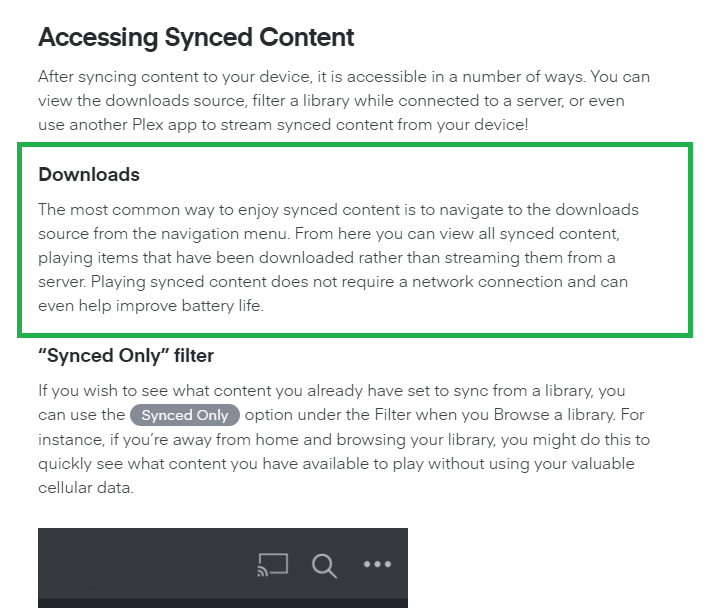
Instead, you need to look in the “Sync and Downloads” section in the sidebar.
So that’s interesting. I went to that section of the Plex app and I was able to listen to the one album I had sync’d while in Airplane mode. I see no reference to this in all of the guides that I’ve read through. Do you have any articles you can link me to?
Also, referencing the guide above, at the very bottom it talks about the filter and “Synced only”. Is it still normal that when viewing from this page that none of the media has cover art and when selecting any album it says “Media unavailable”? This in itself is very confusing/misleading.
I’ll have to sync more media to thoroughly test this, since this raises the question of Playlist usage. Off to do more testing.
It’s already there. It’s slightly off since it says “Download” when it is “Sync and Download”. I think the naming is changing and the apps haven’t updated yet. The newer Plex for Windows and Mac apps show Download.
This is incorrect. It says “…it is accessible in a number of ways”. No, it’s only accessible one way…the way you described. You must go to “Downloads & Sync”. Filtering by “Synced Only” only shows you what’s sync’d, but it’s not accessible in this manner. That being said, the verbiage in the “Synced Only” Filter section is correct. At this point we’re basically splitting hairs, with the basic point being the documentation you linked definitely needs some revisioning.
Documentation aside, the Sync process is having issues and is currently stalled. After having tested successfully with 2 albums, I deleted everything and created a new sync of the entire Music library. It looks like the total number of items it is syncing is 11,803 according to Plex Web. So far it has sync’d 124 GB and according to the file explorer it has approximately 5,112 items. Status simply says “Updating information” and when I check the logs the following SQLiteException error repeats over and over…
Summary
10-15 19:23:40.452 i: Fetching [method:GET] https://10.x.x.10:32400/sync/b993c85a5e9c6853-com-plexapp-android/status?X-Plex-Token=...P4SW
10-15 19:23:40.459 i: Fetching [method:GET] http://127.0.0.1:32500/media/providers?includeStorage=1&includeExternalMedia=1
10-15 19:23:40.466 i: [HttpServer] /127.0.0.1:48684 - GET /media/providers
10-15 19:23:40.494 w: [PlexPivot] Version for section ‘Music’ doesn’t support pivot ‘/hubs/sections/268435460’
10-15 19:23:40.494 w: [PlexPivot] Version for section ‘Music’ doesn’t support pivot ‘/library/sections/268435460/all?type=8’
10-15 19:23:40.495 w: [PlexPivot] Version for section ‘Music’ doesn’t support pivot ‘/hubs/sections/268435460’
10-15 19:23:40.495 w: [PlexPivot] Version for section ‘Music’ doesn’t support pivot ‘/library/sections/268435460/all?type=8’
10-15 19:23:40.496 i: [Sync] Total: 476.89 GB Limit: 340.51 GB Used by Sync: 124.84 GB Free: 341.45 GB Available 215.67 GB.
10-15 19:23:40.496 i: [Sync] Sync finished with 1 errors.
10-15 19:23:40.497 i: [Sync] Something may have changed during the last sync; syncing again.
10-15 19:23:40.499 i: [ConnectivityManager] Device is under Wifi
10-15 19:23:40.499 i: [Sync] Starting sync.
10-15 19:23:40.499 i: [Sync migration] Checking if there is data to migrate.
10-15 19:23:40.502 i: Fetching [method:GET] http://127.0.0.1:32500/media/providers?includeStorage=1&includeExternalMedia=1
10-15 19:23:40.509 i: [HttpServer] /127.0.0.1:48686 - GET /media/providers
10-15 19:23:40.520 i: Fetching [method:GET] https://10.x.x.10:32400/sync/b993c85a5e9c6853-com-plexapp-android/status?X-Plex-Token=...P4SW
10-15 19:23:40.527 i: [Sync] Syncing database changes from ‘SERVER’ (794ad6f003d6e728eb2468243578ae4f908c2ff5) (changestamp: 1011410).
10-15 19:23:40.528 i: Fetching [method:GET] https://10.x.x.10:32400/sync/b993c85a5e9c6853-com-plexapp-android/package?changestamp=1011410&limit=25&X-Plex-Token=...P4SW
10-15 19:23:40.530 w: [PlexPivot] Version for section ‘Music’ doesn’t support pivot ‘/hubs/sections/268435460’
10-15 19:23:40.530 w: [PlexPivot] Version for section ‘Music’ doesn’t support pivot ‘/library/sections/268435460/all?type=8’
10-15 19:23:40.531 w: [PlexPivot] Version for section ‘Music’ doesn’t support pivot ‘/hubs/sections/268435460’
10-15 19:23:40.531 w: [PlexPivot] Version for section ‘Music’ doesn’t support pivot ‘/library/sections/268435460/all?type=8’
10-15 19:23:40.531 i: [Sync] Total: 476.89 GB Limit: 340.51 GB Used by Sync: 124.84 GB Free: 341.45 GB Available 215.67 GB.
10-15 19:23:40.762 i: [Sync] Received 25 database change sets from ‘SERVER’ (794ad6f003d6e728eb2468243578ae4f908c2ff5).
10-15 19:23:40.841 e: An exception occurred: com.plexapp.plex.net.sync.db.core.DatabaseManager$OperationError: com.plexapp.plex.net.sync.db.core.DatabaseError: org.sqlite.database.sqlite.SQLiteException: no such collation sequence: naturalsort (code 257): , while compiling: DELETE FROM metadata_items WHERE id=?
10-15 19:23:40.842 e: Stacktrace: com.plexapp.plex.net.sync.db.core.DatabaseManager$OperationError: com.plexapp.plex.net.sync.db.core.DatabaseError: org.sqlite.database.sqlite.SQLiteException: no such collation sequence: naturalsort (code 257): , while compiling: DELETE FROM metadata_items WHERE id=?
at com.plexapp.plex.net.sync.db.core.DatabaseManager.b(SourceFile:22)
at com.plexapp.plex.net.sync.j1.c(SourceFile:13)
at com.plexapp.plex.net.sync.j1.a(SourceFile:54)
at com.plexapp.plex.net.sync.m.run(Unknown Source:10)
at java.util.concurrent.ThreadPoolExecutor.runWorker(ThreadPoolExecutor.java:1167)
at java.util.concurrent.ThreadPoolExecutor$Worker.run(ThreadPoolExecutor.java:641)
at java.lang.Thread.run(Thread.java:919)
Caused by: com.plexapp.plex.net.sync.db.core.DatabaseError: org.sqlite.database.sqlite.SQLiteException: no such collation sequence: naturalsort (code 257): , while compiling: DELETE FROM metadata_items WHERE id=?
at com.plexapp.plex.net.sync.db.core.b.a(SourceFile:32)
at com.plexapp.plex.net.sync.db.c.a(SourceFile:3)
at com.plexapp.plex.net.sync.db.core.b.a(SourceFile:1)
at com.plexapp.plex.net.sync.db.core.b.a(SourceFile:2)
at com.plexapp.plex.net.sync.db.d.a(SourceFile:21)
at com.plexapp.plex.net.sync.j1.a(SourceFile:65)
at com.plexapp.plex.net.sync.n.a(Unknown Source:6)
at com.plexapp.plex.net.sync.db.core.DatabaseManager.a(SourceFile:18)
at com.plexapp.plex.net.sync.db.core.a.call(Unknown Source:4)
at java.util.concurrent.FutureTask.run(FutureTask.java:266)
… 3 more
Caused by: org.sqlite.database.sqlite.SQLiteException: no such collation sequence: naturalsort (code 257): , while compiling: DELETE FROM metadata_items WHERE id=?
at org.sqlite.database.sqlite.SQLiteConnection.nativePrepareStatement(Native Method)
at org.sqlite.database.sqlite.SQLiteConnection.acquirePreparedStatement(SourceFile:3)
at org.sqlite.database.sqlite.SQLiteConnection.prepare(SourceFile:2)
at org.sqlite.database.sqlite.SQLiteSession.prepare(SourceFile:3)
at org.sqlite.database.sqlite.SQLiteProgram.(SourceFile:8)
at org.sqlite.database.sqlite.SQLiteStatement.(SourceFile:1)
at org.sqlite.database.sqlite.SQLiteDatabase.delete(SourceFile:3)
at com.plexapp.plex.net.sync.db.c.a(SourceFile:2)
… 11 more
How exactly can I get past this error? I’ve also researched this issue and from what I’ve found so far the people reporting this problem haven’t had a solution. Hopefully that’s not the case here.
In case it helps, looking through the list of artists (and their albums) to determine where it is stalled, it appears I’ve found the exact album where it’s stuck. Not sure if that information can be helpful or not, but just wanted to toss that out there.
You have made incredible strides with this app. I would like to 2nd the motion to apply focus on the downloads section. As I’m sure many folks do, they DL and want to use their device on the plane, car, etc in offline mode.
There are so many issues, I find it too frustrating to use. Start with just logging in when in Airplane mode – why does it need to network time out, the phone knows it’s in airplane mode?
Attention to this area of the app would please many.
3 days later and quite literally countless phone restarts later, I was able to finally get the entire Music library synchronized. So many times it would simply stall at “Updating Information” so after some time of no actual activity I would restart the phone and it would begin syncing again. That was a tip I found when researching the sync problem online.
Now, the only remaining problem is that Smart Playlists will not sync. Standard playlists are fine, but when I open any Smart Playlist from the “Downloads & Sync” section, the playlist is empty. What is the trick to getting Smart Playlists to sync properly?
I have a plex media client on my android phone and android tablet - Testing whether a plex pass is worthwhile - trying media syncing
Have a serious issue - the sync’d music albums dont show up when I turn on the “sync’d media” filter - I get a error message saying “media unavailable” with the filter turned off, I can see and play the media - the album icon shows a down arrow, indicating that it is downloaded I presume -
I can see the media I downloaded if I go to the download and sync menu item and bring up my “music”
why cant I filter my library in the main music view to see and play just my downloaded files ?