Addendum 20230227: So I was looking at an unrelated issue and think I found the issue and it is so simple, I found a file system quota was set on the share… never thought to check for it, as it was 500Gb. The issue only started happening when I had a lot recorded.
Original Post:
Server Version#: PlexMediaServer-1.28.1.6018-c1f308c6a-x86_64_DSM7, 4.84.1 (Synology DSM 7 x86_64)
Player Version#: 1.50.1.3176-06a9352d
Tuner Make/Model: HD Home Run Quatro
Guide/Lineup name: Any
Using XMLTV?: No
Channel number/Name: Any
Hello All
Been using plex since about christmas, and can’t believe i dismissed it for so long, what a great app.
I setup the Live TV tuner feature and up till now only had a few minor nigles, some of which are more to do with the broascaster (split films with entertainment news in the middle causing only one half of the film to be recorded).
Today i had a really odd issue, which i could not really find a cause of. but I do have a workaround and an explanation of the symtopms which might help others.
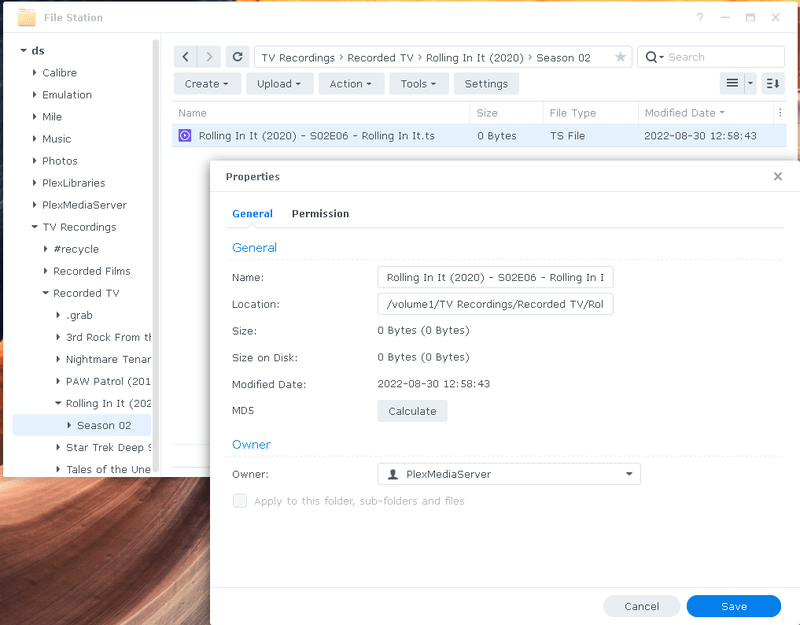
The issue was that since last night recordings started failing. some recordings loop making many copies of 0 bytes and others start then immidiatly stop, leaving only 0 byte files as “completed” recordings.
I noticed after a lot of mucking about that the recording starts then the dashboard shows a metadata grab message, then the recording dies, armed with this knowlegde i thought, what if the metadata grab is the issue, so I modified the recording libraries to get as little extra metadata as possible and what do you know, no more problem. So some function of metadata retrieval in both film and tv show recording is stopping recordings just after they start.
I have got some logs from early on in the problem if anyone in support wants them.
Post breach version:
Server Version#: PlexMediaServer-PlexMediaServer-1.28.1.6104-788f82488-x86_64_DSM7 (Synology DSM 7 x86_64)
The problem is back again… recordings schedual seem to start in the dashboard then just die, Have rebuilt my DVR setup, deleted the Libraries re-added them, using my own advice from above, but it is not working this time, all recordings now die after starting, some recordings loop and create multiple empty copies: I see messages like this in the console:
A full set of debug logs would help pinpoint the issue. Given that you are on Synology and have uninstalled re-installed it will probably be a permissions problem.
I would probably have though it was the permissions as well, looking from the outside, but the plexmediaserver role has read & write for its own folders and for the directories where tv recordings are being stored.
Attached are the full logs taken this morning, they probably dont contain the point this started happening, but they will show what is happening with current schedualed recordings, I can see the recording initialize then they just stop and leave an zero byte file. Plex Media Server Logs_2022-08-30_09-46-48.zip (4.3 MB)
First test is if you can watch live tv but not record then you know that the stream is good up until it writes to the Library location. (/volume1/TV Recordings/Recorded TV/)
Second, if you have renamed or dropped the recording location, for each scheduled program you will have re-select the “Add to Library” location. A quick test, if you create a one time scheduled recording of a program and it records then the library id is mismatched.
Third (this is what the logs indicate) reapply permissions to /volume1/TV Recordings/ and all subdirectories. You can’t just go by what the file explorer says.
Test 1 : tuners work with the live tv, so we know the hardware and stream is good.
Test 2: Yes they have been renamed, but I also deleted all schedualed recordings and rebuilt them, If i check the scheduel I can see the recordings target the correct library.
Test 3: I have removed and re-applied the permissions (making sure to tick the (apply to all folders and subfolder).
I picked a random program from the guide to start recording and still the same problem.
The zero byte file is produced, with the correct permissions.
It should probably be noted that the permissions on the synology DS are internal role permissions, not user permissions, but this is what the latest DS plex server expects.
Oh actually one circumstantial bit of evidence, this issue seemed to conicide with a synology data scrub, I cant see why it would be related by just putting it out there.
When I initiate a recording, I can see a random string directory is created in the .grab directory. I saw no subsequent file generation. after a second the random string dir is then is removed and the zero byte file is created with the correct program name , if try to start the same program recording again I get another error:
I’'m going to move the current recordings and re-create the DS share folder, then the subfolders and finally the plex libraries, see if that makes a difference.
So the problem is gone and I’m totally stumped as to why.
I was moving the good recordings elsewhere so i could rebuild the share folder and the libraries as said.
I moved all files I wanted to keep off the NAS. I then emptied the recyling bins of the share folder (it was big 500Gb+ I use the record feature a lot).
I thought, now i have removed all files, i’ll test again, and to my suprise, the recoding started working as expected. I did not even refresh the library.
So it seams like some file handle (maybe caught up in the data scrub) was being held on to, but this also makes no sense as i rebooted the NAS previously to see if it would make a difference.
I have even copied the files back (not the recycling bin files) and everything is ok.
Have no idea why moving the existing recordings out and emptying the recycling bin would free the recording service up, expecially after multiple server restarts and a nas server restart did not.
Well I have no doubt i will see this issue again at somepoint, but now i know emptying the share directory of all files fixes the issue, I at least have a workaround, this is not so bad for me as it sounds, as i take the recordings and do post ad remove ect elsewhere.
Is there a hidden GB limit somewhere to the number or size of recordings allowed ?