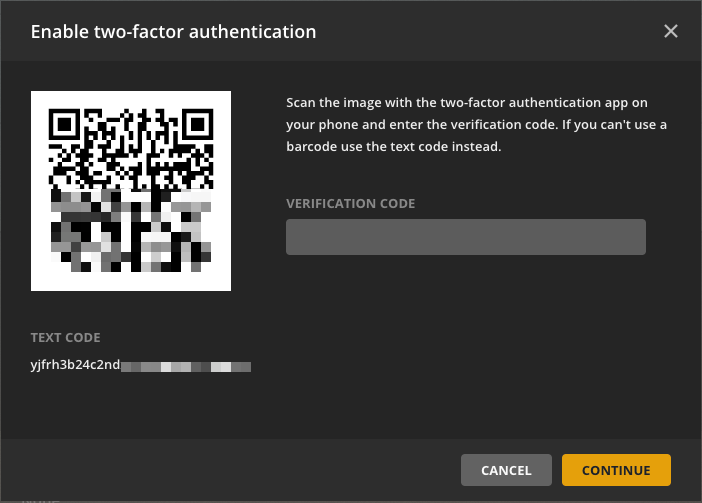
I’m trying to set up 2 factor authentication, but the QR code doesn’t work, and the alternate text code doesn’t work either. Has anyone else run into this?
Thanks,
I’m trying to set up 2 factor authentication, but the QR code doesn’t work, and the alternate text code doesn’t work either. Has anyone else run into this?
Thanks,
iOS or Android? What app are you using? Have you tried one of the suggested apps in their support article?
Android 11 with AndOTP here and I had zero issues setting it up.
iOS. I was doing it wrong. I was trying to scan the QR with my camera and not a TOTP app. I think I’ve got it now.
Thank you
Enabling 2FA worked well using the Google Authenticator app. Open it, hit the “+” button, select “QR Code”, scan the QR code shown in Plex, type in the code shown in Google Authenticator into Plex to complete the setup.
After that it got a little scary for about 10 minutes. My entire library of 10+ years had vanished. No movies, shows, music … nothing. What I had to do was navigate to my local web instance of Plex on http://127.0.0.1:32400/web and “claim” my server (again). Once done, everything showed up in Plex Web app and Windows 10 app. Panic over.
@Plex - I didn’t see anything in the support page that says we have to do this step. Not sure if others will fall foul of this too.
Maybe PLEX should post something in the instructions. It says "
Scan the image with the two-factor authentication app on your phone and enter the verification code. If you can’t use a barcode use the text code instead."
WTF does that mean? Use the text code? C’mon PLEX. Lifetime subscribers need better support. Some asshole signed into my account from China, so you were hacked, and I’m trying to steup 2 factor authentication. Jesus Christ Superstar
Where does it say this? I could certainly be wrong, but I don’t believe Plex mentions “barcode” anywhere.
The screenshot says “barcode”. I am quite sure it should say “QR-code” instead.
@schrady the black and white picture on the left, with all those blocks on it, is a “QR code”.
The “text code” is displayed below of it.