I will take your advice…I will reread links. I know filebot adds name of ep to naming convention too which is prop a no-no…Pretty nifty for $6 thanks Otto…how old is Plex anyway?
What do you mean by that? It sure makes things easier for the meatbag in front of the screen. 
But if you don’t like it, you can tailor the behaviouir pretty extensively by using a custom renaming pattern. If you peruse the thread about Filebot, there are some nifty tricks in there.
Otto,
All is working GREAT, THANK YOU.
Here is a frame grab of the naming convention via filebot which imported perfectly.
Not sure if it is KODi or not as I have no way to tell, but it works GREAT.
My only issue (small issue) is when a DVD rip has a two part episode combined as a one movie while databases show it as 2 episodes. I do not know how to properly proceed since it will throw off the naming convention. I don’t know if there is a simple answer other then spiltting the movie into 2 parts?
However all my issues have been addressed thanks to you and this wonderful forum.
Oh, if I build a new computer and reinstall plex, the files in original build user/app/data; is that just put in new system and allowed to override that newly installed data file?
Thank you again Otto, and everyone else very much
I hope to pay it forward one day soon
Jeff

That screenshot doesn’t look correct.
- it is still using Kodi-style (Plex wants
s01e01, Kodi uses1x01) - there is no
Season xsubfolder
Regarding the double episodes: Simply leave the file intact and leave a gap in the episode numbering.
If you make sure that all your media files are accessible under the very same drive letters and folder names like they had on the old computer, you can copy the whole Plex data over:
https://support.plex.tv/articles/201370363-move-an-install-to-another-system/
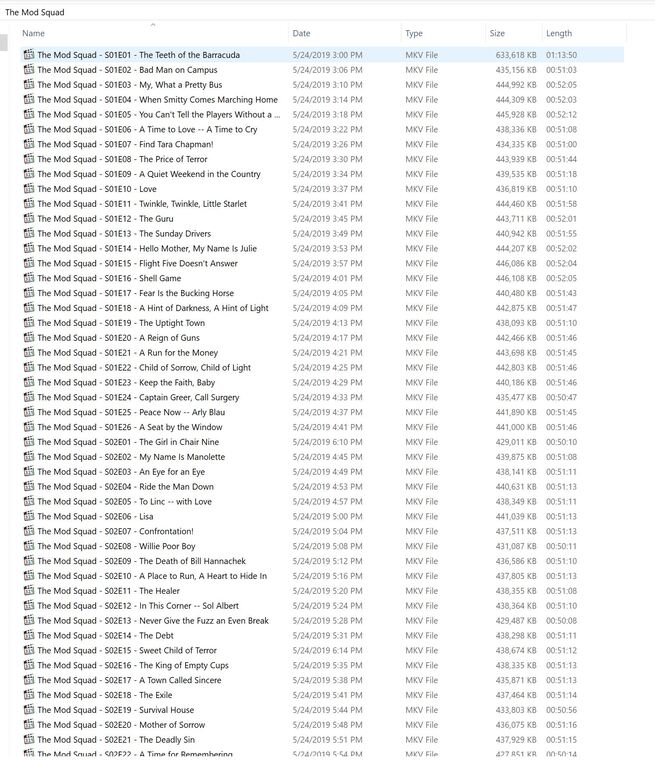
Hi Otto, I understand now what you mean as the screenshot shows.
Regarding the double ep, what do you mean by “leave a gap in the episode numbering.” ?
Thanks,
jeff
Well if TheTVDB has for instance episodes 1 and 2 separately, but your rip has Eps 1 and 2 as one single file, then simply name it s01e01, then leave out s01e02 and continue with s01e03 for ther next file.
The gap in the numbering doesn’t matter.
Great flawless logic Otto as I can do that with similar seasons
One last question for today…what would call or label a pilot movie that aired months before a series began?
I am buying the plex 4.99/ montj pass too!
Thank you!
Jeff
Always look up the show on TheTVDB.
Some shows have the pilot as s01e01. Others have the pilot as a ‘special’, which goes into season number 00.
Thank you Otto for your thorough information!!
Otto, really the last question for the day.
When I rip TV series I use ANYDVD and DVD shrink.
Can this be used with a smart application which would name the files in a plex friendly format while being ripped instead of
VTS_01_1, VTS_01_2 etc… I get the impression to accurately name I have to preview each ep to see if it matches up with naming convention?
Also look at the rockford files specials from 1974 - 1999 what naming convention would I use? Season?
That’s it for this weekend,
Thanks and peace !

Sorry, no idea about the ripped files’ names.
One might assume that the episodes are in the order noted on the disc’s cover.
If that’s not the case, then it might be indeed necessary to preview the files.
Episodes in the ‘Specials’ season get season number ‘00’.
Double episodes use the following naming convention.
/TV Shows/ShowName/Season 02/ShowName – s02e17-e18 – Optional_Info.ext
I cannot recommend to use this. It will lead you to playing the same epiode twice.
1 Like
Just following the Plex naming comnvention at: https://support.plex.tv/articles/naming-and-organizing-your-tv-show-files/
It only plays once for me, if you watch both episodes at once.
If you try to watch the first episode one day and the second episode later it will try play both each time.
unless you physically split the episodes, or just leave the 2nd part
off the file name (leaving a gap in the episodes), there is no other way than.
ShowName – s02e17-e18 – Optional_Info.ext
Hi Otto,
All Solved !
Otto,
ALL continues to be fine as all my issues have been addressed as I now understand the issues that plagued me earlier.
One question though. Importing TV SHow thumbnails and posters look great on my smartphone, tablet and PC monitor.
On my 65 inch TV though they do not look razor sharp. Is there a method to enjoying higher resolution graphics an a bigscreen TV?
Thank you !!
Sorry, no. Not at the moment. The interface is not particularly optimized for large 4K screens.
Otto,
Is it possible to add skins to the plex interface or to further customize the interface beyond the default installation or have all plugins been discontinued as per what i have read?
Thank you !
