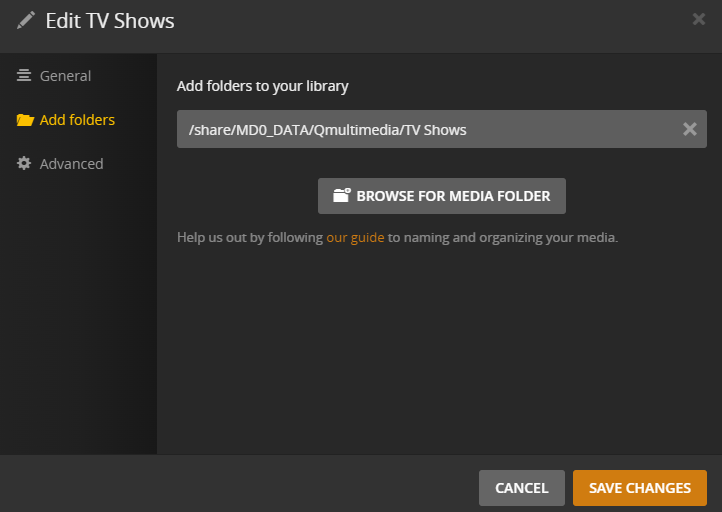
Plex TV Shows Libary detection appears to be totally broken

Plex Server version 1.24.5

Hello,

I am new to Plex and I am on a QNAP TS-251b NAS. I have been using Twonky Server for several months now and that works just fine, but it isn’t as nice of a program as Plex. I purchased the ‘Lifeltime’ version of Plex yesterday and I am able to create all of the other libraries that I want, but TV Shows simply refuses to work, and the symptoms are truly odd…

I’ve spent about an hour searching for solutions, and nothing seems to work. In fact, when I try to do the “Plex Dance” after moving my files to another directory and kicking off a Library Scan, Plex still continues to see the library. I’ve rebooted my NAS and still have the issue.
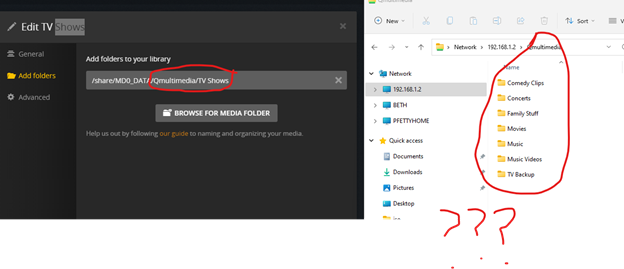
image

Note that the directory that my library is pointing to doesn’t exist when I look at my multimedia directory via File Explorer.

So, getting back to the original problem. I have deleted this Libbrary multiple times and have tried recreating it, and every time, it only shows me portions of my entire library, but it ALWAYS shows me the same folder/episodes. As you can see from below, I believe my naming convention is correct, but the agent isn’t even picking up the majority of the directories that are under my “TV Shows” folder on the NAS:

image

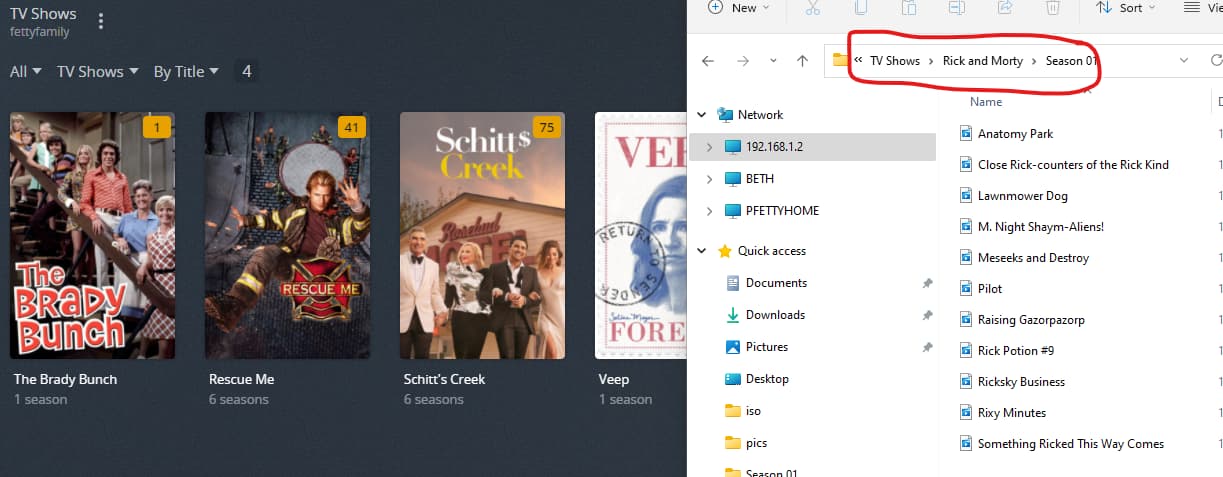
On the left side is what Plex finds as my TV Show library, and on the right is the directory structure on my NAS under TV Shows… Oddly enough, the ONLY TV show that gets picked up by Plex and shown correctly is Schitt$ Creek, and the naming convention, folder structure etc. for that show is EXACTLY the same as the rest of my library. The ONLY difference between this show and others is that under each Season folder, I simply gave the episodes numbers, but Plex was able to figure this out and properly organize and show everything!

Here’s the same snapshot from another show in my library:
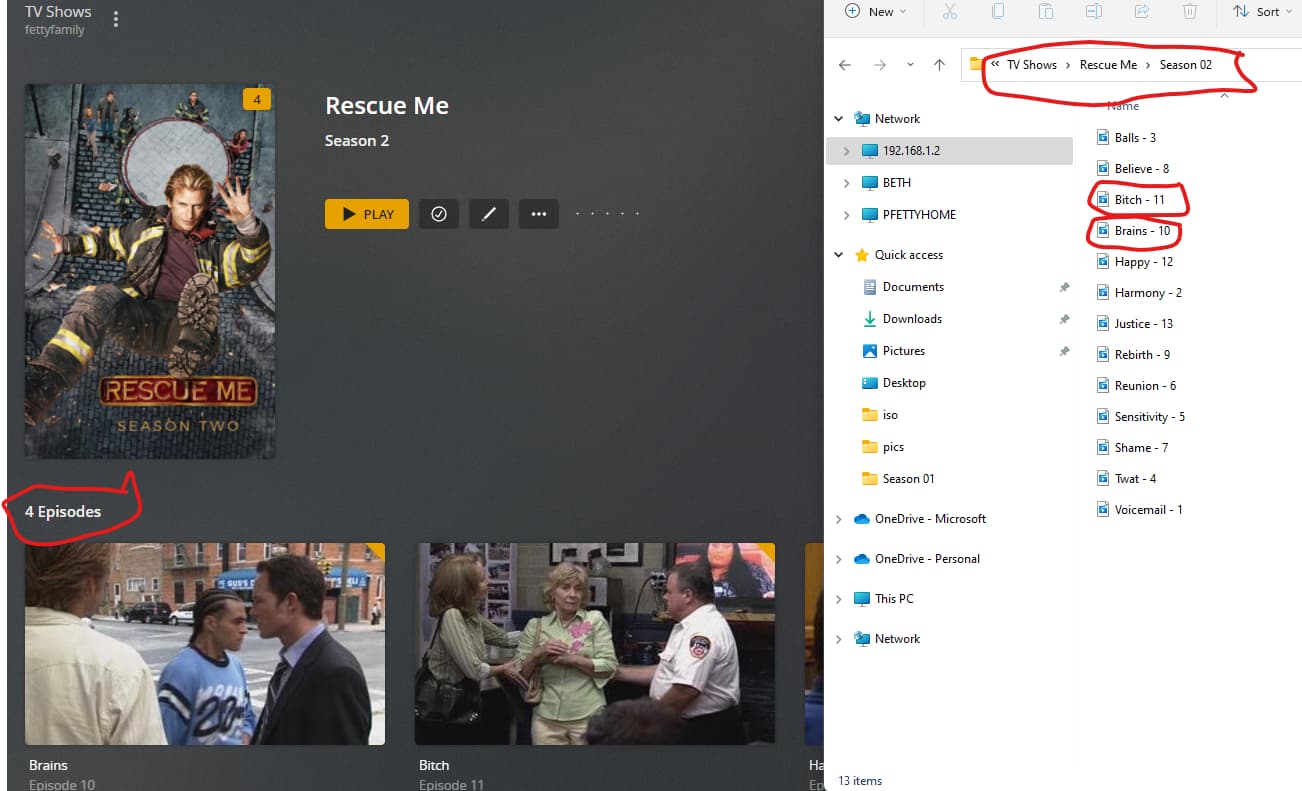
Why are only certain episodes being picked up when each and every one of them uses the same naming scheme (the numbers represent episode numbers which I need when using Twonky if I want to watch something in order…)

Lastly, trying to Add a Folder, also fails. I see the activity icon sping for about 3 seconds and nothing gets added, not even the top level directoy. Here’s an example of a show that fails to get added.

Here is what Plex thinks my entire library consists of:
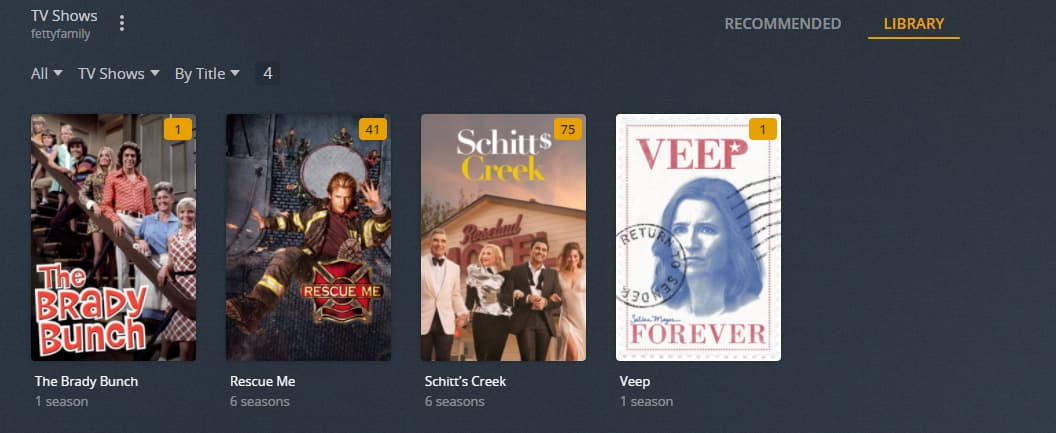
Here is the show I am trying to add. Again, folder and file naming all looks good to me…
I think that’s about it. I am at my wits end and am pretty disappointed that a $100+ piece of software seems to be unable to do some of the basic things it is supposed to do.

Does anyone know if these boards are the only support mechanism for this app for paid users?

Any help would be super, duper awesome!

Thanks,

Pat
You’ll need to spend some effort in preparing your media. For Plex to pick those files up, you need to name them properly. Plex will ignore files which it doesn’t recognize to be episodes.
https://support.plex.tv/articles/naming-and-organizing-your-tv-show-files/

Side note: you don’t need a Plex Pass membership to setup/test/use a Plex Media Server. Plex Pass is mostly about a bunch of premium features like DVR, sonic features or skipping intros.
https://support.plex.tv/articles/200288566-what-is-plex-pass/

Thanks for the reply…

I have read the naming article countless times and I am still not sure where my formatting is incorrect, especially since some things work (like my Schoitt$ Creek example where all episodes were simply named 1, 2, 3 etc…)

If you look at my bottom example with Rick and Morty, can you tell me what is wrong with that naming format???

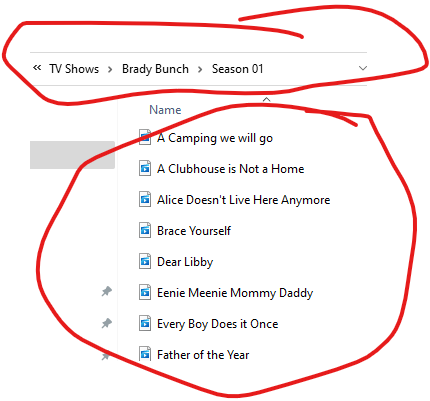
I’ve got the same problem with The Brady Bunch episodes, they also appear to be named just fine, but only 1 single episode is getting picked up by Plex

image

I don’t mind doing the extra work, but this is so inconsistent, I don’t know exactly what needs to be changed and what doesn’t???

Also, thanks for the info on Plex Pass!

Thanks,

Pat

If I may add here?

You minimally need the episode ID numbers.

Best possible match, which is done using a tool like FileBot (which I use and will give you the rules I run) are:

[chuck@lizum ~.2001]$ cd /vie/media/tv2/Star\ Trek\ Discovery/
[chuck@lizum Star Trek Discovery.2002]$ ls -la
total 16
drwxr-xr-x  5 chuck chuck   73 Oct 15  2020 ./
drwxr-xr-x 78 chuck chuck 4096 Oct 31 23:56 ../
drwxr-xr-x  2 chuck chuck 4096 Oct 17 04:25 Season 01/
drwxr-xr-x  2 chuck chuck 4096 Oct 17 04:25 Season 02/
drwxr-xr-x  2 chuck chuck 4096 Oct 17 04:25 Season 03/
[chuck@lizum Star Trek Discovery.2003]$ cd *01
[chuck@lizum Season 01.2004]$ ls -la
total 65903616
drwxr-xr-x 2 chuck chuck       4096 Oct 17 04:25 ./
drwxr-xr-x 5 chuck chuck         73 Oct 15  2020 ../
-rw-r--r-- 1 chuck chuck 4123956522 Apr  5  2021 Star Trek Discovery - S01E01 - The Vulcan Hello.mkv
-rw-r--r-- 1 chuck chuck 4586502859 Apr  5  2021 Star Trek Discovery - S01E02 - Battle at the Binary Stars.mkv
-rw-r--r-- 1 chuck chuck 5900788166 Apr  5  2021 Star Trek Discovery - S01E03 - Context Is for Kings.mkv
-rw-r--r-- 1 chuck chuck 6330952046 Apr  5  2021 Star Trek Discovery - S01E04 - The Butcher's Knife Cares Not for the Lamb's Cry.mkv
-rw-r--r-- 1 chuck chuck 5116305067 Apr  5  2021 Star Trek Discovery - S01E05 - Choose Your Pain.mkv
-rw-r--r-- 1 chuck chuck 5215824727 Apr  5  2021 Star Trek Discovery - S01E06 - Lethe.mkv
-rw-r--r-- 1 chuck chuck 5285960655 Apr  5  2021 Star Trek Discovery - S01E07 - Magic to Make the Sanest Man Go Mad.mkv
-rw-r--r-- 1 chuck chuck 4361985302 Apr  5  2021 Star Trek Discovery - S01E08 - Si Vis Pacem, Para Bellum.mkv
-rw-r--r-- 1 chuck chuck 6015350789 Apr  5  2021 Star Trek Discovery - S01E09 - Into the Forest I Go.mkv
-rw-r--r-- 1 chuck chuck 3790821432 Apr  5  2021 Star Trek Discovery - S01E10 - Despite Yourself.mkv
-rw-r--r-- 1 chuck chuck 3699724712 Apr  5  2021 Star Trek Discovery - S01E11 - The Wolf Inside.mkv
-rw-r--r-- 1 chuck chuck 2435110539 Apr  5  2021 Star Trek Discovery - S01E12 - Vaulting Ambition.mkv
-rw-r--r-- 1 chuck chuck 3799667150 Apr  5  2021 Star Trek Discovery - S01E13 - What's Past is Prologue.mkv
-rw-r--r-- 1 chuck chuck 3428742007 Apr  5  2021 Star Trek Discovery - S01E14 - The War Without, the War Within.mkv
-rw-r--r-- 1 chuck chuck 3393574360 Apr  5  2021 Star Trek Discovery - S01E15 - Will You Take My Hand.mkv
[chuck@lizum Season 01.2005]$ 

Notice how each file identifies the Series and episode in full SxxExx notation with the Episode title.

Files named to this structure will never miss.

1 Like

Thanks for the reply Chuck! I will run some test tomorrow using your naming format and see how it goes. From there I can probably script the rest of my file renaming…

Curious why something like you’ve posted here isn’t in the docs? The doc provided in the link above really doesn’t tell you much about the actual file naming rules…

Thanks,

Pat

@pfetty_microsoft_com

Because I’m using Linux, everything is a path.

My episode mode naming rule in FileBot is:

/nas/media/tv/{n}/Season {s.pad(2)}/{n} - {s00e00}  - {t}

where:

  • n = Series name
  • s = Season number
  • .pad(2) = pad to 2 digits (makes it 01-09 for cleanliness)
  • s00e00 = SxxExx identifier
  • t = Episode title

On Windows, that’s a simple edit:

N:\tv\{n}\Season {s.pad(2)}\{n} - {s00e00}  - {t}

(where N:\ is the network mapped NAS \media shared folder )

=====

I don’t think they put it in the docs because of looking like they’re endorsing one product over another.

Personally, I chose FileBot. I use it for everything. I like it because it takes the filename I give it; performs the internet lookup to validate and grab the perfect name BEFORE I submit it to Plex. I can rename thousands of files in a few minutes.

If/when it’s not 100% sure of the right title / series, it presents me with what it found and I make the selection with 2 clicks.

It will also handle merging different sources (allowing me to pick the better file) when it’s moving & overwriting.

It works so slick & fast that I went and bought the best license he offers.

Hi Chuck,

Thanks for the tip on Filebot! That is indeed a fantastic piece of software and appears to be developed exactly for Plex scenarios. I did some test renames, etc. and everything worked great, and more importantly, when I look in the Plex app, all the episode names are numbered and in plan English. I was concerned that the extra numbers and characters that the app was adding to the titles would show up in the menu, but not so, everything looks great!

I’ve got a lot of renaming to do accross my library, so I also bought the full, lifetime license for $45 and it’s the best money I have spent on a program in some time!

One question for you since it looks like you are also using a NAS, I am running Filebot on a local Windows machine, and then doing the rename on the files that are on the NAS as it seemed like it would be faster than local renaming, then pushing up tons of files to overwrite what is on the NAS.

This seems to be very slow in my case, so curious if you’ve found a faster way to rename lots of shows and episodes for shows stored on a NAS?

Thanks again for your help, I am much happier today than I was yesterday :slight_smile:

Pat

I am bold (network sharing protocols support this). I reach across the network and tell the networking protocol to rename it (move it) on the server side :smiling_imp:

  1. Assume N:\ is your NAS mapped shared folder
  2. Open FileBot
  3. Highlight a bunch of files in the Explorer window opened for N:
    –here’s where it gets slick–
  4. Drag and Drop them into the left pane of FileBot
  5. Now,
  • make sure you’re in the right mode (movie or episode)
  • right-click and select “TheTVDB” or “TMDB” or …
  1. Let it spin and propose new names

  2. If your rule is written correctly, the destination (new) name is also N:\something

  3. When you click Rename …

  • It will rename for you

  • If it must also MOVE the file(s) it will.
    – Magic occurs here –
    ---- On Linux (QNAP and Synology), mv (move) is how we rename :slight_smile:
    ---- If I want to rename a/b/c.mkv to be file /a/d/e.mkv it’s mv /a/b/c.mkv /a/b/d.mkv. No file is moved. It’s renamed (including the directory structure)

  • FileBot will create directories for you on the fly so this magic will happen.

Try it on a few test cases to confirm it works as you expect.

  1. Drag from drive N:
  2. Have the destination rule also put it back on drive N: (important)
  3. Watch what happens when you click “Rename”. – it’s almost instantaneous.

PS: I also have lifetime.

OK, I am following you here! The “magic” piece I am curious to see about, but I have some TV series (Movies are all done and work flawlessly) that I can tinker with and if they get hosed, I have backups…

Many thanks!!

Pat

@pfetty_microsoft_com

Here, do this kind of test:

  1. Create a “test-source” and “test-destination” directories on the NAS (Drive N)
  2. Copy a few test episode files into "test-source’
  3. Edit the Episode rule to be
  • N:\test-destination\{n}\Season {s.pad(2)}\{n} - {s00ee00} - {t}
  1. Drag the Source files into the left pane of FileBot
  2. Right-click → TheTVDB (so it starts matching)
  3. Observe the new proposed names show up in the right pane (full path)
  4. If it’s right, click Rename
  5. Since both are on the same drive, the move should be instantaneous. (magic happens here :smiling_imp: )

So I tried your suggestion on a series with just a few seasons, which in my case was Arrested Development. Basically took the whole Arrested Development top level folder from my NAS and dropped into the left pane of FB. I clicked ‘Match’ from the TVDB and then rename and it did it’s thing for a few minutes.

I checked the season sub folders under the upper “Arrested Development” folder and all episodes looked to be rename correctly. I then added the file path to Arrested Development into the Plex Library and for whatever reason Plex can’t find it as a series. Per the screenshots below, I have the top most folder called “TV Shows” in the library list, but that doesn’t appear to be sufficient since there are many sub folders with the names of TV shows below them that Plex isn’t finding.

Seems like whatever I do I cannot get any additional TV shows to show up in my Plex library

Any ideas on what I may be doing wrong?

Thanks,

Pat

Don’t point your library to individual tv-show folders.
Pointing it to the last visible line should do.

/share/MD0_DATA/Qmultimedia/TV Shows/

To add to Tom,

If you can add the individual shares and not use the Multimedia share, you’ll be better off.

Historically, the Multimedia plug-in package conflicts with Plex because of the Codex Pack.

The best choice would be something like:

/share/MD0_DATA/Movies  
/share/MD1_DATA/Movies2

I specifically use completely volume independent

/share/Movies
/share/Movies2

because I export all those shared folders via NFS. They will also be visible this way if you export the shared folders via SMB

Hi Tom,

So I just removed all of the TV Show sub folders, Plex did a sync, and nothing has been added, and in fact, I lost a show from the list (Veep).

Is there a step I am missing here?

Hi Chuck,

Movies for me are all sorted, they are in one big folder.

Are you suggesting taking TV shows and putting them on another volume completely? Also, I don’t think I have mentioned it before, but my NAS doesn’t have any file shares, it is just used for storage and streaming. Moving my TV shows to another volume would probably take at least a day and that’s assuming I have space on the internal drives (as opposed to trying to stream from an external ESATA drive.)

Thanks,

Pat

Forgot to post the “after” screenshot after I made the above change, Veep disappeared…

I have TV broken out as well.

Because I have so much, I have tv1tv4. Each is about 5TB in size.

In Plex, I use:

/share/tv1
/share/tv2
/share/tv3
/share/tv4

Each tvX has the proper

/share/tvX/
   Series/
    Season 0x/
      Series - SxxExx - Title

structure .

@pfetty_microsoft_com

Pat,

I would make shared folders. That one extra directory adds so much ease to managing it. You aren’t stuck at dealing with the entire volume of “Stuff” in one lump.

I went a bit overboard (because of my Plex work) but I think you can see?

animated/
apple/
audio/
classical/
configs/
deefa/
dovi/
gdrive/
iso/
jazz/
jellyfish/
makemkv/
mmg/
movies/
movies2/
music/
oldmusic/
photos/
requested/
seasonal/
tv1/
tv2/
tv3/
tv4/
tv-nodata/
uhd/

Managing them is a piece of cake now… Backing up is even easier

Ahh, OK, I see, and that makes sense. You’ve got way more TV stuff than I do.

It seems that by removing/adding file paths to the Library magically brought back Veep, and Plex is now catching some of the other shows in my list.

I am taking time off around Christmas where I am going to dedicate some time and finish this project, but this tool has been super helpful. I was also reading a Redit thread that is brand new talking about other tools like Sonarr, Radarr, etc. and I downloaded some of them, but I wasn’t impressed.

It sounds like Plex no longer supports plugins, but if you have any other multimedia management apps for Plex, I’d love to hear about them!

Thanks,

Pat

A tool which will help you a GREAT deal – FileBot .

  1. Internet lookup of the names you give it
  2. Renames and moves the files into position for you.
  3. Cleans up after itself.
  4. NOTHING missed by Plex.’

You run it on your desktop - reaching over the network to the QNAP – it still knows what to move and what to copy as it moves things (copy across volumes ; move within the same volume)

I like it so much, have done others, I bought Lifetime license.

I recommend trying it. I’ll help you with the first renaming rules so you have a good first experience with it and see how easy it is.

Once you get the hang of it (try it at first by making copies), you’ll find you can do an entire series in a couple minutes.

With more confidence and experience, you’ll do stuff like I do

  • clone all the names into test files (they are all 65 byte files for QA purposes)
  • Mass-rename everything to test the TV or Movie scanner.
  • do this for 800 TV series and a few thousand movies in 5 minutes.