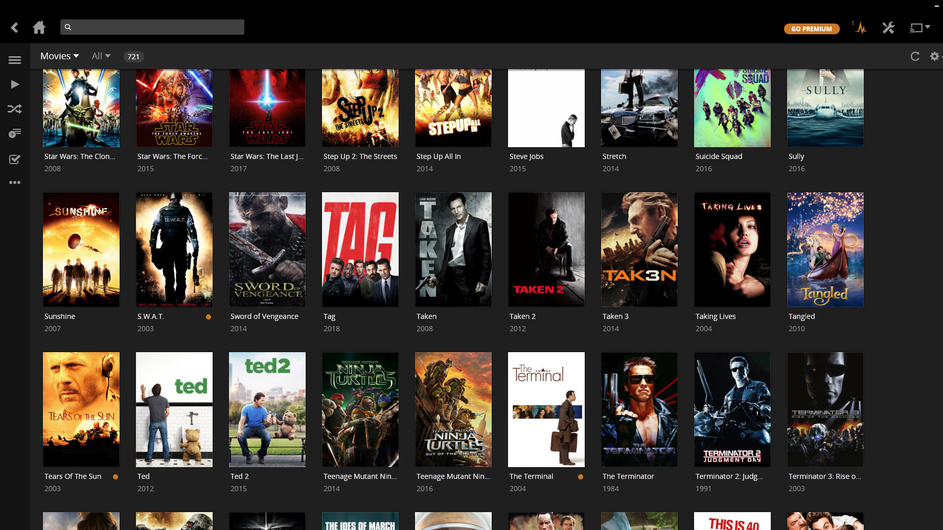
A specific movie isn't showing up in my library

Hi everyone.

I have a slight problem that I’ve been trying to fix for a while now. At this point I just gave up.

I have the movie SWAT from 2003 that is not showing up in my library for some strange reason. I tried renaming the file and deleting it and copying it again. But nothing seems to work.

I’ve refreshed the library, I’ve analysed the library. I have no idea what else to do.

Anyone have any idea how to fix this?

Thanks in advance

What is the exact, actual file name that you’re using. Short of that have you tried manually matching it?

https://support.plex.tv/articles/200889878-matching-process/

After mismatches and subsequent renaming of the file, perform the Plex Dance

I don’t know how I can manually match it if I cant see it through plex. It doesn’t even show in the library.

The exact file name is just “Swat”

Add at least the release year in parentheses.
see https://support.plex.tv/articles/200381023-naming-movie-files/

1 Like

I would do this: S.W.A.T.(2003)

I changed the name to S.W.A.T.(2003)

I’m noticing every time I refresh the library i see for a split second that it has finished processing S.W.A.T.(2003) but it still doesn’t show up.

Is this perhaps a mp4 / m4v file?

Is there a .nfo file present in the same folder?

No .nfo file. It’s an mp4

I have it my library as an mp4 and it’s just named:
Swat (2003).mp4

Then do the following, to rule out embedded metadata interfering with the matching process:
Go to

  • Settings - Server - Agents - Shows - TheTVDB

In there, grab the line ‘Local Media Assets’ with your mouse and drag it downwards, so it ends up being at the bottom of the stack of active agents.
Repeat the same under

  • Settings - Server - Agents - Shows - TheMovieDatabase
  • Settings - Server - Agents - Movies - Plex Movie
  • Settings - Server - Agents - Movies - TheMovieDatabase

Then perform the Plex Dance

1 Like

I just did everything you told me OttoKerner in that order, including the plex dance. And it’s still not showing :frowning:

Ok this is weird. I hit refresh all and i went down the list in the status section. I found it there, and i clicked on the name and it came up. But it still doesn’t show in the library… I don’t understand

Click on it again, then ‘edit’ it and look for the ‘sorting title’. What’s in there?
Do also look if it has anything in the ‘Tags’ tab, under ‘Collections’.

1 Like

Fixed it! I did as you said OttoKerner. Went on it through the status list. Edited the name and renamed it Swat. Then I hit Analyse and there is is!

Thanks guys

1 Like

You should really stop using that Chrome app for Plex.
It is severely outdated and won’t get updates anymore.

In fact, this issue might have been caused by your use of this app, because it has no support for Collections.

1 Like

You’re right. I know it’s outdated but I honestly like it too much. I’m going to get the plex lifetime the next time they send me a discount code so I can use the desktop app. I’ve been using plex for the past few years, so it’s time I gave back. :smile:

This topic was automatically closed 90 days after the last reply. New replies are no longer allowed.