The Ask:
Provide a way to see all Playlists and [mod-edit: duplicate] Collections that a particular piece of media, Artist, or Album appears in. The feature is a way for a Plex user to easily view all Playlists or [mod-edit: duplicate] Collections containing an Artist, Album, or Track. The feature could also work for Movies and TV Shows, etc. [mod-edit: duplicate]
WHO: As a Plex Power User
WHAT: I want to have the ability to inspect a piece of media and see all Collections and Playlists [mod-edit: duplicate] in which it appears
WHY: So that I can curate my collection more efficiently.
The feature would need some entry point. It could potentially be located in the ‘…’/dialog button menu context. Initially, I thought it could become part of the Get Info option, but it could potentially warrant its own label/entry in the main menu, perhaps labeled “Appears In…”
The Problem:
Currently, when organizing playlists and [mod-edit: duplicate] collections, there is no way to know if a track is already part of an existing playlist or [mod-edit: duplicate] collection. I have to manually look through playlists and [mod-edit: duplicate] collections for certain items to see if they are where they belong, or missing, etc.
Current Workaround:
I whipped up a Python script that uses the API to build a .csv that I am able to sort and find the information I am looking for easily. However, the current workaround is not really feasible as a long-term solution.
Nice To Have:
It would be nice if a matrix of checkboxes could be displayed, allowing a user to essentially add or remove the entity to/from all available collections /playlists [mod-edit: duplicate] both collectively and individually.
Supporting Information:
The feature would need some entry point. It could potentially be located in the ‘…’/dialog button menu context. Initially, I thought it could become part of the Get Info option, but it could potentially warrant its own label/entry in the main menu, perhaps labeled “Appears In…”
Here is a visual example of where this option could be placed:
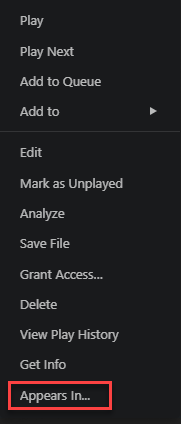
In this example, the “Appears In…” option is added to the context menu, making it easy for users to find and use.
