I plan to add a group of friends to my PLEX installation and am trying to determine whether/how I set up a second PLEX installation for them. They will not need access to all my libraries, but I know how to select which libraries they will be able to access. My issue is that they do not need access to all the individual content in any library. Consequently, I would need to set up second, streamlined versions of libraries just for them. Rather than clutter up my main PLEX installation, I am wondering how to set up a second, separate one for them.
Can a second installation be under the same PLEX account?
Can a second installation be run from the same computer?
Do both operate under the same PLEX Media Server?
Can both installations be run/operating at the same time?
Does this work well, or should I just slam the new, streamlined libraries into my existing PLEX installation?
You can have as many servers as you want under your account. However, running multiple servers on the same computer is so difficult that it is impractical.
Plex’s Sharing Restrictions feature is the simplest way to achieve your goal. No additional servers or Libraries needed. Say you want your kids, “Jessie” and “David,” to be able to see only certain movies in your library:
Go to Settings > Users & Sharing. Click on “Jessie” and go to the Restrictions tab. Add the label “Jessie” to the “Allow Only Labels” field, then Save Changes. Do the same on David’s account.
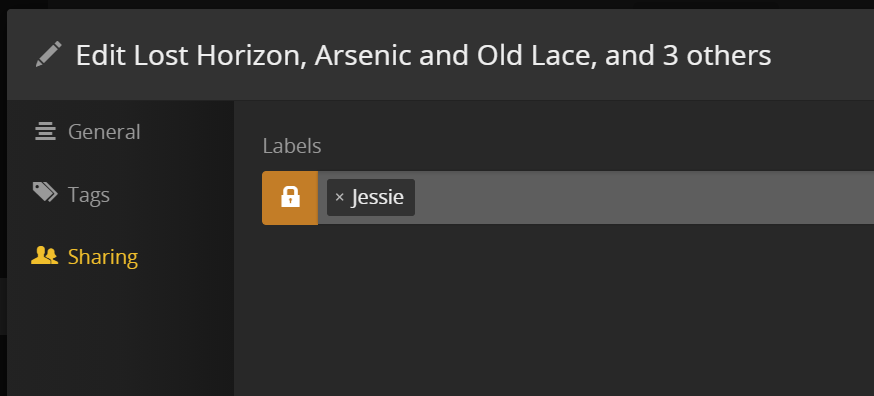
If you add movies to your library that you want “Jessie” and/or “David” to have access to, all you have to do is add the appropriate labels to the movies.
Multiple labels can be added to Restrictions, so you can have some movies available only to “Jessie,” and some only accessible to “David.” For movies available to both, you can either add both names to “Allow Only Labels, (and both names in the movie’s Sharing screen),” or you could create a “Kids” label.
This is great. I knew that I could restrict access to entire libraries for specific people. However, I was not aware that I could select only those few within any given library that I would like to allow specific people to be able to access.
I have a group of guys I would like to add to my PLEX sharing feature. All of them would be subject to the identical restrictions in each of my libraries. In your message, you indicate a restricted group called “Kids” could be set up. How does one do that?
Must I invite each person to share first, or can I set up the “Guys” restricted sharing group permissions first?
I need a tad of clarification on how to set up “restrictions” for those whom I invite to share my content.
Question 1: Since these are friends and not family, and do not live in my home, I assume that I need to set them up as “Friends” and not as “Managed Users”. Is that correct?
Question 2: It appears that in order for me to set up restrictions on specific content (meaning specific movies within a library) I need to have a PLEX Pass. Is that correct?
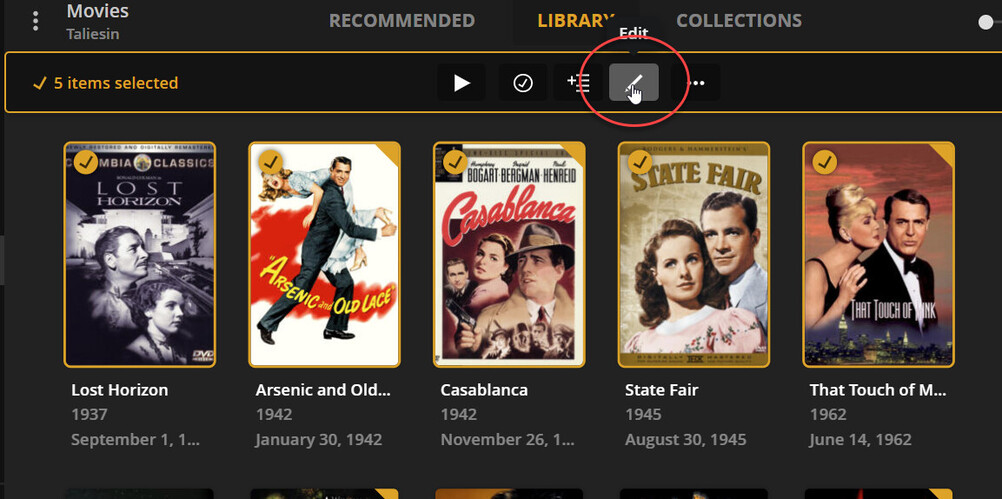
Question 3: Once I sign up for a PLEX Pass I can then go into any library and select specific movies by clicking on the upper left-hand corner. Is that correct?
Question 4: My ability to set these specifically selected movies as being available to a group of “Guys” I then will have some way to do that. At present, without a PLEX Pass, I cannot see how to accomplish that.
Question 5: Once I set up restrictions under a group-type label called “Guys” I can then apply that “Guys” filter (of whatever that is called) to each of the individual guys I am going to invite to share as “Friends”. Is that correct?
Question 1: Since these are friends and not family, and do not live in my home, I assume that I need to set them up as “Friends” and not as “Managed Users”. Is that correct?
Yes, that’s the recommended method.
Question 2: It appears that in order for me to set up restrictions on specific content (meaning specific movies within a library) I need to have a PLEX Pass. Is that correct?
I keep forgetting that, and I never notice whether the person I’m talking to has a Pass or not. Yes, a Pass is required for all three steps I described.
Question 3: Once I sign up for a PLEX Pass I can then go into any library and select specific movies by clicking on the upper left-hand corner. Is that correct?
For merely selecting items in the library, you don’t need a pass for that. You can do that now. There are several things you can do without a Pass - add to playlists, edit tags, etc. - but setting up restrictions isn’t one of them.
Question 4: My ability to set these specifically selected movies as being available to a group of “Guys” I then will have some way to do that. At present, without a PLEX Pass, I cannot see how to accomplish that.
Correct. Without a Pass, you should be seeing these in steps 1 and 3.:
Question 5: Once I set up restrictions under a group-type label called “Guys” I can then apply that “Guys” filter (of whatever that is called) to each of the individual guys I am going to invite to share as “Friends”. Is that correct?
Right. It doesn’t matter in what order you do it. After it’s all set up, if you add a new movie, simply include the “Guys” Sharing Label. If you add a new User, add the “Guys” to “Allow Only Labels” in their Restrictions.
OK, thanks to your sage advice, I have figured out how to set up specific media files within any given library as “accessible” to my friends. I have also sent an email invitation to one friend who visited today. So, he downloaded the PLEX Player onto his iPhone, then was able to “accept” my invitation to my PLEX Media Server.
However, there were several problems. First, we noticed that the only media he was able to access on his iPhone were those media files that are in several libraries where I granted him permission to access the entire library. Other files that we specifically selected from libraries where I did not grant him access did not appear at all, nor was the library they are located in appear on his iPhone screen. Did I do something wrong?
Second, although I gave him access to several entire libraries that included video files, the library appeared, but also an error message saying “No Content Available For This Library” and “This library is currently empty. The server owner still needs to add media or remove any filters that prevent it from appearling here.” But t;here is content in each of these libraries, and specific videos that I granted him access to. Perhaps I have some setting wrong somewhere.
Third, we discovered that while he could access music files, they would only play for a minute. This was before we discovered the need to pay the $5 fee to have access. Is it possible that not having yet paid the $5 fee might have caused the first two problems?
Your friend should see a “Shared Media” section that contains the items you individually shared with them. If it’s not immediately showing in the main navigation you might find it under More....
Edit: I believe there’s a known issue/bug with individually shared playlists – their content will show but you won’t see an actual “Playlist” item.
Did you apply some restrictions when you shared that library with your friend? You can e.g. restrict a share by a “restriction profile” which will apply some age/content rating restrictions (e.g. only allowing media for small kids / bigger kids / teens) – alternatively you can define that your friend can only see media with certain criteria (e.g. only allowing items with specific labels). https://support.plex.tv/articles/204232573-restricting-the-shares/
No, those seem unrelated.
Most Plex apps are free – usually it’s just the mobile apps for Android or iOS which require a one-time activation (once activated, he can use it across all his Android/iOS devices using the same app store account). https://support.plex.tv/articles/205556278-unlocking-or-activating-plex-for-ios/
So, Tom . . . when I want to use “labels” to restrict access to media content, must I first grant the friend access to that specific library, and then use the label as a limit his/her access?
Or do I just indicate in the “Sharing” tab in the media file that it is to be made available to any and all users for who I have indicated should have access to that file (even though I have not granted them library access?
As per the support article linked above…
Those restrictions apply per user – you can e.g. configure a share so users will only see items with a certain label (or hide those with a certain label). The label restriction will apply to all shared libraries.
Thanks, Tom. For some reason this “label” thing does not seem to work. I send out an invitation to a friend, granting him access to multiple libraries, then thinking that I have selected the right label (a group label to be used for 5 people) to limit his (their) access to specific designated media only. But I am not seeing evidence that it is working.
Yes, I can go into the “poster overflow” function for each file (one at a time), select “Share” then click on his email address (one person at a time), and that works. But it is laborious as I have to do this one media file at a time for each of five people.
It would be so much easier if I could get the “group label” restrictions to work. Please provide counsel. Thsnk you.
Here’s an example that’s working quite nicely for me:
I’m sharing a library with my parents. They’re not understanding any English, therefore I’ve used an advanced filter to determine which of my movies have an English language audio track but none in German (our mother tongue). I’ve tagged all those movies with a label.
When sharing with my parents, I’ve set a restriction to their shares to exclude all items with that label (Exclude labels).
When watching media from my parents’s Apple TV (signed in with their user), they will not see a single item with that label.
The same works the other way around when it comes to sharing only items that have a certain label (Allow only labels) – e.g. sharing only some kids friendly shows and animated films from my library that had specifically been labelled for them (alternatively I could have relied on a content rating based “restriction profile” or set which ratings they’re allowed to see… while this works as well, I know they won’t necessarily be interested in “20 century woman” or “spotlight” )



 Yes, a Pass is required for all three steps I described.


 )
)