[HowTo] Selecting multiple items for edit, playlist, etc.

Note: These instructions apply when browsing your libraries in Plex Web. They also work within collections. They do not apply to search results. To discuss or vote for feature requests regarding search results, please search the Feature Suggestions forum.

When you hover over any Library item, some controls appear:

You can put the UI into Selection mode in either of two ways:

  • By clicking on the ‘Select’ control for any item. OR
  • Hold the Ctrl key and click on any item (you don’t have to hit the ‘Select’ control in this case. Anywhere on the poster will do).
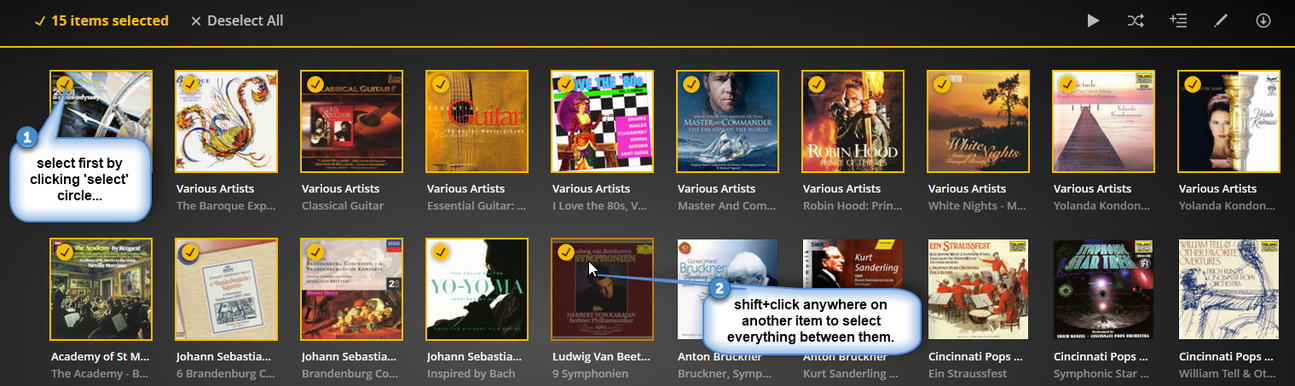
As soon as any item is selected, you are in Select mode. To select additional individual items, you can just click anywhere on the poster.

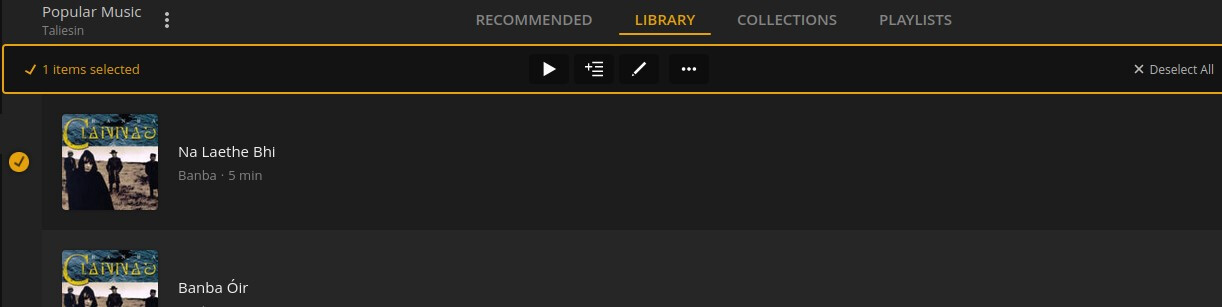
Note - In Folder View, multi-select only works when selecting tracks. The ‘select’ tool appears when you hover over the track:
As always, you can select a range of items by using Shift+click. Select the first item as shown above, then hold the Shift key down and click the last item. Everything between them will be selected.

As you can see in the screenshots, the Multi-select Actions bar contains a count of selected items, controls to play, add to playlist/collection, edit, etc, and a ‘Deselect All’ control, which clears all selections and takes you out of Selection mode.

image

Note: You can only edit multiple items of the same type. In Movie libraries, if the library is configured to display collections, be careful to only select individual movies, and not a mix of movies and collections.

Mass Edit Collections / Select All
Is there a way fast to edit all Movie info and tags?
Manual tagging of photos
Adding Tags through SQL - changes get lost
Duplicate movies showing even will collections turned off
Asdfasdf
Select All (custom filter)
Set Metadata Per Category Not Individual
Search Results
How to update field (played) for all eps in a season
I have 2 versions of one movie. One is Black and White the other is Color.How can I add both of them
Personal video qualification
Music selection for playlist
Start System Scan for Intro and Credits
How do you restrict Genres?
Adding a second installation of PLEX
Mass Unwatch select
Playlist & Category Wide, Mark as Played & Unplayed
Merging albums takes the more recently added album artwork, which is usually the second CD
Playlist Creation
Some Collections are not being created
Create a playlist from a folder - windows PC
How can I set up a playlist on the server that can be seen by any connected client?
Other Video needs select folder option
Filter Kids Movies PG 1990s and newer?
Resetting all display names
Question about libraries and labels
Possibility of "select all"
Workflow to delete mass video files and question on "Labels"
Plex not showing accurate metadata
Remote Samsung TV - Dauerhaftes Buffering bei 4k Filmen
All unrated video files are hidden from any managed user with a restricted profile!
Exclude horror genre for managed users
Cross Media Category Playlist
TV Shows - Analyzing a Show Should Trigger All Analysis Tasks
How do you restrict Genres?
Can someone from plex team reset my account?
Share only collection

Weird, I don’t see circles in the top left corner. What I’ve done it search movies for “harry potter” and then I want to add all of the search results to a “Harry Potter” playlist.
I have and edit button in the bottom left, and 3 dots in the bottom right. Also in the middle is a circle with the “Play” icon in the middle for playing the movie. Screenshot attached.

These instructions only apply to browsing your libraries. They do not apply to search results.

Hello,

It’s posible to renaming multiple movies in 1 time?

I have 2 folders of movie in plex.

Movie
4k movies

I want to edit all movie in"4k movie" to put “4k” in the title. Exemple: 4k Inerstellar, 4k Logan, 4k Matrix…

@beckfield - replying to your Nov '17 comment: This is precisely the problem; this is why there are several feature requests that effectively amount to “please add the select control(s) to searh results.” While I dont understand the underlying architecture of this particular software, I have dealt with this exact issue many, many times, and this seems like a relatively minor/incremental feature add.

1 Like

That should be discussed in those feature request threads, not the How To section.
