You can have as many servers as you want under your account. However, running multiple servers on the same computer is so difficult that it is impractical.
Plex’s Sharing Restrictions feature is the simplest way to achieve your goal. No additional servers or Libraries needed. Say you want your kids, “Jessie” and “David,” to be able to see only certain movies in your library:
-
Go to Settings > Users & Sharing. Click on “Jessie” and go to the Restrictions tab. Add the label “Jessie” to the “Allow Only Labels” field, then Save Changes. Do the same on David’s account.
-
Select all of Jessie’s movies in your library and click the ‘Edit’ icon:
-
On the Sharing tab of the Edit screen, set the label “Jessie” (or whatever labels you choose to use). Save Changes. Repeat for David’s movies.

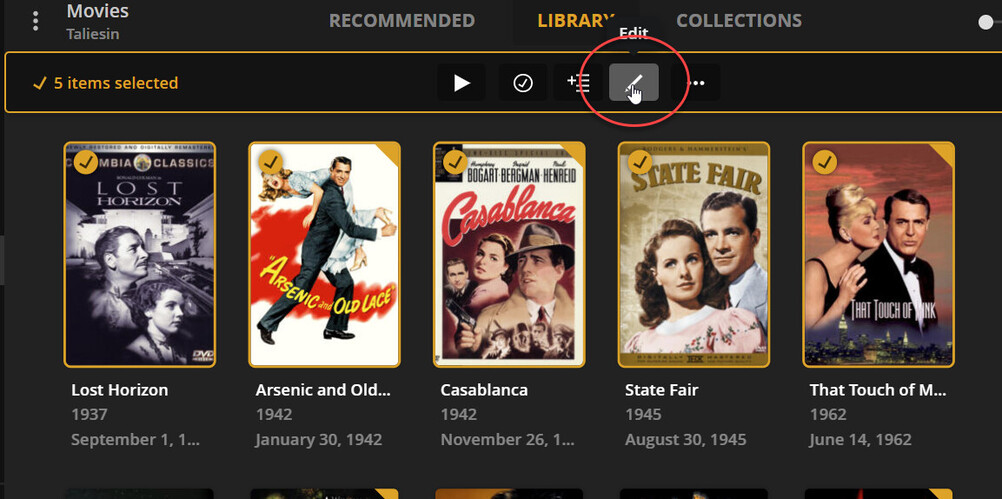
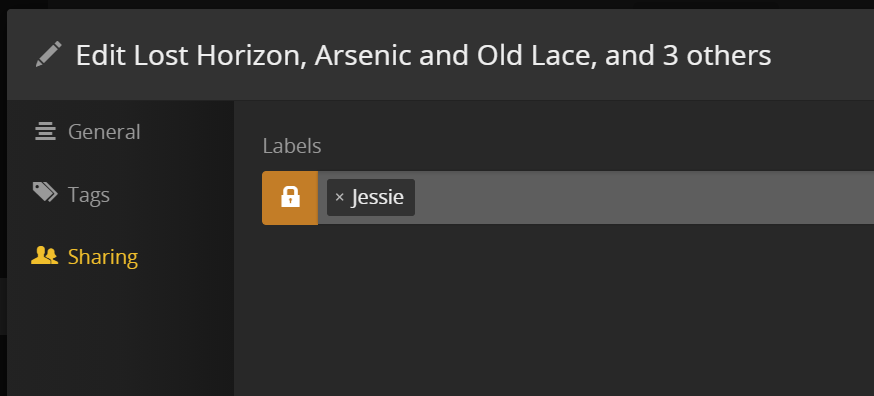
If you add movies to your library that you want “Jessie” and/or “David” to have access to, all you have to do is add the appropriate labels to the movies.
Multiple labels can be added to Restrictions, so you can have some movies available only to “Jessie,” and some only accessible to “David.” For movies available to both, you can either add both names to “Allow Only Labels, (and both names in the movie’s Sharing screen),” or you could create a “Kids” label.


Here are a couple of other discussions of running 2 servers on one computer:
HELP - Newbie - 2 servers on same computer
One Server for movies + One Server for Music - #2 by johnm_ColaSC
Running 2 Plex servers on 1 computer
