I am trying to load Lost S1 E01-E04 and cannot seem to get the terminology right as plex says their are no tv shows in the library. I’m sure I’m doing it wrong, but have rewritten it several times per advice online and all were different( Lost S1 E01-E04 is the current try). I would appreciate any help.
Thank you, Jim
What is the full path and filename(s) of the media you’re attempting to add?
If you are trying to use iso or a dvd rip folder, it won’t work with plex.
Indeed. If you are attempting to add raw ISOs to a library it will not work. You’ll need to use a program, such as MakeMKV, to rip the individual episodes from the disk/ISO. Then name them according to the guidelines which @TeknoJunky linked above. For Lost, a working example would be:
TV Shows/            <--- Library points here
     Lost (2004)/
          Season 01/
               Lost (2004) - S01E01 - Pilot.mkv
               ...
               Lost (2004) - S01E04 - Walkabout.mkv
MakeMKV is fairly simple to use; the online help section of their website has a short walkthrough.
I did use MKV.
Ok, that’s good. Do your paths and file names follow the pattern I showed above? If not, give that a shot. And, what are your current paths and file names? They are very important for proper matching.
And if that doesn’t work, it may be that the scanner has picked the shows up as duplicates of some other show already in your library. In that case, the Plex Dance may help to clear out any incorrect matches:
You don’t need to move out the entire library’s contents, just the files with which your are having issues.
All of this assumes that you already have a library of type “TV Shows” set up and working, and that you’re just attempting to add new content.
I will give that a try.
Thanks to all.
Jim
I did as you advised and still no success. Odd because it shows my Z drive with all the files in it only they are grayed and not active. Here is a pic of how I did my paths and file names. Hope you see my error. Total of 24 Episodes
Thanks
Jim
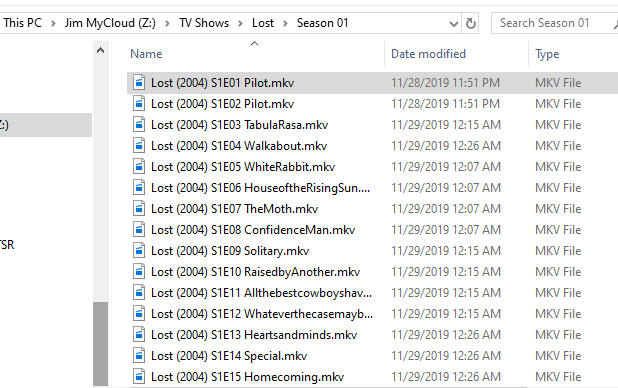
The only obvious error I see is the lack of hyphens in your files’ names. For example:
Lost (2004) S1E01 Pilot.mkv
Should be:
Lost (2004) - S01E01 - Pilot.mkv
Note the addition of hyphens before and after the season/episode information. Also note the zero added to the season/episode information (S01 vs. S1).
Other than that, I’d suggest adding the year to your directory name. So “Lost (2004)” instead of “Lost.”
Finally, as mentioned above, if these have been mis-matched as something else (perhaps duplicates of another show), you may need to follow the Plex Dance steps in the How-To I linked above.
Still no effect. I loaded 306 movies with absolutely no problem 10-15 last week. Just this tv shows file gets me. Made the changes as you suggested.
Here is a pic of the changes and a pic of my zdrive(cloud drive) on Plex. All the episodes are there but grayed. Think I might just stick with movies and watch the tv series via bluray player. lol
Thanks again,
Jim

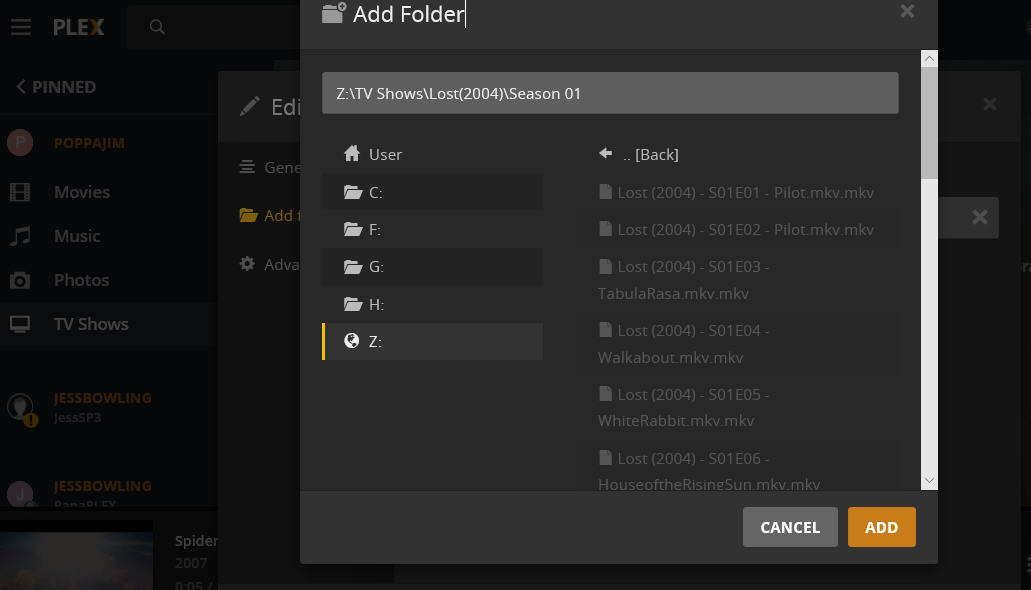
The tv shows library should point at Z:\TV Shows\ — not the folder of an individual show or season.
Two quick things:
- You should be adding “Z:\TV Shows” as the library folder, not the full path to the show.
- Add a space between the show name and the parenthesis in the directory name:
Lost (2004)
Instead of:
Lost(2004)
Also, it is normal for the actual files to be grayed out.
