I can access my server just fine using the http://local:32400/web method but still can’t get see it using the app.plex.tv website. Can you confirm you are able to do so?
After multiple attempts, I finally got my password changed… now it can’t find my server. (It did for a hot minute, now it cannot). I also briefly got a “plex.tv is down” message, which went away.
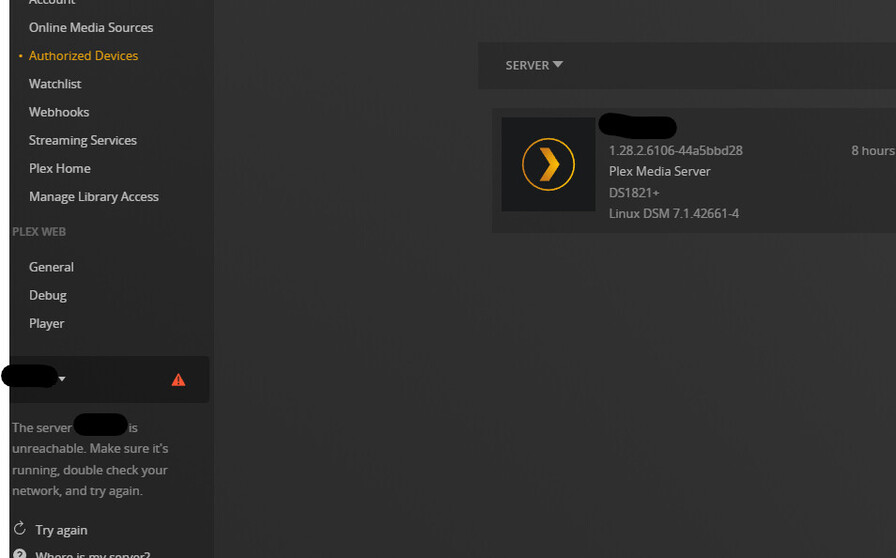
*EDIT: I had to reclaim the server for some GD reason. Did that, now everything is back.
Things I did today:
- woke up to a ‘your password was stolen’ message from Plex, reddit and a dozen other source
- changed my password. It didn’t take. tried multiple times
- restored my Plex DB from yesterday
- had to change my password again for…reasons, I guess
- stop-start my Synology Plex server several times
- login/logout - password lost again
- reset password
- successfully logged into app.plex.tv only to find no access to my server
- got a quick mystery message saying the “plex.tv was down”*
- struggled with my lack of server for a while until I discovered it was unclaimed
- reclaimed it
How was your day?*
Okay I found a workaround to my problem, if one can’t reach Plex with a local ip such as 192.168.x.x and don’t have any means to use 172.0.0.1, it would be helpful.
My friend told me to use Port Forwarding using SSH, it requiers having Windows Linux Subsystem installed (if on windows).
First, you have to enable Port Forwarding on the machine that has plex installed. To do so, you need to edit this file here : sudo nano /etc/ssh/sshd_config, then search for AllowTcpForwarding, change no to yes, and save the file.
Next you need to be on your Windows Linux Subsystem, on your own machine, and type ssh -L 32400:127.0.0.1:32400 <user>@<ip-nas>, replacing the last part according to your configuration.
It will act like a casual ssh connection, except that you enabled port forwarding.
Then you will need to open a browser page, and go to http://127.0.0.1:32400/web, and you should appear on the web interface to manage your options, such as reclaiming your server.
Hope it’ll help
Same problem here.
It’s spotted a “new” version of my server that has no history or media libraries.
I’m having to re-add everything to my server now that I have claimed it which is really annoying.
I also have no view history on anything so I don’t even know where I left off on a lot of TV shows.
Wish I stuck with Kodi now 
this was pointless for me, as i “can” already get to my server, only that its just showing “Not authorised”… via direct IP, via plex.tv is shows as “Plex is not reachable”
1 Like
Later tonight, I’ll try another solution. COMPLETELY REMOVE plex from my Expenology setup. and go in with WinSCP and remove all the “plex” type directory. BLAT IT.
then reboot, and re-install plex. will also, logout of plex.tv and web and delete cookies before re-installing.
if that doesnt work - god knows whats going on. like what you said above “Plex have a Cert issue” , or may be they have a claiming issue too!
Changed the password as per the “sorry we’ve been hacked” email and now am unable to connect my LG TV. Keeps telling me that it is linked, but then an expired message appears on my TV screen. Tried lots of times now. Getting fed up now.,
What a complete shambles! I guess I will using Emby for a while.
Just want to update here that my server JUST started working on it’s own. Maybe they fixed something on their end with certs? Recommend restarted PMS and hoping for the best.
Thats a good point!
does anyone want to suggest any opensource or free movies/series app that we can use in the mean time … ?
I’ve spent all day on this issue to no avail. I decided to try recreating my libraries to see if that will work, and now I can’t even add any media because it keeps prompting me to install PMS, which I’ve done again 3 times. I never get to a screen where I can add libraries. Infuriating.
And I haven’t ever gotten an option to claim my server.
I had the same issue after resetting my password as Plex asked for today after a hack. Suddenly I could not connect to my plex server. Resolved that by deleting 4 plex entries in my windows registry. I did it with the help of this page: Why am I locked out of Server Settings and how do I get in? | Plex Support
After restarting my Plex app it worked again.
But…I have one more issue. My Plex Premium Pass disappeared. The system proposes to start a subscription. But I’ve just payed for one more month. According to my settings on plex.tv I do not have any subscription. Who experienced this also and found a solution?
what kind of server are you using?
Linux
maybe it’s a plex.tv <–> synology thing?
Not sure, the only thing I did outside the scope of what was listed here was delete CertificateUUID and CertificateVersion in Preferences.xml (same place you remove the PlexOnline* stuff mentioned earlier) I restarted after doing that and nothing changed but not too long after that everything started working. shrug
its possible, i dont know. because PLEX are NOT saying anything… i cant believe plex are not involving themselves with these blogs…
did you delete the value or the whole key from the line in Preferences.xml?
I think they might be inundated. Maybe they are hoping these ENV’s self heal or heal based on community effort?
The whole key
