Server Version#: Version 1.19.5.3112
Player Version#: irrelevent
This has been somewhat addressed in this link:
They theorize in that thread that there’s some sort of timing issue of data being written to the database but not finalized before a second write comes along and updates the record, leading to two entries.
I recently moved my Plex data directory from its default location in C:\Users\user\AppData\Local\Plex Media Server. to a new location on a different internal drive (d:\plex\plex media server).
That seems to have worked, new metadata is flowing into the new location, and I was able to rename the original folder, with plans to delete it soon.
However, since I’ve done this, all new TV shows and Movies have been showing up with two, or sometimes 3 duplicate entries in the database, despite only one file existing in the physical location on the (seperate) storage drive.
Here is an example:
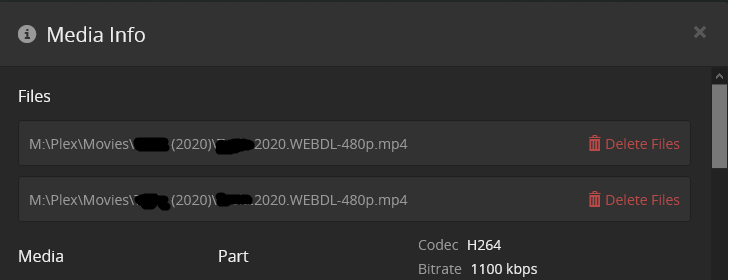
One file, two entries, so it shows as having the 2 in the upper left.
I cannot stress enough that there are not duplicate files or two files of differing quality. All these duplicates point at the exact same file when I do a “get info” on them.
I run both Sonarr and Radarr. I saw in the other thread that turning off automatic library scanning and updates seemed to fix this, so I turned that off, and new things coming in are not being duplicated. Unfortunately, now I have about 100 different pieces of media, both movies and tv, that came in before I made the change that now show as having duplicates.
I have been able to correct this by going into the duplicate in Plex, and splitting the duplicate. The problem with this is, I can of course delete one, but because they both point at the same file, if i delete one it deletes it for both. The way I found around this was by moving the actual media file to a new place, deleting one of the entries, and then moving the file back so the remaining member of the pair of duplicates sees it and picks it up correctly.
Long story short, I’d like to know if there is a faster way to fix this than individually splitting, copying, deleting, then moving back for the 100s of media objects affected.
In addition, I was wondering if anyone would know why moving the database to a new location would cause this problem. Optimally, I’d like to turn the autoscanning/update back on on plex, but I won’t do that until I can be assured this won’t start happening again. I currently have it set up for scanning for changes every hour, but that’s not optimal for me.
Any help you can offer would be great, if I need to provide logs or anything else, let me know what you need and what the best way to send them would be.
Thanks!

