Server Version#: Version 1.25.2.5319-7000
Player Version#: Version 1.25.2.5319
I updated to the newest Synology NAS DSM last night (I had not updated in probably over a year year old) and immediately every file on plex became “unavailable”. (DSM 7.0.1-4218)
I can still access/play every file directly from the NAS, so it seems like Plex can’t access the files. When I scan library files it only takes a second to search the folders that (should) have thousands of files in them.
On searching for the problem I keep seeing other’s solution of permission
being changed, though I have made sure that Plex has permission to access the files and I still have the issue.
I would greatly appreciate if anyone’s aware of anything I can do to try to resolve this issue.
Are you using 3rd party programs (e.g. Sonarr, Radarr) which write files directly into your shared media folders?
If so, when they write their files, if the permissions are not set correctly within those apps, Plex won’t be able to see them (they break the Synology ACLs).
I must ask, in addition to setting the permissions for the shared folders, have permissions been “Apply to this folder, sub-folders and files”?
I too have this issue! I have migrated from old /plex to /PlexMediaServer settings and I’ve given the PlexMediaServer read/write access to my media shared folders – yet they appear empty in plex and all my files are “Unavailable” … Help?
Oh my gosh, I had not selected to apply it to folders, sub-folders and files. I am sorry how basic the solution was, clearly I was massively overthinking it.
Thank you so much everyone for your help, I really appreciate it. You are incredible!
Background Synology NAS and Plex with upgrades to DSM6. Then held upgrading to DSM 7 until late Jan.
This issue manifested with some files but not others. I thought I had file compatibilities and needed to redo them.
But last week now every file is "unavailable. I can direct access via File Station and play them, and I can see the video details, actors, etc but the video itself is unavailable.
Couple days ago, I followed ChuckPA instructions per new Plex policies and set permissions.
I have a few users locally created in Plex but really all access via Plex apps in TV, etc come thru the default Plex account.
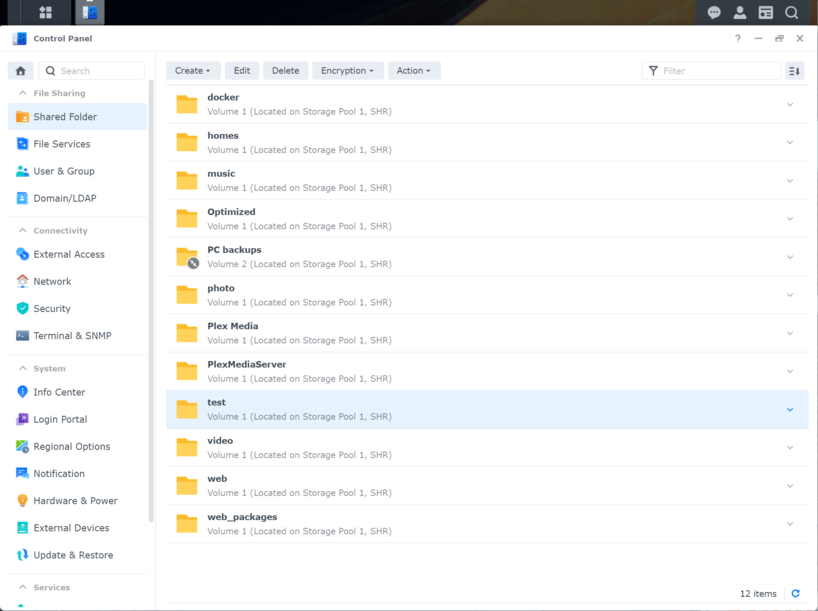
In User & Group I gave all “real” users RO in all folders except the new “PlexMediaServer” folder. User plex has RO in all folders including “PlexMediaServer”. I don’t see this “Grant permissions in all subfolders” in User & Group or in Shared Folders.
In Shared Folder I edited Permissions to RO for each user. I disabled default admin and made myself an admin with RW permissions. Local user ‘plex’ has RO all media folder & in “PlexMediaServer”. I created an Optimized shared folder with user plex as RW. I created a subfolder in Optimized called Movies. Then in Plex account Libraries I added a Library volume1/Optimized BUT the folder Movies doesn’t appear so I can’t follow this part of ChuckPA instructions.
Hasving done all this I still can’t see any videos.
You missed reading the DSM 7 release notes and migration instructions. Please read it so you understand all the changes.
Plex user is no longer used – DSM 7 forced the change. You must change permissions to grant “System Internal User” PlexMediaServer (See the FAQ below).
PlexMediaServer shared folder is for PMS use ONLY. IF you have placed media in the PlexMediaServer shared folder – MOVE IT OUT. We do not support (DSM limitation) placing media in PlexMediaServer.
If you are placing media in PlexMediaServer, MOVE IT out now please!
We do not support placing media there. There are warning files, written in 6 languages, at multiple levels.
User Plex is abandoned. You can safely delete it (DSM 7 change)
Do Not change permissions of PlexMediaServer. It is maintained by DSM. If you mess with permissions there, DSM will override you and put them back at next restart.
Please show me the shared folder you created and the permissions you assigned. (Screenshot)
Please also confirm whether or not you have media in PlexMediaServer -OR- are now using the old Plex shared folder for media (which you can safely use)
Sorry for the delay. Had some issues to deal with.
First let me say that I did too many things at the same time so when something went wrong, I compounded it.
While I was getting the info to reply to you, I realized that by changing the folder name from Plex to Plex Media I would have to redo the library and folders. Once I did that and rescanned the library the files started coming back. So, I guess I fixed the permissions using your instructions but then broke it when I changed the folder name.
To answer you.
No files in PlexMediaServer. Only whatever the install put there. I am using the old plex share for the media. The reason I changed the media folder naming is because I got so confused between the folder Plex and the user Plex that I thought I should make them less similiar.
Do I even need this Optimized folder? I haven’t optimized any media as of yet. If I delete the plex user then I where would I put the Optimized to?
 probably +3-4 years