I believe the intentional part is subtler than that. I’ve been a lifetime plex pass user for many years. “They” have slowly eroded the independent utility of the product step by step with some kind of long term aim of making it a streaming service platform. First the offline support was removed - try running a plex server and client on a non-Internet connected LAN - then the player experiences keep acquiring junk which becomes harder and harder to disable. The add a new player but leave the old one ther, then silently change the old player to be as disfunctional as the new one rather than just leaving it alone.
Soon perhaps you’ll have to watch ads before your own content.
Just started having this issue… not sure why it wasn’t happening for me when this was first reported back in February?? Perhaps i have upgraded Android, which has left Plex broken? Anyway, like I said, i started seeing the issue yesterday. Thankfully, for the messages in this forum, I was able to disable the “new player” and then everything started working. Seems like this problem has been a occurring for a long time without any resolution from Plex. Hopefully, they are working on a fix. xx
I’ve been battling this fault for months on my Sony Android TV’s. I disabled the new player and it fixes it. But then after a while, the new player gets enabled again (maybe after an update) and my family can’t watch TV anymore.
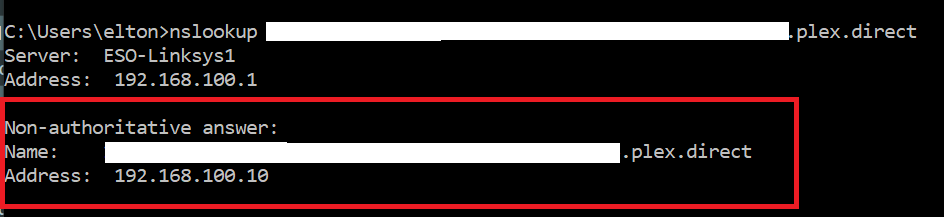
Finally decided to so more troubleshooting and quickly found that new player requires DNS resolution of an FQDN registered to plex.direct for your server. My server is configured to use local access but the new player seems to need this FQDN regardless.
Finally, use nslookup to check from any PC and make sure it resolves to your internal server address. Use the name from your log file, <YOUR-SERVER>.plex.direct.
If the name does not resolve correctly (see above) then the new player probably won’t work. Check your router config again. You may need to run a packet capture on your router to confirm. More details below.
I enabled logging, say that the new 8.0.0 beta appears to use exoplayer2 for both old and new player (I think the old player was the old exoplayer too up to a point). On a hunch, seeing exceptions, I remuxed the mp4 to mkv (stream copy) and voila. So, I can work around the non-DNS version of this issue but it’s still a bad show by “Inc.” to fiddle with the old player which is/was a backup for many of us to their ongoing broken-ness.
So I am using a Fritz!Box. To fix the DNS rebinding problem should I put the IP of the plex server in here or put the address that the plex client is trying to reach?
You might be successful by setting your lan to not require secure connections in Plex server settings.
You might not be able to switch user anymore, but you can always revert that.
For those Asus-Merlin firmware router users you can simple add the dnsmasq.conf.add file in the /jffs/configs directory with the rebind-domain-ok=/plex-direct/ command in it.
I am having the same issue playing back files that had no problem before. It seems Plex developers are quite bad, breaking functionality if something each time an update is released, instead of the other way around.
In any case, I turned off new player and now it works. I would like to know when this issue came up with the new player, so I can roll back the version and never upgrade the client or server ever again.
Running this ecosystem is just frustration after frustration…
OK, so just checking back in. It’s been over 2 months, and the bugs have not been resolved. There needs to be a new approach. Can Plex management join the thread?
Had the same problem. Entered „plex.direct“ in exceptions of the DNS protection of my Fritzbox Router and now everything works correct. Even 4k with Subs and unsupprted sound like the new beta says it should.
So 100’s, Maybe close to a thousand people, Or even more ? That have Android TV devices (Even if they have not posted in this or similar threads, But have this issue, Or are going to have this issue Soon ™) Are expected to suss out their routers & add these DNS/Cert/Rebinding & whatever else themselves ( & God forbid, Not screw up the rest of the router ?) If this issue is a nightmare to fix at Plex HQ, Considering how long this issue has been around (Plus with everything going on in the world right now) Then why not just enable the Old Player by default, Which is known to work/bypass this issue. Why are they so hell-bent on having this new player enabled by default anyway ? Wouldn’t be surprised if its something they’ve added for Plex Free Movies & TV Shows causing the issues, & why their so hell-bent on forcing it as default & not in a rush to fix anytime Soon ™… Meh…
Probably. Running a server comes with responsibility for it.
If you want remote access, you need to setup a port forward don’t you?
Alternative that might work:
PMS → Settings > network > whitelist your network for not requiring authentication.
1, Yes, Running a Plex Sever comes with some responsibilities. DNS rebinding within my router for 1 specific app whilst the rest of the apps do not, Should not be required. The error is with the app, Not my server, Not my router.
2, uPnP/NAT-PMP does this automatically on most modern routers, & works fairly well.
3, So, I need to go out of my way & whitelist IP’s, Lowering the security of the connection to my server to fix a error on 1 specific app.
3.2, What about my shared user’s? Do I add their IP’s to this whitelist? What if they have a Dynamic IP? Would I need to setup a Dynamic DNS for each shared users IP? Would that even work for a connection to a Plex sever?
Enable the Old Player by default or fix the issue with the app… Nope… Jump through those hoops you listed… Yup!
BTW, Im not having a dig at you!! I know you’re trying to help & I appreciate that. This can be fixed internally by Plex & released to the masses, & not require 100’s (Maybe 1000s) of user’s to jump through the hoops you have listed above. Hope you can understand my frustration better now